

Why Migrating from Zoom to Microsoft Teams Makes Business Sense in 2025?
In today's hybrid work environment, organizations are finding themselves caught in a costly and inefficient juggling act between…
Boost collaboration, cut costs, and unlock productivity with a strategic platform migration
| 25 years of M365 expertise
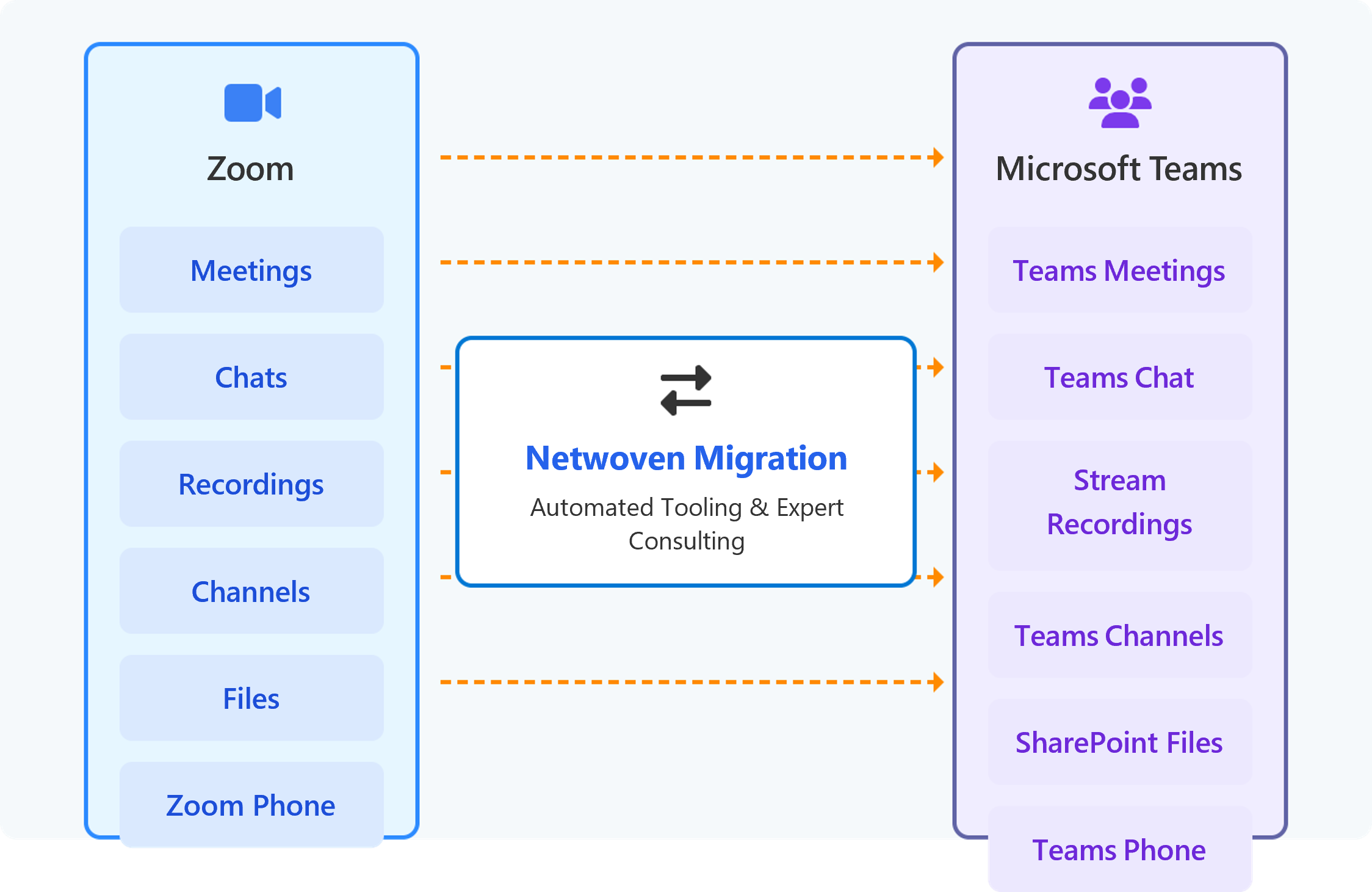
In the post-pandemic business landscape, a curious phenomenon has emerged in enterprise technology stacks: the dual-platform collaboration environment. Many organizations find themselves maintaining both Zoom and Microsoft Teams, creating a fragmented digital workplace that impacts everything from IT budgets to employee productivity and data security.
As a CEO or IT executive, you’re likely aware of this redundancy but may be hesitating on consolidation due to migration concerns. This isn’t merely a technical decision-it’s a strategic business opportunity that impacts your bottom line, operational efficiency, and competitive advantage in the digital economy.
Key Insight: Organizations that consolidate collaboration tools report a 28% reduction in overall communication costs and a 37-minute daily productivity gain per employee.
The financial case for migration is compelling when analyzing the total cost of ownership and return on investment across multiple dimensions.
* Based on Microsoft-published productivity research. Actual results vary by organization.
** Actual savings depend on licensing agreements, user counts, and purchased Zoom services.
A successful Zoom to Teams migration requires a structured approach that minimizes business disruption while ensuring complete data transfer and user adoption. The following methodology provides a proven path to successful platform transition
| Migration Approach | Cost Factors | Time to Value | Risk Level |
|---|---|---|---|
| Expert-Led Solution | Fixed, predictable pricing | 6-8 weeks | Low |
| Internal Development | Variable, often underestimated | 4-6 months | High |
Begin your transition to a unified collaboration ecosystem with these structured next steps:
The successful transition from Dialpad and Zoom to Microsoft Teams Phone demonstrates Netwoven expertise.
We combine deep Microsoft expertise with proven delivery frameworks to build modern, secure, and scalable data platforms that drive measurable outcomes
Designed for security, scale, and speed
Migrate from anywhere to Microsoft 365
Protect data before, during, and after migration
Ensure business value beyond go‑live
The timeline varies based on organizational size and complexity. For mid-sized enterprises (1,000-5,000 employees), a complete migration typically takes 8-12 weeks. For larger organizations, a phased approach over 3-6 months is more common. Netwoven works with your team to develop a timeline that minimizes disruption while maintaining momentum.
Yes, phone numbers can be ported from Zoom Phone to Microsoft Teams Phone System. Netwoven manages this process, coordinating with carriers and ensuring continuous service throughout the transition.
Netwoven conducts a detailed analysis of your existing Zoom integrations and develops equivalent functionality in Teams. In many cases, Teams’ native integration capabilities provide enhanced functionality compared to the original implementation.
Microsoft Teams offers robust external collaboration capabilities, including guest access and streamlined join experiences for external participants. Netwoven configures these features to match or exceed the experience provided by Zoom, while maintaining appropriate security controls.
As organizations continue to refine their digital workplace strategies, consolidating on Microsoft Teams represents a strategic advantage that extends far beyond video conferencing. By eliminating communication silos and creating a truly unified collaboration experience, enterprises can boost productivity, enhance security, and reduce costs.

Whether you're planning a migration or optimizing your environment, our experts are here to help you move faster and more securely.
Prefer to call?
+1-877-638-9683Drop us a mail
info@netwoven.com🔒 No spam. Your information stays private.