
How a Global Investment Firm Migrated from Okta to Microsoft Entra ID
The company partnered with Netwoven to migrate approximately 1,000 users, 1,300 groups, and 206 applications from Okta to Microsoft Entra ID. Using a phased migration and authentication cutover strategy, Netwoven completed the engagement in approximately 22 weeks while minimizing disruption to users and business operations.


Executive Summary
A leading global private equity firm partnered with Netwoven to migrate its identity platform from Okta to Microsoft Entra ID, driven by licensing cost optimization and closer alignment with its Microsoft technology ecosystem. The engagement covered roughly 1,000 users, ~1,300 groups, and 206 SSO applications spanning SAML, OIDC, SWA, and bookmark authentication protocols.
Netwoven executed a staged, wave-based cutover using Password Hash Synchronization as the target authentication method, de-federating domains from Okta while validating sign-in at each step to maintain business continuity. The project followed a milestone-driven approach across five phases - Onboarding, Okta/Entra health assessment, Test migration and change management, Phased production migrations, and Post migration support - completed in approximately 22 weeks using a hybrid U.S. and Global Delivery Center model.
Migration strengthened the company's security posture through modern Entra ID authentication controls, simplified identity administration by consolidating within the Microsoft ecosystem, reduced business risk through white glove support and structured change management and established a scalable identity foundation to support the firm's future growth and governance needs.
What challenges did the firm face when migrating from Okta to Microsoft Entra ID?
A leader in the private equity sector decided to migrate from Okta to Entra ID for two primary reasons - Okta licensing cost optimization and aligning more closely with its Microsoft technology ecosystem.
The company also had several key concerns regarding migration.
- Existing domain objects and applications were federated through Okta and required a carefully planned de-federation strategy.
- The organization needed a comprehensive inventory and assessment of applications, users, provisioning rules, and identity configurations before migration could begin.
- Maintaining business continuity during migration was critical, requiring minimal disruption to end users and business operations.
- Security readiness needed compliance through Entra ID health checks, including recommendations surrounding MFA, Self-Service Password Reset (SSPR), and identity governance controls.
- User adoption and change management were necessary to prepare employees for authentication changes and new access experiences.
Company selected Newoven as its partner for execution after evaluating various vendors. Company liked Netwoven’s expertise in migration, IP that it had developed to reduce risk and the global delivery model to manage costs.
What Solution Did Netwoven Use to Overcome Okta to Microsoft Entra ID Migration Challenges?
The primary goal of the project was to disconnect the federated domain objects from Okta and migrate all users and application configurations to Microsoft Entra ID. This process encompassed planning and executing the transfer of user accounts, groups, roles, and associated policies while ensuring minimal disruption to business operations.
Migration Workloads
The following details were collected by Netwoven team during the Planning and Assessment phase of the project and provide some indications about the scale and highlight important migration considerations.
- ~1,000 users were in scope for migration
- ~1,500 groups were analyzed and ~1300 groups were taken in for migration. Roughly 200 groups were excluded being duplicate, Okta specific etc. after reviewing with the stakeholders
- ~ 260 SSO applications were analyzed as part of the migration assessment and a total of 206 applications were migrated since other applications were found to be retired apps, duplicates across DEV/UAT, apps intentionally left on Okta etc.
Applications Migration
A total of 206 applications were identified for migration planning and execution.
There were a mix of authentication protocols involved in these applications managed in Okta. The following table indicates the major migration mechanics by protocol.
| Protocol | Migration Mechanics |
|---|---|
| Secure Web Authentication (SWA) | This has no direct Entra equivalent and requires password-based SSO with the My Apps extension |
| Security Assertion Markup Language (SAML) | The metadata and certificate exchange with app owners, claims mapping and NameID format changes |
| Open ID Connect (OIDC) | App re-registration, redirect URIs and secret rotation |
| Bookmark | Linked sign-on entries in the gallery |
Okta Authentication Policies
The following table depicts active authentication policies within OKTA based on a Tiered approach and their Entra ID equivalents for migration. Okta policy model works like a firewall where if the top rule is not met it continues down to eventually block access if no rule is met.
| Okta Policy | Entra ID Equivalent |
|---|---|
| Group Based is where VIPs or break-glass accounts are granted permission by singlefactor authentication. | Break-glass exclusions |
| Office IP is defined by a group of Office IP addresses that allow users access by single factor as well. | Conditional Access named locations |
| Island Logon is for consultants who do not have corporate devices. Instead, they use an Island Browser to authenticate apps which are allowed by this policy. | Device-state / unmanaged-device Conditional Access policy |
| Okta Fast-Pass is integrated with windows hello and Okta agent to allow login with the presence of these sign-ins. | Windows Hello for Business or password less with device compliance |
| Okta Two Factor Allows standard two factors based on available authenticators for the user. | CA MFA grant control plus the Authentication Methods policy |
| Block will Block the user from accessing applications when not met by the tiers above. | Catch-all block policy |
Okta De-federation and Authentication Cutover
The core of the engagement was converting the customer's domains from Okta-federated authentication to Entra ID managed authentication. Netwoven established PHS (Password Hash Synchronization) as the target authentication method, selected to reduce dependencies with OnPrem AD for authentication. Rather than a single domain-wide cutover, the conversion was executed as a staged rollover, allowing users to be moved in controlled batches (waves) with sign-in validated at each step. Ahead of conversion, Microsoft Entra Connect was reviewed to confirm the source of authority for each object class and to validate on-premises to cloud object matching against the source anchor (ImmutableID). Once domain conversion was complete and authentication verified, the Okta AD agent and the Okta provisioning and SCIM flows were decommissioned, with joiner-mover-leaver lifecycle management transferred to Entra ID group-based licensing and the federation trust revoked.
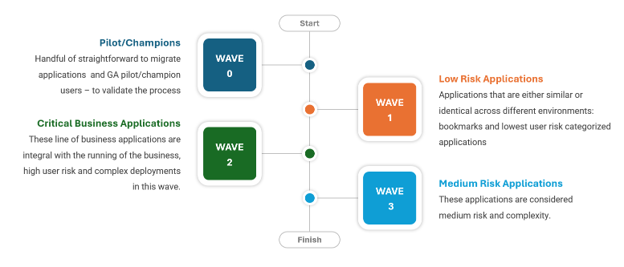
Netwoven employed a strategic approach for selecting and migrating applications in waves. In the wave strategy, for the 1st wave, the focus was on applications that were either similar or identical across different environments, such as DEV, UAT, and others. This allowed for testing the migration process thoroughly in less critical environments before moving on to production. Thereafter, all other applications were categorized according to their criticality and migrated in different waves. The picture highlights the rationale of the waves decided.
Project Milestones
The project followed a milestone-driven approach with 5 key milestones as described below. The migration was completed in approximately 22 weeks with a hybrid delivery model leveraging both U.S. and Global Delivery Center resources from India.
| Milestone | Activities and Deliverables |
|---|---|
| Project Onboarding | ✓ Kickoff Meeting - aligned stakeholders on goals, timelines, and roles ✓ Access Provisioning - Entra ID/Okta access requested and verified for all team members ✓ Project Team Site Setup - collaboration site created with charter, project plan, and stakeholder list uploaded ✓ Draft Project Plan - detailed plan with milestones and tasks developed and reviewed with team |
| Okta Analysis, Entra ID Health Check & Remediations | ✓ Okta Inventory - documented all applications, groups, and users in Okta ✓ Integrations & Workflows Mapping - identified third-party integrations and mapped existing workflows ✓ Identity Flow & Sync Analysis - documented identity flow/sync processes and identified sync issues ✓ Provisioning Rules & Flows - documented provisioning rules and mapped provisioning flows ✓ Okta Migration Strategy - consolidated inventory and developed migration strategy with risk mitigation ✓ Entra ID Connect Review - documented current settings and analyzed error logs ✓ Redundancy Recommendations & Config Changes - assessed single points of failure and implemented redundancy improvements |
| Assessment and Strategy, Test Migration & Change Management | ✓ Application Owners - identified application owners and initiated federation metadata update coordination ✓ Finalized Project Plan - refined tasks, effort estimates, and timeline ✓ Stakeholder Presentation - presented finalized plan and strategy, gathered approval/feedback ✓ Test Migration - executed test migration and documented outcomes and issues ✓ Communication Plan & Assets - developed key messages, email templates, presentations, and FAQs ✓ Training & Helpdesk Assets - developed end-user training materials and helpdesk support documentation ✓ Netwoven White-glove support for each phase - Discovery, phased migrations, Support, PMO, ACM |
| Phased Migrations | ✓ Validate User Assignments - Check user roles and permissions ✓ Test Application Functionality - Ensure applications work as expected post-migration ✓ Validate Provisioning Processes - Test user provisioning and deprovisioning ✓ Document Results - Record any issues and resolutions ✓ Execute Migration Waves - Perform the migration in three waves, providing level 3 support after each wave. ✓ Plan Cutover - Develop detailed cutover plan for each wave ✓ Verify User Assignments - Ensure all users are correctly provisioned ✓ Resolve Any Issues - Address any assignment errors |
| Support & Post Migration Clean Up | ✓ Provide 2 Weeks of Post-Migration Support - Establish dedicated support channels, Address and resolve post-migration issues ✓ Review and Document New Sign-In Logs - Analyze new sign-in logs for anomalies, Document findings, Record any issues and resolutions ✓ Document New Processes - Reflect new processes in documentation, Inform team and stakeholders of updated processes ✓ Remove API Keys - Identify unused API Keys, Deactivate and remove old API keys |
What business benefits did the Okta to Entra ID migration deliver?
The migration delivered several strategic and operational benefits:
- Enhanced Security Posture: By moving from Okta federation to Microsoft Entra ID, the company established a stronger identity platform foundation and gained the ability to implement recommended Entra ID security controls and modern authentication capabilities.
- Simplified Identity Management: Consolidating identity services within the Microsoft ecosystem reduced complexity and streamlined administration of users, authentication, and application access.
- Reduced Business Risk: Through a planned migration strategy, white-glove support model, communication campaigns, and user readiness activities, the organization minimized disruption during the transition. This resulted in successful migration and adoption of Entra ID security environment.
- Scalable Future-State Architecture: The migration positioned the company to leverage Microsoft Entra ID as its primary identity platform for future growth, governance, and security initiatives.