

Tableau to Power BI Migration: What Nobody Tells You About (Until It’s Too Late)
Thinking about switching from Tableau to Power BI? You’re not alone-and you’re not crazy. But here’s the truth:…
Netwoven helps you migrate from Tableau to Power BI in a structured, low-risk way. We focus on what matters—report continuity, data accuracy, and faster user adoption, so your teams don’t lose trust during the transition.

As organizations grow more data-driven, many are rethinking Tableau due to rising license costs, increasing integration complexity, and limited AI innovation. Microsoft Power BI offers a modern, scalable analytics platform that integrates seamlessly with your Microsoft ecosystem.
Netwoven helps organizations migrate from Tableau to Power BI with a proven framework that reduces cost, complexity, and risk—while empowering smarter, AI-driven insights. As a Microsoft Solutions Partner, we bring deep expertise in Power BI, data visualization, and Microsoft Fabric to help you reimagine your analytics future.
Kickstart your move from Tableau to Power BI with a free feasibility assessment — including a deep dive into your current Tableau usage and a clear roadmap to overcome migration challenges. Contact us to accelerate your Power BI journey today.
Netwoven reduces migration time and cost with proprietary tools:
Automates extraction and transformation of Tableau visuals, filters, and calculations into Power BI.
Analyzes Tableau joins, measures, and hierarchies to optimize Power BI semantic layer design.
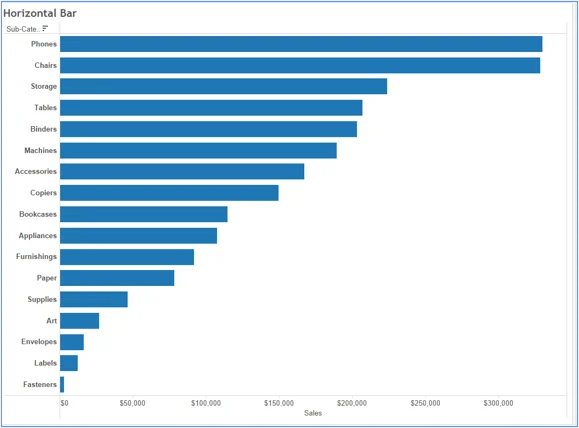
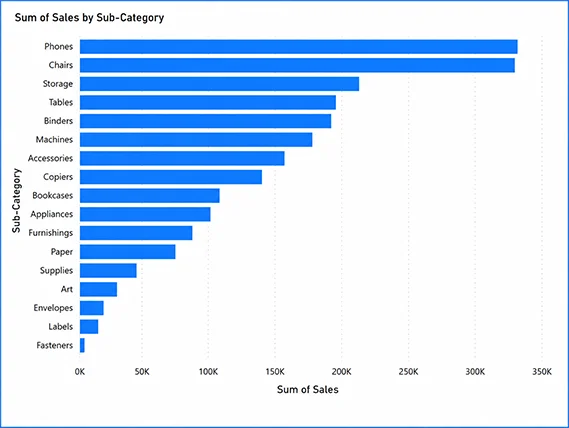
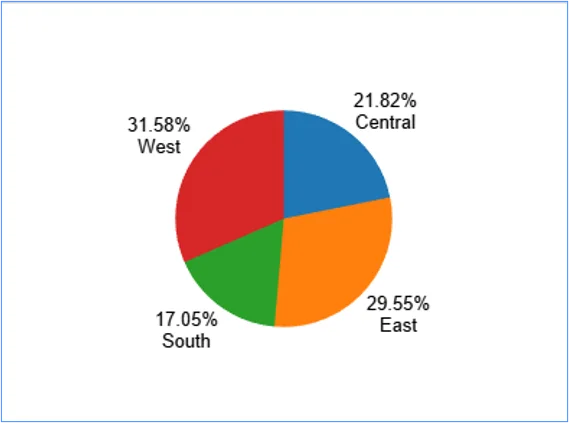
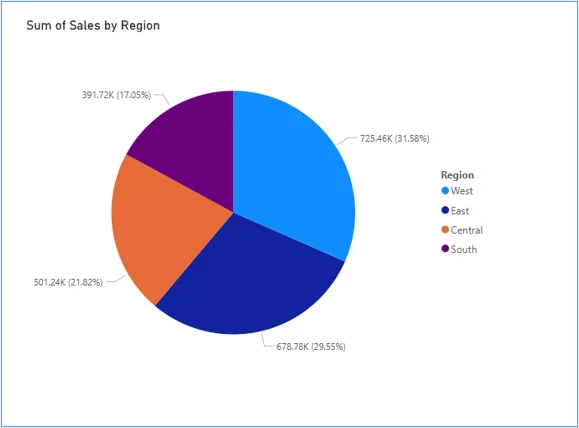
Colors might differ when Tableau reports are converted to Power BI reports
Our team uses automation-powered accelerators and a structured delivery process to ensure a smooth transition from Tableau to Power BI.

A healthcare service provider innovates solutions for optimizing appointments and vaccination schedules…

A semiconductor manufacturing company creates innovative solution for customer meeting and logistics management…
We combine deep Microsoft expertise with proven delivery frameworks to build modern, secure, and scalable data platforms that drive measurable outcomes
Purpose-built architectures on Azure and Microsoft Fabric.
From BI modernization to applied AI.
Trust data without slowing innovation.
We align data initiatives to business results.
We validate each report against Tableau outputs during a parallel run phase before final switch.
Yes. We map calculations, data sources, and logic to Power BI equivalents and optimize where needed.
Yes, but we provide targeted training to ensure quick adoption and minimal disruption.
It depends on the number of reports, complexity, and data sources. We prioritize high-impact assets first.
We do both. Migration is combined with data model and performance optimization.
Whether you're planning a migration or optimizing your environment, our experts are here to help you move faster and more securely.
Prefer to call?
+1-877-638-9683Drop us a mail
info@netwoven.com🔒 No spam. Your information stays private.