

Microsoft’s OneDrive Storage Limits Update: What to Keep Active and What to Archive
A user’s OneDrive often contains years of work. Some files are used every week. Others belong to projects…
SharePoint Online archiving that moves inactive SharePoint and OneDrive content to cost-efficient Azure storage. ArcUp keeps every file searchable, previewable, and retention compliant, at over 80% less than premium storage
SharePoint archiving — also called SharePoint Online archiving — moves inactive files out of premium SharePoint Online storage into lower-cost storage such as Azure Blob, without deleting them and without losing compliance coverage.
Most Microsoft 365 tenants outgrow the default allocation of 1 TB plus 10 GB per licensed user within a few years, then pay roughly $0.20 per GB each month for content that has remained inactive for several years. If you are trying to understand why your Microsoft 365 storage bill keeps growing, that accumulation is almost always the answer.
ArcUp relocates eligible content to a cheaper tier and leaves a shortcut in its place, so files stay searchable, previewable, and restorable. Done as an ongoing policy rather than a one-time cleanup, automated SharePoint archiving is how organizations reduce SharePoint Online storage costs permanently instead of buying headroom every renewal.
Compliance requires retention. Finance sees an unsustainable line item. Every year without a policy, the gap widens.
The default allocation fills fast, and there is no native mechanism to retire inactive content.
Legal holds and audits require years of retention. Deleting content is not an option.
Every GB beyond the default costs approximately $0.20 per month, indefinitely. Buying more storage treats the symptom.
Archiving that hides files from search generates helpdesk tickets on day one.
The last of these is the objection that stalls most projects. It is worth understanding how archived SharePoint files stay searchable, previewable, and easy to restore before you evaluate any approach — if users cannot find what they expect, nothing else about the business case matters.
Most organizations are choosing between four architectural approaches, not simply four products. The right one depends on where archived data needs to live, how quickly users need it back, and whether archiving is a one-time cleanup or an ongoing discipline.
Microsoft native
Microsoft’s built-in archive tier reprices inactive content from roughly $0.20/GB/month to $0.05/GB/month while keeping it inside the Microsoft compliance boundary. No data leaves your tenant and no new vendor is onboarded.
Tenants moderately over quota, with content that is genuinely dormant and unlikely to be needed at short notice.
Charged only when archived plus active storage exceed your licensed allocation. Reactivation is free, but re-archiving is restricted for four months. File-level archiving covers SharePoint sites, not OneDrive.
Third party
These move content out of Microsoft 365 into storage the vendor operates. They typically offer mature records management, full-text indexing across archived content, and source coverage well beyond SharePoint.
Regulated organizations archiving many sources at once — email, file shares, collaboration platforms — under one retention regime.
Ask where data physically resides, what retrieval costs apply, and what an exit looks like. When archived data sits in vendor-operated storage, the cost of leaving is worth answering before you sign.
Adjacent category
Backup platforms retain copies of SharePoint content and are sometimes positioned as an archiving answer. They solve a real problem, and most organizations already run one — but it is a different problem from storage cost.
Disaster recovery and point-in-time restore, which is what they are built for. They are often already in place, which is why they get considered for archiving in the first place.
Backup duplicates content while the original stays in place, so your storage bill does not fall. Archiving relocates content to reduce active consumption. If storage cost is the driver, backup alone will not address it.
Netwoven’s approach
Rather than replacing Microsoft’s archive, this approach uses it. Native Microsoft 365 Archive serves as the cold tier for content that may need in-place reactivation; customer-owned Azure Blob serves as a deep archive tier for dormant content at roughly $0.003/GB/month. A policy engine decides the split.
Organizations where archiving is an ongoing discipline rather than a cleanup project, where OneDrive coverage matters, and where restores need governance and an audit trail.
Only content routed to the Azure deep-archive tier reduces active quota and overage billing. Document libraries across SharePoint Online and OneDrive are covered; SharePoint Lists and list attachments are not. See the five-year cost model.
Capabilities described reflect publicly available vendor documentation as of Sept, 2026. Microsoft’s archiving capabilities are evolving; roadmap items and licensing requirements reflect current Microsoft guidance and may change. If anything here is inaccurate or out of date, let us know and we will correct it.
The most material differences are in restore experience and governance — the areas that decide whether archiving stays usable once it is running.
| Capability | Microsoft 365 Archive | ArcUp by Netwoven |
|---|---|---|
| Restore speed | 7-day instant window; after that up to 24 hours | No rehydration delay |
| Re-archive cooldown | Restricted for four months after reactivation | No cooldown — archiving stays a dynamic tool |
| Preview without restore | Requires full reactivation | Instant preview via the shortcut URL |
| OneDrive coverage | File-level archive covers SharePoint sites | SharePoint Online and OneDrive document libraries |
| Quota impact | Repriced to $0.05/GB/mo; still counts toward tenant quota | Deep-archive tier removes content from M365, reducing quota |
| Content scope | Site-level archives entire sites including Lists and list data | Document libraries; Lists and list attachments not included |
| Data ownership | Microsoft-managed tier | Customer-owned Azure storage — you control tier and geo-redundancy |
If you are evaluating a Microsoft 365 Archive alternative, the decision usually comes down to cost over time rather than cost in year one. Our CTO modelled both approaches across a 242-user tenant: SharePoint archiving ROI at scale over Microsoft 365 Archive walks through the year-by-year numbers, the hybrid architecture, and seven questions buyers actually ask.
File-level SharePoint archiving moves individual files and folders rather than entire sites — permissions mirrored, version history preserved, and a shortcut left in place so archived content stays searchable, previewable, and restorable.
That granularity is what separates enterprise SharePoint archiving software from a site-level cleanup tool:
you can archive inactive SharePoint files without users noticing, rather than taking whole sites offline and fielding the tickets afterwards.
Netwoven combines deep Microsoft 365 expertise with purpose-built archival automation — delivering a solution that is secure, non-disruptive, and built for enterprise governance from day one.
Archived files remain visible, searchable, and previewable — users never know content has moved.
Set a tenant-wide baseline policy, then let departments define their own overrides.
Users request file restores with a reason. Admins approve and files return to SharePoint with full fidelity.
Site owners and admins can right-click any file or folder and archive it immediately — no policy required.
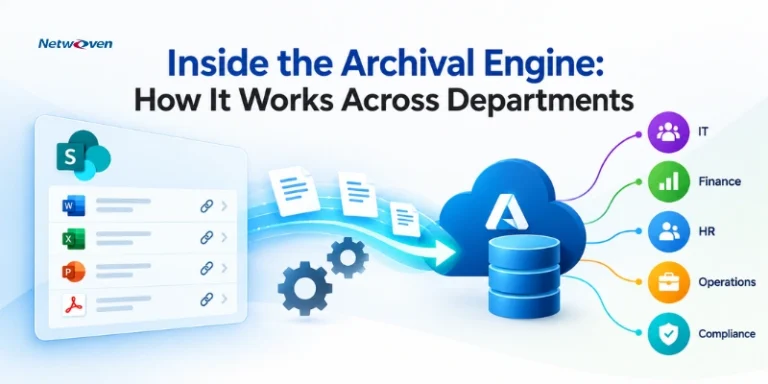
Netwoven deploys SharePoint archiving in five steps: policy design, automated tenant scan, secure archival to Azure, shortcut replacement, and ongoing monitoring.
01
Define tenant-wide and department-level policies, inactivity thresholds, and execution model.
02
Scan SharePoint and OneDrive to identify files eligible under the configured policies.
03
Eligible files move to Azure Blob with permissions mirrored and version history preserved.
04
The original is replaced with a shortcut at the same name and location.
05
A dashboard tracks archival runs, restore requests, savings, and policy performance.
Rollout matters as much as configuration. Archiving projects that fail usually fail as change-management projects, not technical ones — deploying SharePoint Online archive for long-term success covers the four-tier policy hierarchy, stakeholder alignment, and why a phased rollout beats a big-bang migration.
Backup creates a duplicate copy for disaster recovery while the original stays in place. Archiving relocates the only copy to cheaper storage to reduce cost, leaving a shortcut behind. Backup protects against data loss; archiving controls storage spend.
Microsoft 365 Archive covers the core cost-reduction case well. Third-party archiving is chosen when files must stay searchable and restorable without administrator intervention, when OneDrive coverage is needed, or when archived content must leave the tenant quota entirely.
File-level archiving moves individual files and folders rather than entire sites. Users keep normal access to everything not archived, and archived files stay searchable and previewable without reactivating a whole site.
Start by scanning the tenant to identify content past an inactivity threshold, then apply a policy that routes eligible files to lower-cost storage and leaves a shortcut behind. Our deployment guide covers policy design and phased rollout.
Content archived to Azure Blob storage remains Microsoft Purview compatible and stays eligible for compliance, legal hold, and eDiscovery workflows, with all archival and restore activity logged for audit.

Whether you're planning a migration or optimizing your environment, our experts are here to help you move faster and more securely.
Prefer to call?
+1-877-638-9683Drop us a mail
info@netwoven.com🔒 No spam. Your information stays private.