Introduction
When it comes to SharePoint Online archival, vital enterprise data, most Microsoft 365 customers face the same challenge. They must retain data for compliance, but paying for premium inactive storage is unsustainable. Without a strategy, the problem compounds year after year. The challenges of Uncontrolled Data Growth, Compliance & Retention Risk, Escalating Storage Costs and Broken User Experience Risk after archival become a major IT concern. One may argue that there exists the native Microsoft 365 Archive and why then something else is needed.
This article deep dives into Netwoven’s Intelligent Archival solution and tries to explain how an innovative overlay Azure Blob Storage can help a holistic archival management embracing OneDrive, rather than competing with Microsoft 365 Archive.
The article focuses on three key aspects:
- Hybrid architecture
- A feature and cost comparison matrix
- Important business questions
Architecture
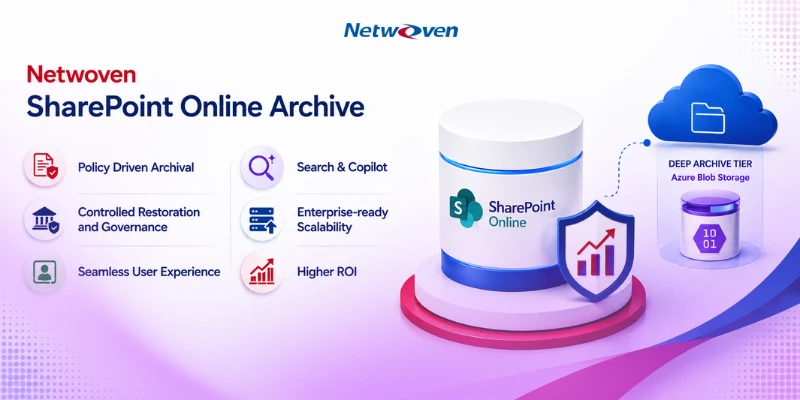
The design of Netwoven’s SharePoint Online archival solution orchestrates it as one of two storage tiers. Microsoft’s native archive serves as a “cold” tier for content that may need in-place reactivation; customer-owned Azure Blob serves as a much cheaper “deep archive” tier for dormant, long-retention content. Netwoven provides policy, orchestration, restore experience, and OneDrive coverage across both.
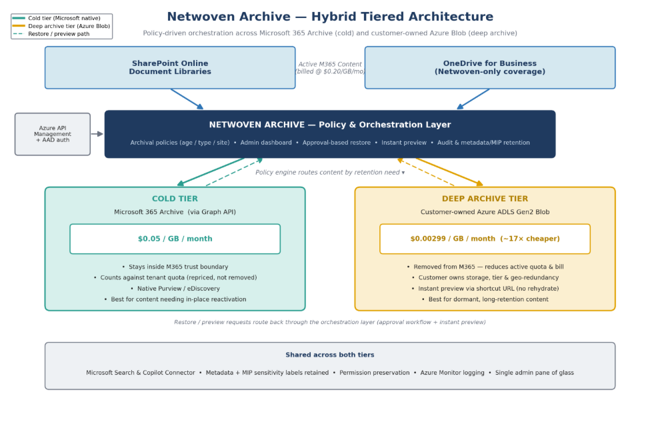
Key point for ROI
Only content moved to the Azure Blob deep-archive tier leaves Microsoft 365 and therefore reduces your active SharePoint/OneDrive quota and overage billing. Content routed to the Microsoft cold tier is repriced (to $0.05/GB/month) but still counts against tenant storage. The policy engine lets you decide the split deliberately, by content age, type, and site.
Cost Comparison
The table below compares annual cost under each approach. Microsoft figures assume policy-based archiving, which is expected to require SharePoint Advanced Management (SAM) licensing (~$3/user/month × 242 users ≈ $8,700/year).
How to read the Table
The flat Netwoven price is decisively better than the status quo (~$204K saved over five years) and pulls ahead of Microsoft’s metered model from roughly Year 3 onward as your data grows, because Netwoven’s price stays fixed while Microsoft’s scales with volume. In Year 1, the two are close; the Netwoven advantage is growth-proofing plus the capability differences as highlighted in the feature comparison section, not a claim of beating Microsoft on raw storage price in month one.
| Annual Cost | Do Nothing | MS 365 Archive + SAM | Netwoven (flat, all-in) |
| Year 1 (~17.2 TB over) | ~$46,200 | ~$20,300 | $25,000 |
| Year 2 (~21.3 TB over) | ~$56,000 | ~$22,700 | $25,000 |
| Year 3 (~25.4 TB over) | ~$65,900 | ~$25,200 | $25,000 |
| Year 4 (~29.5 TB over) | ~$75,700 | ~$27,600 | $25,000 |
| Year 5 (~33.6 TB over) | ~$85,500 | ~$30,100 | $25,000 |
| 5-Year Total | ~$329,000 | ~$126,000 | $125,000 |
Feature Comparison Matrix
The most material differences are in the restore experience and governance, areas where Microsoft’s native archive carries constraints that matter for an organization that may need archived content on short notice.
| Capability | Microsoft 365 Archive | Netwoven Archive |
| Restore speed & flexibility | ✘ 7-day “instant restore” window only. After that, rehydration takes up to 24 hours. Restored content returns to active storage and cannot be re-archived for ~4 months – unusable as a dynamic storage tool. | ✔ No rehydration delay and no cooldown period. Content can be restored and re-archived freely, so archiving stays a dynamic, ongoing storage-management tool. |
| Preview without restore | ✘ Opening a file requires full reactivation (up to 24 hrs); no way to view archived content on demand. | ✔ Instant preview of the archived file via the shortcut URL without triggering a restore – ideal for read-only access. |
| Restore governance | ✘ Self-service reactivation: any user with Edit permission can unarchive files with no admin oversight. | ✔ Controlled workflow: request + reason + admin approval, with full audit trail – the governance layer compliance-conscious teams expect. |
| OneDrive coverage | ✘ File-level archive is SharePoint sites only; OneDrive is not a supported target. | ✔ Automated/bulk archival covers both SharePoint Online and OneDrive document libraries. |
| Quota & billing impact | Repriced to $0.05/GB/mo but still counts against tenant quota – storage is repriced, not removed. | ✔ Deep-archive tier removes content from M365, reducing active quota and overage billing; Azure Blob ~$0.003/GB/mo (~17× cheaper). |
| Policy-based automation | On roadmap (post-GA); expected to require SAM licensing at added per-user cost. Site-level policy already requires SAM. | ✔ Policy-driven archival available today by age / created date / department / scope – no SAM dependency for the Azure tier. |
| Content scope | ✔ Site-level archives entire sites incl. Lists & list data – broader than Netwoven for full-site archiving. | Document libraries (SPO + OneDrive). Lists / list attachments not included. |
| Data ownership & control | Microsoft-managed tier; customer does not control storage tier or geo-redundancy. | ✔ Customer-owned Azure storage – control over tier, geo-redundancy, and retention economics. |
| Admin & cost visibility | Managed in SharePoint admin center; no dedicated archival cost dashboard. | ✔ Dedicated dashboard: active vs. archived storage, tier breakdown, policy health, projected savings, CSV / Azure Monitor export. |
| Search & Copilot | Searchable via Purview/admin & eDiscovery; archived content removed from Copilot’s active index. | ✔ Microsoft Search integration plus a Copilot Connector making archived content discoverable to Copilot. |
✔ = advantage / capability present, ✘ = limitation. Microsoft’s file-level archiving is in public preview (GA targeted July 2026); roadmap items and SAM requirements reflect current Microsoft guidance and may change.
Important Business Questions
These are some real-life business questions that a customer asks.
Q1: How does Microsoft’s file-level archive roadmap and contract term play out?
A: Your instinct to de-risk the term is right, and we will not ask you to ignore the GA timing. Yes – a 1-year agreement is available and given the roadmap we recommend it over a multi-year commitment. It lets you validate realized savings and adoption against Microsoft’s GA reality before any longer term and keeps the onus on us to prove value in year one.
Two facts worth holding alongside the roadmap: (1) GA covers manual/API file archiving – policy-based automation comes later and is expected to require SAM licensing (added per-user cost); and (2) Microsoft’s native archive reprices storage but does not remove it from your quota. The hybrid design lets you ride Microsoft’s roadmap for the cold tier while using Azure Blob where the ~17× cheaper rate matters most.
Q2: Does the solution reduce active M365 quota, or run a workflow on top of native archive?
A: This is the pivotal ROI question. The Netwoven Archive solution moves qualifying content to customer-owned Azure Blob storage, which reduces your active SharePoint/OneDrive quota and overage billing – this is the source of the savings in the cost comparison section. Where the solution invokes the Microsoft 365 Archive Graph API (the cold tier), that content moves to Microsoft’s tier at $0.05/GB/month and still counts against tenant storage; that path is a lifecycle/restore-experience benefit rather than a quota-reduction benefit. The hybrid model gives you both, and the policy engine controls the split. Figure 1 shows exactly which content lands where and what each tier does to your bill.
Q3: How does the Storage cost align with the target-archival-eligible volume (SPO report)?
A: Agreed that the ROI is only as good as the eligible volume, and that the headline overage is not the same as what genuinely qualifies. We will run our analysis directly against the output of SPO storage report and return a realistic archival-eligible figure broken down by last-modified date bands, site type, and file type – so you can see what truly qualifies before any commitment. If the eligible volume does not support the case, you should know that up front, and so should we.
Q4: How is the unused Virtual Data Room (VDR) footprint exempted from consideration?
A: Noted and accepted. If most of your VDRs are test sites or low-activity workspaces, unlimited VDR count is not a value driver for you, and we are removing it from justification entirely. The conversation should be sized around what you would use.
Q5: Does User adoption and Governance scale add to the cost?
A: A fair and honest point – capability you do not adopt is not value. If the Standard tier already exceeds what you have deployed, layering AI-agent governance, recertification workflows, or a new UI onto an immature adoption base is buying capability you cannot yet absorb. We will not build the case on those features. Let’s scope to what moves the needle now – the storage/archival economics and restore experience – and revisit governance when your adoption maturity warrants it.
Q6: What is the level of Support at Standard tier?
A: If the 8 hour/month is the main pull toward Enterprise, our goal is to let you buy the support you need without paying for the tier of features you have told us you won’t use. We will provide standalone support-plan options and pricing at the Standard tier so you can evaluate that independently of any upgrade.
Q7: How will you size and scale your solution to fit to our own archival needs?
A: Our methodology follows a structured approach.
- Automated Tenant Scan
- Policy Design & Configuration
- Secure Archival to Azure Storage
- Shortcut Replacement in SharePoint
- Ongoing Monitoring and Reporting
This enables us to size the archival solution appropriately. For your environment, we would specifically address the following:
| 1 | Netwoven’s analysis of storage script output – realistic archival-eligible volume, segmented by age, site type, and file type. |
| 2 | Written technical clarification of whether/where the solution reduces M365 active quota vs. operates on the native cold tier, with the architecture diagram (Figure 1). |
| 3 | A 1-year agreement option, recommended given the Microsoft roadmap timing. |
| 4 | Standalone support-plan options and pricing at the Standard tier. |
For more queries, please reach out to our experts.