The Authority in Enterprise Migrations

SharePoint Online Migration

De-Risk the July 2026 Deadline: Move SharePoint to M365 with Confidence & Speed

Legacy to M365

Trusted by Global Enterprises

Delrin
Jelly Belly
Kids2
Excelitas

The July 14, 2026 Deadline:
Why Organizations Must Act Now

The EOL Risk Surface: SharePoint 2016 / 2019, InfoPath and SharePoint Designer lose all support, patches and updates

The Business Continuity Imperative

  • Unsupported technology & workflows risk interrupting business processes
  • Delayed migrations force rushed timelines that carry interruption risk

Security & Compliance Exposure

  • Security risk increases with no patching from Microsoft for future-identified vulnerabilities
  • Compliance & audit risk increases with no updates from Microsoft

Inhibited Process Modernization

  • Legacy SP on-prem content, IA, forms & WFs lack deep & native integration with Copilot & AI
  • Enabling AI-transformation to business process is imperative to remain competitive

Why SharePoint Migrations Are Harder Than they Look

Microsoft’s July 2026 end‑of‑life deadline creates urgency across IT, security, and business teams. But migrating SharePoint environments is rarely a simple lift‑and‑shift. Legacy customizations, unsupported forms and workflows, information architecture sprawl, and competing stakeholder priorities introduce material risk — operationally, commercially, and reputationally.

Challenges not adequately addressed by competitors

“Netwoven delivers the modernization that matters now — and defers the modernization that slows you down.”

  • Migrate only essential content, forms, and workflows
  • Archive or retire what no longer delivers value
  • Re‑platform for continuity first
  • Limit or defer process transformation

EOL Risk & Executive Accountability

  • SharePoint 2016/2019 approaching end of support
  • Executive pressure to exit EOL without disruption
  • Increased audit, security, and compliance exposure
  • No margin for missed deadlines or failed cutovers

Legacy Forms & Workflow Dependency

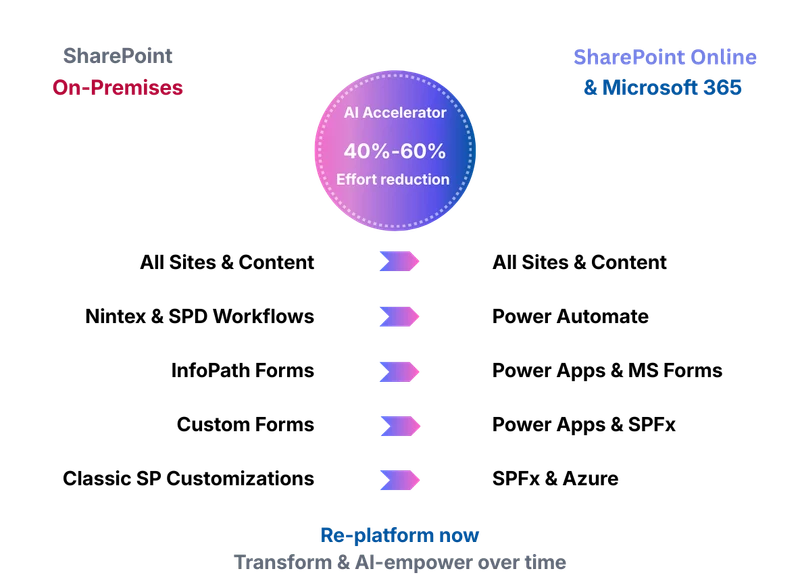
  • Heavy reliance on InfoPath forms and Designer/Nintex workflows
  • Mission‑critical business processes at risk
  • Unclear rebuild vs. re‑platform decisions
  • Power Platform readiness gaps slowing progress

Information Architecture Debt

  • Deeply nested subsites and inconsistent site models
  • Permissions sprawl and ownership ambiguity
  • Poor findability impacting productivity
  • Architecture not ready for Copilot or AI experiences

Delivery & Governance Pressure

  • Over‑ambitious modernization during migration
  • Program complexity straining PMO and delivery teams
  • Business owner fatigue and limited bandwidth for redesign
  • Cost overruns and schedule risk from excess scope

The Netwoven SharePoint Migration Advantage

Netwoven delivers EOL aligned SharePoint migrations using AI assisted tooling, proprietary accelerators, and a proven 2 phase modernization model. Our approach aligns executives, infrastructure, security, architects, PMO, and business owners around a single, achievable migration plan.

Discerning AI-Accelerated Assessment & Decision Making

Migrate only what is required for business continuity.

AI-accelerated data & usage discovery with rich, interactive Power BI outputs
Content ROT analysis – Data-driven migrate vs. archive vs. retire decisions to limit scope
WF, forms & customization ROT analysis – Data-driven rebuild vs. re-platform vs. retire & prioritization to limit scope
Apply challenger methodology to provide executives with realistic & defensible scope

Risk Reduction

Continuity-focused migration with EOL-aligned modernization, built-in security and governance, and transformation enabled after cutover.

Business continuity above all
Pragmatic EOL-aligned modernization
Foundational security, IA, and governance established during migration
Re-platform now, transform after cutover

Foundation Power Platform COE

Enable safe exit from InfoPath and Designer‑based workloads.

Production and sandbox environments
Core governance and DLP policies
Solution structuring for migrated apps and flows
Maker access guardrails
Monitoring and telemetry (COE Starter Kit components)
ALM‑light practices to ensure stability during migration

AI-Accelerated Migration of Content, Forms & Workflows

Fully exit unsupported platforms before EOL.

Migrate all required business content, forms, workflows, and customizations within the project window
Prioritize mission‑critical processes first
Execute secondary (but required) workloads in controlled waves
40-60% acceleration in WF & Form replatforming

Focused Information Architecture Modernization

Establish a clean, Copilot‑ready foundation without over‑engineering.

Flatten classic subsite hierarchies
Map content into hub‑based navigation models
Improve ownership, permissions hygiene, and findability
Prepare the environment for Copilot and AI experiences

Foundational Security & Governance Alignment

Reduce risk exposure while protecting delivery timelines.

Sharing and external access controls
Site classification and ownership alignment
Basic Purview guardrails implemented during migration

Adoption, UAT & Cutover Readiness Enablement

Minimize disruption and accelerate user readiness.

UAT and issue‑tracking applications to reduce helpdesk overload
Migration Help Center for self-service assistance
Core communications and champions enablement
Cutover readiness & targeted training for launch

Global Delivery & Proprietary Migration Accelerators

Execute at scale with speed, consistency, and efficiency.

Global, follow‑the‑sun delivery model for cost efficiency and momentum
Migration mapping application to distribute IA and content decisions with structure and guidance
Help Center AI Agent to improve business owner self‑sufficiency
Reusable script library for proven, repeatable solutions

Click any advantage above to explore our detailed technical approach

01

  • Content, form, WF and customization inventory, ROT analysis & dependency mapping
  • Workflow, form & customization complexity & risk scoring
  • Analysis and decision-making workshop preparation

02

  • Migration & transition strategy and planning
  • Information architecture & migration mapping decisions
  • Tenant foundation & baseline planning

03

  • Information Architecture readying
  • Baseline Power Platform COE
  • Security, sharing & access hardening

04

  • Ready consistent & scalable scripted migration
  • Site & content migration
  • Leverage OOTB features to replace customizations, where possible

05

  • Re-platform for continuity, minimize redesign creep
  • Migrate Forms & Workflows to Power Platform
  • Utilize documented patterns to accelerate

06

  • ShareGate & SPMT log aggregation & error extraction automation
  • Permissions validation
  • UAT facilitation & remediation cycles

07

  • Leverage pre-existing ACM materials to accelerate speed & quality of transition
  • Help Center template and AI Agent
  • Delta migration & cutover

08

Post-Cutover Hypercare & Phase 2 Modernization

  • Intense support to quickly address migration issues & questions
  • Final migration reports & project retrospective
  • Review accrued backlog for post-EOL cutover transformation:
    • Deep workflow redesign
    • AI/Copilot “agentification” of key business processes
    • Advanced Purview rollout
    • Expanded COE & ALM pipelines
    • UX redesign & business process innovation

Success Stories

Hear how we’ve helped Fortune 500 companies transition without missing a beat.

Case Study

Fortune 500

Transforming The Digital Landscape of a Semiconductor Giant Through Global SharePoint Migration and Modernization

Case Study

SMART

Sonoma-Marin Area Rail Transit’s SharePoint Migration made them a SMART workplace
Latest Insights

View Related Insights
Talk with an Expert

Prefer to call?1-877-638-9683

Drop us a mailinfo@netwoven.com

Talk with an Expert

Find out how we can help you with your organization’s digital transformation journey.