



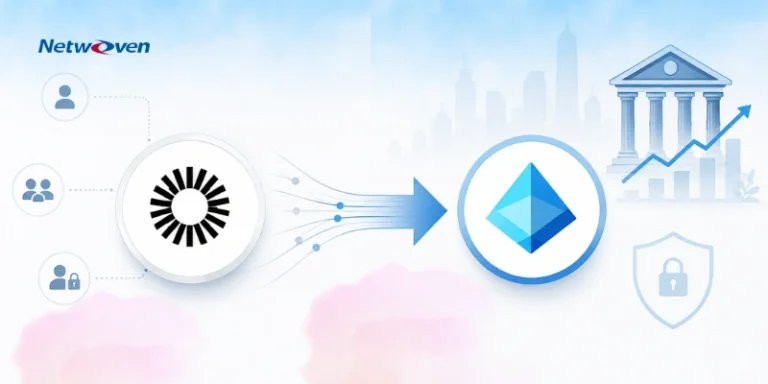
How a Global Investment Firm Migrated from Okta to Microsoft Entra ID
The company partnered with Netwoven to migrate approximately 1,000 users, 1,300 groups, and 206 applications from Okta to Microsoft Entra…
Read Case StudyMove off Okta without breaking access. Netwoven maps every app and policy first with our AI Discovery Workbench, then migrates to Microsoft Entra ID 60% faster — with full MFA and Conditional Access parity and zero downtime
Trusted by Global Enterprises



Why Migrate
If your organization already runs Microsoft 365, you are very likely paying for identity capabilities inside your existing E3 or E5 licenses that overlap directly with what Okta provides. Entra ID delivers single sign-on, MFA, Conditional Access, lifecycle provisioning, and identity governance from the same tenant that already holds your email, files, and Teams data. Cost is the headline, but in the migrations we run it is rarely the only driver. Four others come up consistently:

Consolidating identity and security signals into one platform — rather than stitching Okta to Defender, Sentinel, and Intune — gives security teams a single, coherent picture instead of a correlation exercise.

Conditional Access can reason over user risk, sign-in risk, device compliance, and app sensitivity in one evaluation, because those signals originate in the same ecosystem.

Native support for FIDO2 keys, Windows Hello for Business, and passkeys in Microsoft Authenticator lets you retire passwords as an attack surface over time.

Every extra identity tool is another integration to maintain, another vendor relationship, and another place for configuration drift to hide.
What We Migrate
A migration moves your users, groups, application integrations, authentication factors, and access policies from Okta to Microsoft Entra ID — then decommissions Okta as your identity provider. It touches five layers, and the difficulty lives in the last three.
Accounts and memberships are reconciled against the source of truth. Where Okta runs directory synchronization, that moves to Microsoft Entra Connect-based synchronization.
Each app using SAML 2.0, OpenID Connect, or OAuth 2.0 is reconfigured to trust Entra ID — gallery apps from the Entra app gallery, custom apps via app registrations. Okta custom authorization servers map one-to-one to Entra app registrations that expose an API.
Enrolled factors do not transfer between providers. Users re-register in Entra ID — a communication and support exercise, not just a technical one.
Okta sign-on policies are migrated to Microsoft Entra Conditional Access — a distinct workstream in Microsoft’s own guidance, not an automatic conversion. Network zones and group-based rules are redesigned, not copied. This is where most of the real engineering effort sits.
Lifecycle automations, Okta Workflows, and custom API integrations are inventoried and rebuilt against Entra ID and Microsoft Graph.
The most common reason migrations run long is that layers 3–5 contain undocumented logic — a nested group that silently grants production access, a service account nobody remembers, a provisioning rule encoding a business policy. You cannot migrate what you cannot see, which is why every engagement begins with discovery.
Microsoft documents the move as four distinct workstreams — applications, federation, directory synchronization, and sign-on policies — which is why we sequence them as separate tracks rather than one cutover.
Four workstreams, sequenced as separate tracks — aligned to Microsoft’s documented migration path.
Okta vs Entra ID
Both platforms do SSO, MFA, and policy-based access well. The differences that affect a migration are structural, not feature-checklist.
| Capability | Okta | Microsoft Entra ID |
|---|---|---|
| Access policy model | App sign-on + global session policies, evaluated per app | Conditional Access, evaluated across signals (risk, device, app, location) in one engine |
| MFA & factors | Okta Verify, FIDO2, SMS/voice, third-party | Microsoft Authenticator, FIDO2/passkeys, Windows Hello for Business, certificate-based |
| Device signal integration | Via integrations and third-party MDM | Native with Intune/Entra-joined devices; compliance state is a first-class policy input |
| Provisioning & sync | SCIM, Lifecycle Management, Workflows, directory sync agent | SCIM app provisioning, Microsoft Entra Connect sync, lifecycle workflows, Microsoft Graph |
| Governance | Okta Identity Governance (separate SKU) | Entra ID Governance — access reviews, entitlement management, PIM |
| Licensing model | Standalone per-user subscription | Included with / layered onto existing Microsoft 365 E3/E5 |
| Best fit | Heterogeneous, multi-cloud, non-Microsoft-centric estates | Estates already standardized on Microsoft 365 and Azure |
The practical takeaway: MFA methods and access policies do not map one-to-one. A faithful migration is a translation exercise, not a copy-paste — and the quality of that translation determines whether your security posture holds through cutover.
Want the deeper feature-by-feature breakdown? See our full Okta vs Entra ID comparison across five identity risks — SSO, MFA, identity governance, adaptive access, and CIAM.
Risks & Controls
These are the four failure modes we plan against on every engagement, with the control we use to neutralize each.
Custom SAML/OAuth configs need manual reconfiguration, legacy apps may not support modern auth cleanly, and API-dependent integrations need endpoint updates.
Inventory every federated app and its protocol during discovery, then sequence reconfiguration into waves so no single failure has broad blast radius.
Okta and Entra ID use different policy models, so MFA journeys and access rules can’t transfer literally; network- and group-based controls often need redesign.
Re-express each Okta policy as an equivalent Conditional Access policy, then validate parity against a documented checklist before any user is cut over.
Nested group memberships, Okta-specific Workflows, undocumented service accounts, and provisioning rules with embedded business logic create invisible access chains.
Automated dependency mapping during discovery surfaces these before they become outage tickets.
A misconfigured cutover can lock users out instantly; rollback must be documented and rehearsed; compliance requires a continuous audit trail.
Parallel authentication during transition, phased waves, documented rollback at every stage, and 24/7 support during cutover windows.
Manual, spreadsheet-driven migrations fail precisely because they cannot hold the complete dependency graph in view.
That is the specific problem our discovery process is built to solve.
Go deeper: Mastering the Real-World Challenges of Okta to Entra ID Migration · Navigating MFA and Conditional Access Parity
Cost
The financial case rests on three line items, in roughly this order of impact.
If you run Microsoft 365 E3/E5, you’re already entitled to identity capabilities Okta bills separately. Consolidating removes a standalone per-user subscription.
Folding SSO, MFA, and parts of governance into the platform that already holds Defender (EDR) and Sentinel (SIEM) cuts integration and maintenance overhead.
One control plane means fewer systems to keep in sync and fewer places for configuration drift.
The headline savings figure for identity consolidation depends entirely on your current licensing position and tool stack — it is not a flat number. We model your specific before-and-after during discovery, so the business case is yours, not a generic benchmark. For the CIO/CFO framing, see Cut Identity Costs Without Cutting Security.
We don’t hand you a tool and walk away. Our AI Discovery Workbench maps every app, group, and access policy before we move anything — so you migrate to Entra ID with MFA and Conditional Access parity, zero downtime, and full visibility the whole way.
Quarter-century of SharePoint, Teams, OneDrive, and Exchange. We know where your sensitive data actually lives.
Few partners credibly span AI data security, compliance, AI Agent identity, endpoint, SOC, and . We deliver across all five pillars.
M365-native VDR-grade Microsoft Purview based secure collaboration product that no other Microsoft partner offers. Real product, not slideware.
Active partnership, co-sell access, MAICPP funding eligible. Information Protection & Governance Specialization in pursuit.
A Disciplined, Phase-Based Journey to Identity Modernization.
Inventory and dependency mapping
AI Discovery Workbench connects to both environments, inventories all users, groups, applications, and policies, then generates comprehensive dependency maps and compatibility reports.
Architects configurations with Security Policies
Architect target Entra ID configuration, design conditional access policies, create phased migration waves, establish testing criteria, and develop comprehensive rollback procedures
Test with select users and groups to minimize impact
Execute controlled pilot with select user groups, validate application functionality, test MFA flows, refine policies based on feedback, and finalize production procedures.
Safely migrate in waves to provide time for planned user communication and ACM
Migrate users and applications in planned waves, maintain parallel authentication during transition, provide 24/7 support coverage, and monitor real-time health dashboard.
Implement advanced features and policies
Implement advanced Entra ID features, enable passwordless authentication, configure risk-based conditional access, activate Identity Protection, and establish governance workflows.
Enable a smooth transition to steady‑state operations
Provide extended support during stabilization period, conduct administrator training, deliver comprehensive documentation, and establish ongoing optimization practices.
Hear how we’ve helped Fortune 500 companies transition without missing a beat.
The company partnered with Netwoven to migrate approximately 1,000 users, 1,300 groups, and 206 applications from Okta to Microsoft Entra…
Read Case Study
The company figured that their previous Cloud Identity Provider Okta started being disorganized adding to their maintenance and license costs.…
Read Case Study
The company modernized its security by migrating from Okta to Microsoft Entra ID, streamlining identity management and application access with…
Read Case StudyIt depends on the number of federated applications and the complexity of your Conditional Access requirements, not headcount. A focused environment can move in weeks; a large estate with many custom integrations runs longer. Discovery produces the realistic timeline for your specific environment.
Our approach keeps parallel authentication live during transition and moves users in waves, so the platform changes underneath people without an access outage.
No. Authentication factors do not move between identity providers — users re-register their methods in Entra ID. We plan this as a communication and support exercise so it doesn’t surprise anyone.
No. Microsoft treats migrating Okta sign-on policies to Conditional Access as its own workstream, not an automatic conversion — and treating it as copy-paste is the most common cause of post-migration security gaps. Each policy is re-expressed as an equivalent Conditional Access policy and validated against a parity checklist before cutover.
Yes. Parallel authentication during the transition is core to how we avoid downtime and enable safe rollback.
Yes. For organizations consolidating their security and compliance roadmap, we run multi-pillar programs sequenced through the Capability Strategy Workshop. A typical multi-pillar engagement covers two to four pillars in the first 12 months with managed operations layered in once the platform is stable.
They are inventoried during discovery and rebuilt against Entra ID and Microsoft Graph. Undocumented automations are exactly what discovery is designed to surface.
Not necessarily. Many capabilities are available at E3; advanced features like risk-based Conditional Access and Identity Protection require higher tiers. We map the licensing question to your target-state requirements during planning.
Whether you're planning a migration or optimizing your environment, our experts are here to help you move faster and more securely.
Prefer to call?
+1-877-638-9683Drop us a mail
info@netwoven.com🔒 No spam. Your information stays private.