The Authority in Enterprise Migrations
SharePoint Online Migration
Pragmatic, EOL‑Aligned Modernization Strategy
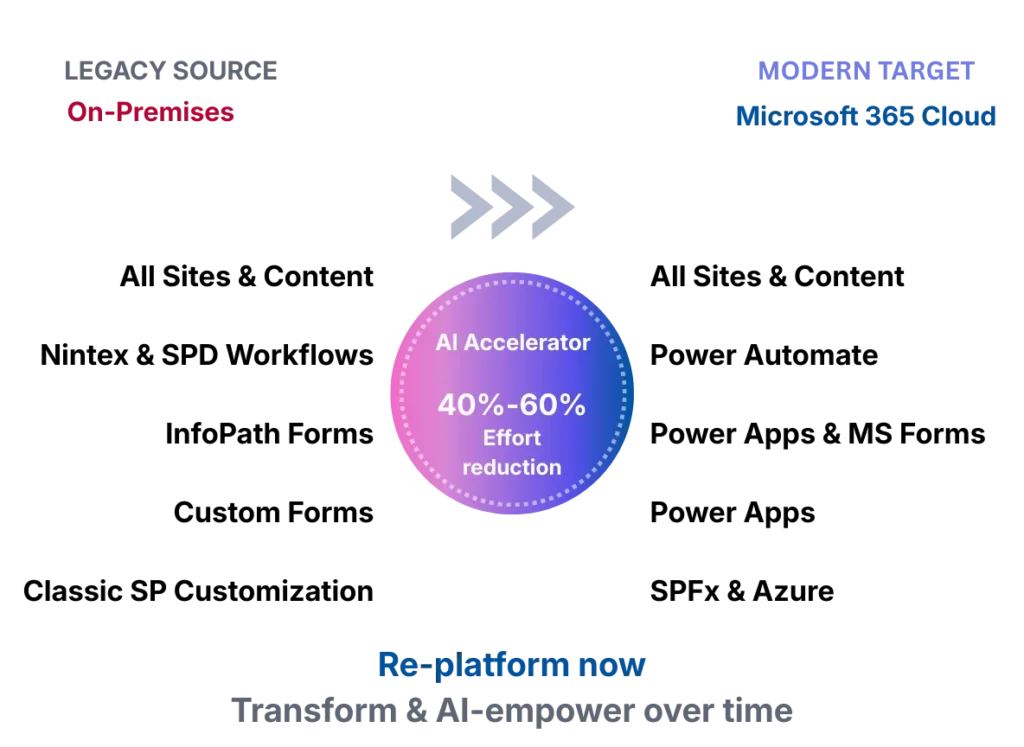
Netwoven modernizes SharePoint environments thoughtfully, balancing the urgency of the July 2026 EOL risks with the need for AI-driven intelligent process transformation to deliver long‑term value. We modernize intelligently — not at the expense of cutover readiness.

Why Exiting SharePoint On‑Premises
Is No Longer Optional
Microsoft Support Ends in July 14, 2026
SharePoint 2016/2019, InfoPath & SharePoint Designer workflows lose all support, patches, and updates.
Security & Continuity
Exposure
EOL platforms introduce critical security, compliance, and business‑continuity risks across the enterprise.
Delay Increases Risk & Inhibits transformation
Organizations must move swiftly to avoid the EOL risks and unlock the ability to transform business processes with AI
Why SharePoint Migrations Are Harder Than they Look
Microsoft’s July 2026 end‑of‑life deadline creates urgency across IT, security, and business teams. But migrating SharePoint environments is rarely a simple lift‑and‑shift. Legacy customizations, unsupported forms and workflows, information architecture sprawl, and competing stakeholder priorities introduce material risk — operationally, commercially, and reputationally.
Challenges not adequately addressed by competitors
“Netwoven delivers the modernization that matters now — and defers the modernization that slows you down.”
- Migrate only essential content, forms, and workflows
- Archive or retire what no longer delivers value
- Re‑platform for continuity first
- Limit or defer process transformation
EOL Risk & Executive Accountability
- SharePoint 2016/2019 approaching end of support
- Executive pressure to exit EOL without disruption
- Increased audit, security, and compliance exposure
- No margin for missed deadlines or failed cutovers
Legacy Forms & Workflow Dependency
- Heavy reliance on InfoPath forms and Designer/Nintex workflows
- Mission‑critical business processes at risk
- Unclear rebuild vs. re‑platform decisions
- Power Platform readiness gaps slowing progress
Information Architecture & Standards Debt
- Deeply nested subsites and inconsistent site models
- Permissions sprawl and ownership ambiguity
- Poor findability impacting productivity
- Architecture not ready for Copilot or AI experiences
Delivery & Governance Pressure
- Over‑ambitious modernization during migration
- Program complexity straining PMO and delivery teams
- Business owner fatigue and limited bandwidth for redesign
- Cost overruns and schedule risk from excess scope
The Verdict: SharePoint migrations fail when organizations either overlook the importance & complexity of migrating WFs, Forms & customizations or attempt to satisfy every stakeholder’s long‑term vision during a time‑critical EOL exit — instead of sequencing modernization intelligently
The Netwoven SharePoint Migration Advantage
Netwoven delivers EOL‑aligned SharePoint migrations using AI‑assisted tooling, proprietary accelerators, and a proven two‑phase modernization model. Our approach is built to align executives, infrastructure teams, security leaders, architects, PMOs, and business owners around a single, achievable migration plan.
Discerning Assessment & Intelligent Scope Control
Migrate only what is required for business continuity.
AI‑Accelerated Assessment, Mapping & Decisioning
Increase speed, accuracy, and confidence in migration decisions.
Foundational Power Platform COE (Required)
Enable safe exit from InfoPath and Designer‑based workloads.
AI-Accelerated Migration of Content, Forms & Workflows
Fully exit unsupported platforms before EOL.
Focused Information Architecture Modernization
Establish a clean, Copilot‑ready foundation without over‑engineering.
Foundational Security & Governance Alignment
Reduce risk exposure while protecting delivery timelines.
Adoption, UAT & Cutover Readiness Enablement
Minimize disruption and accelerate user readiness.
Global Delivery & Proprietary Migration Accelerators
Execute at scale with speed, consistency, and efficiency.
Click any advantage above to explore our detailed technical approach