Part 2 of 3: Technical Deep Dive – C# Plugins & Event Execution
Introduction: Why Dataverse Plugins Power This Pattern
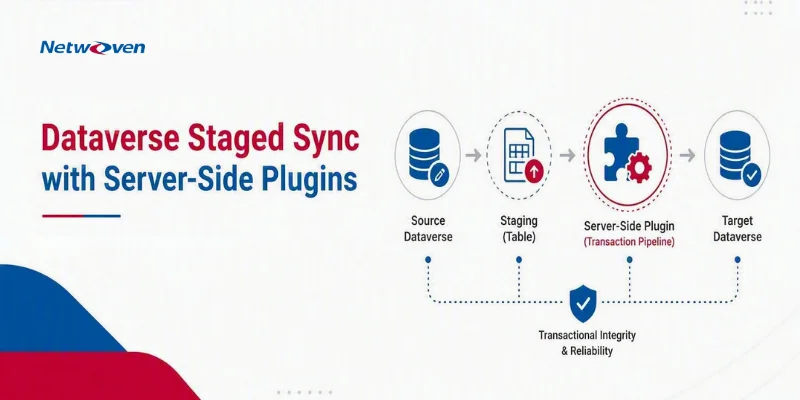
In Part 1: Dynamics 365 Integration Pattern: How to Automate ERP/CRM Sync While Preventing Operational Chaos, we introduced the Staged Sync with Conditional Approval pattern. Now we’ll dive into the server-side implementation that makes it work: Dynamics 365 Dataverse plugins.
Why plugins (not Power Automate):
| Capability | Plugins | Power Automate |
| Synchronous execution | ✅ Real-time, transaction-safe | ❌ Async only |
| Transaction participation | ✅ Rollback if validation fails | ❌ Separate operations |
| Pre-Image access | ✅ Built-in old values | ⚠️ Must query separately |
| Complex decision logic | ✅ Full C# capabilities | ⚠️ Limited expressions |
| Performance at scale | ✅ Optimized for 1000s/day | ⚠️ Can hit throttling limits |
| Cascading updates | ✅ Same transaction | ❌ Multiple async operations |
Recommendation: Use plugins for transactional integrity and decision logic. Use Power Automate for orchestration and external integrations.
For scenarios that need to integrate Dynamics 365 with external ERP systems, plugins can also initiate processing through Azure Functions.
Dataverse Plugin Architecture Overview
Execution Pipeline Stages
The Dataverse plugin execution pipeline includes multiple stages where custom logic can run:
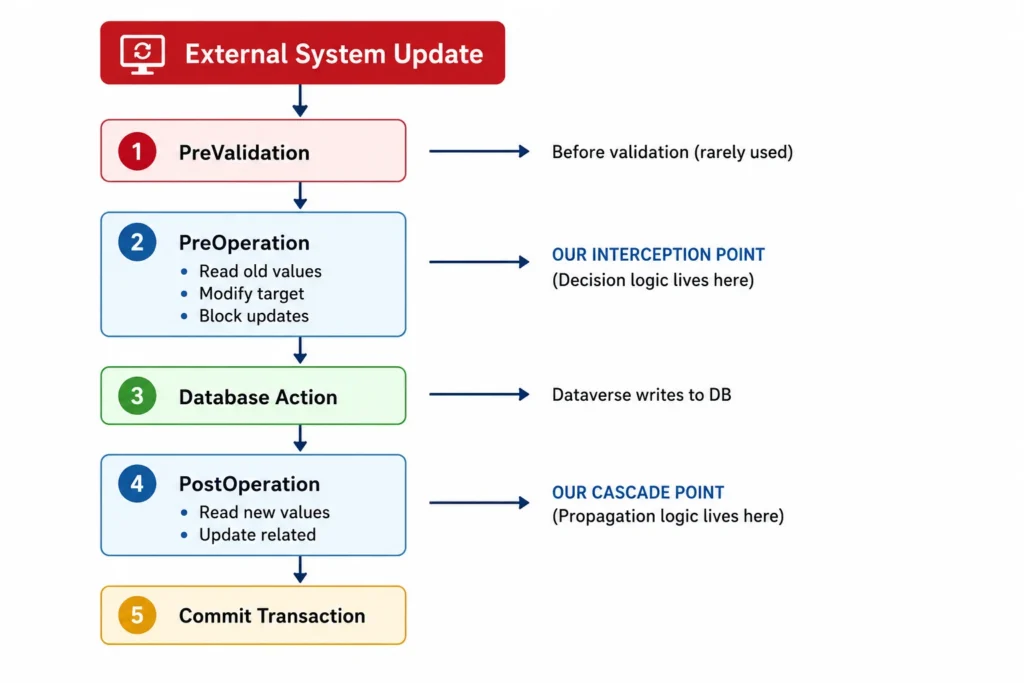
⚠️ Transaction Safety: PreOperation and PostOperation execute within the same database transaction. If PostOperation throws an exception (e.g., cascade update fails due to missing work order), the entire transaction rolls back– including the PreOperation changes. This ensures atomicity: either all changes succeed, or none do.
This type of interception is also useful beyond data synchronization, as demonstrated by this PreOperation plugin pattern in Dynamics 365 for controlling email-tracking behavior.
Our Two-Plugin Strategy
Plugin 1: PreOperation (Decision Logic)
- Intercepts Update message on contoso_demand entity
- Analyzes impact (bookings, labor gaps, urgency)
- Decides: Auto-approve OR stage for manual review
- Modifies transaction (stages values, sets flags, logs decision)
Plugin 2: PostOperation (Cascading Logic)
- Executes after demand is updated (approved)
- Cascades changes to Work Order, Tier Dates, Tasks, Bookings
- Recalculates dependencies
- Logs success
💡 Why This Matters: If your cascade logic in PostOperation fails (e.g., query returns no work order), wrap your code in try/catch and decide: throw exception (rollback entire transaction) or log error and continue (partial success). For this pattern, we throw exceptions to maintain data consistency.
Plugin 1: PreOperation Decision Logic
Registration Configuration
Entity: contoso_demand
Message: Update
Stage: PreOperation (20)
Filtering Attributes: contoso_crd, contoso_mcsd, contoso_new_crd, contoso_new_mcsd, contoso_approval_flag
Pre-Image: All attributes (alias: “PreImage”)
Execution Mode: Synchronous
Why filtering attributes: Plugin only executes when these specific fields change, optimizing performance.
Why Pre-Image: Provides access to old field values before the update commits.
Core Implementation
using Microsoft.Xrm.Sdk;
using Microsoft.Xrm.Sdk.Query;
using System;
public class DemandUpdatePreOperation : IPlugin
{
public void Execute(IServiceProvider serviceProvider)
{
// 1. SETUP: Get context and services
var context = (IPluginExecutionContext)serviceProvider
.GetService(typeof(IPluginExecutionContext));
var serviceFactory = (IOrganizationServiceFactory)serviceProvider
.GetService(typeof(IOrganizationServiceFactory));
var service = serviceFactory.CreateOrganizationService(context.UserId);
var tracingService = (ITracingService)serviceProvider
.GetService(typeof(ITracingService));
// 2. VALIDATE: Ensure we’re in the right context
if (context.MessageName != “Update” ||
context.PrimaryEntityName != “contoso_demand”)
return;
// 2b. DEPTH GUARD: Prevent infinite loops from cascade updates
if (context.Depth > 1)
{
tracingService.Trace($”Depth > 1 ({context.Depth}). Skipping to prevent recursion.”);
return;
}
// 3. GET ENTITIES: Target and Pre-Image
Entity target = (Entity)context.InputParameters[“Target”];
Entity preImage = context.PreEntityImages.Contains(“PreImage”)
? context.PreEntityImages[“PreImage”]
: null;
if (preImage == null)
{
tracingService.Trace(“PreImage not found. Exiting.”);
return;
}
// 4. CONTEXT ANALYSIS: Who initiated this change?
Guid userId = context.InitiatingUserId;
bool isServiceAccount = IsServiceOrDataLoadAccount(userId, service);
// 5. FIELD DETECTION: Which fields are changing?
bool isCRDUpdate = target.Contains(“contoso_crd”);
bool isMCSDUpdate = target.Contains(“contoso_mcsd”);
bool isApprovalFlagUpdate = target.Contains(“contoso_approval_flag”);
// 6. APPROVAL FLOW: User approving staged changes
if (isApprovalFlagUpdate && target.GetAttributeValue<bool>(“contoso_approval_flag”))
{
HandleApproval(target, preImage, service, tracingService);
return;
}
// 7. REJECTION FLOW: User declining staged changes
if (isApprovalFlagUpdate && !target.GetAttributeValue<bool>(“contoso_approval_flag”))
{
HandleRejection(target, preImage, service, tracingService);
return;
}
// 8. SERVICE ACCOUNT FLOW: Conditional approval logic
if (isServiceAccount && (isCRDUpdate || isMCSDUpdate))
{
ApplyConditionalApprovalLogic(target, preImage, service, tracingService);
}
// 9. USER EDIT FLOW: Allow immediate propagation
// (No special handling needed – user is approver)
}
// Helper: Identify service accounts
private bool IsServiceOrDataLoadAccount(Guid userId, IOrganizationService service)
{
// Query systemuser to check if user has specific role or name pattern
Entity user = service.Retrieve(“systemuser”, userId,
new ColumnSet(“fullname”, “domainname”));
string domainName = user.GetAttributeValue<string>(“domainname”);
// Check for service account patterns (customize for your org)
return domainName.Contains(“svc_”) ||
domainName.Contains(“integration”) ||
domainName.Equals(“INTEGRATIONUSER”, StringComparison.OrdinalIgnoreCase);
}
// Core Logic: Conditional Approval
private void ApplyConditionalApprovalLogic(
Entity target,
Entity preImage,
IOrganizationService service,
ITracingService tracingService)
{
tracingService.Trace(“Applying conditional approval logic…”);
// Get demand ID and related work order
Guid demandId = preImage.Id;
Guid? workOrderId = GetRelatedWorkOrderId(demandId, service);
if (workOrderId == null)
{
tracingService.Trace(“No work order found. Auto-approving.”);
SetAutoApprovalFields(target);
return;
}
// IMPACT ANALYSIS
bool hasBookings = CheckForActiveBookings(workOrderId.Value, service);
bool hasLaborGaps = CheckForActiveLaborGaps(demandId, service);
bool isApproachingDeadline = CheckDeadlineProximity(workOrderId.Value, service);
tracingService.Trace($”Impact Analysis: Bookings={hasBookings}, Gaps={hasLaborGaps}, Urgent={isApproachingDeadline}”);
// DECISION LOGIC
bool autoApprove = (!hasBookings && !hasLaborGaps) || isApproachingDeadline;
if (autoApprove)
{
// AUTO-APPROVE: Set tracking fields
SetAutoApprovalFields(target);
LogAutoPropagationSuccess(preImage, target, tracingService);
}
else
{
// STAGE FOR REVIEW: Move to staging fields
StageForManualReview(target, preImage, service, tracingService);
LogAutoPropagationBlocked(preImage, target, tracingService);
}
}
// Impact Query: Active Bookings
private bool CheckForActiveBookings(Guid workOrderId, IOrganizationService service)
{
var query = new QueryExpression(“bookableresourcebooking”);
query.Criteria.AddCondition(“statecode”, ConditionOperator.Equal, 0); // Active
query.Criteria.AddCondition(“msdyn_workorder”, ConditionOperator.Equal, workOrderId);
query.TopCount = 1; // Only need to know if ANY exist
EntityCollection results = service.RetrieveMultiple(query);
return results.Entities.Count > 0;
}
// Impact Query: Active Labor Gaps
private bool CheckForActiveLaborGaps(Guid demandId, IOrganizationService service)
{
var query = new QueryExpression(“contoso_labor_gap”);
query.Criteria.AddCondition(“contoso_demand”, ConditionOperator.Equal, demandId);
query.Criteria.AddCondition(“contoso_gap_status”, ConditionOperator.NotIn,
new object[] { 808240002, 808240003 }); // Not Closed/Cancelled
query.TopCount = 1;
EntityCollection results = service.RetrieveMultiple(query);
return results.Entities.Count > 0;
}
// Impact Query: Deadline Proximity
private bool CheckDeadlineProximity(Guid workOrderId, IOrganizationService service)
{
Entity workOrder = service.Retrieve(“msdyn_workorder”, workOrderId,
new ColumnSet(“contoso_move_in_date”));
if (!workOrder.Contains(“contoso_move_in_date”))
return false;
DateTime moveInDate = workOrder.GetAttributeValue<DateTime>(“contoso_move_in_date”);
int daysUntilMoveIn = (moveInDate – DateTime.UtcNow).Days;
return daysUntilMoveIn <= 15; // Configurable threshold
}
// Set Auto-Approval Tracking Fields
private void SetAutoApprovalFields(Entity target)
{
target[“contoso_auto_propagated”] = true;
target[“contoso_auto_propagated_date”] = DateTime.UtcNow;
// Increment counter (if exists in pre-image)
// target[“contoso_auto_propagation_count”] = currentCount + 1;
target[“contoso_approval_required”] = false;
}
// Stage for Manual Review
private void StageForManualReview(
Entity target,
Entity preImage,
IOrganizationService service,
ITracingService tracingService)
{
tracingService.Trace(“Staging for manual review…”);
// Move CRD to staging field
if (target.Contains(“contoso_crd”))
{
DateTime newCRD = target.GetAttributeValue<DateTime>(“contoso_crd”);
target[“contoso_new_crd”] = newCRD;
target.Attributes.Remove(“contoso_crd”); // Prevent operational field update
}
// Move MCSD to staging field
if (target.Contains(“contoso_mcsd”))
{
DateTime newMCSD = target.GetAttributeValue<DateTime>(“contoso_mcsd”);
target[“contoso_new_mcsd”] = newMCSD;
target.Attributes.Remove(“contoso_mcsd”); // Prevent operational field update
}
// Set notification flag (triggers UI alert)
target[“contoso_approval_required”] = true;
// Send notification (optional: App Notification API or custom logic)
// SendApprovalNotification(preImage.Id, service);
}
// Handle User Approval
private void HandleApproval(
Entity target,
Entity preImage,
IOrganizationService service,
ITracingService tracingService)
{
tracingService.Trace(“User approved staged changes.”);
// Copy staged values to operational fields
if (preImage.Contains(“contoso_new_crd”))
{
target[“contoso_crd”] = preImage.GetAttributeValue<DateTime>(“contoso_new_crd”);
target[“contoso_new_crd”] = null; // Clear staging field
}
if (preImage.Contains(“contoso_new_mcsd”))
{
target[“contoso_mcsd”] = preImage.GetAttributeValue<DateTime>(“contoso_new_mcsd”);
target[“contoso_new_mcsd”] = null; // Clear staging field
}
// Clear notification flag
target[“contoso_approval_required”] = false;
tracingService.Trace(“Approval complete. Cascade will occur in PostOperation.”);
}
// Handle User Rejection
private void HandleRejection(
Entity target,
Entity preImage,
IOrganizationService service,
ITracingService tracingService)
{
tracingService.Trace(“User declined staged changes.”);
// Clear staging fields only (keep operational unchanged)
target[“contoso_new_crd”] = null;
target[“contoso_new_mcsd”] = null;
target[“contoso_approval_required”] = false;
tracingService.Trace(“Rejection complete. No cascade needed.”);
}
// Logging: Success
private void LogAutoPropagationSuccess(
Entity preImage,
Entity target,
ITracingService tracingService)
{
tracingService.Trace(“=== AUTO-PROPAGATION SUCCESS ===”);
tracingService.Trace($”Demand: {preImage.Id}”);
if (target.Contains(“contoso_crd”))
{
DateTime? oldCRD = preImage.GetAttributeValue<DateTime?>(“contoso_crd”);
DateTime newCRD = target.GetAttributeValue<DateTime>(“contoso_crd”);
tracingService.Trace($”CRD: {oldCRD} → {newCRD}”);
}
tracingService.Trace(“=== END AUTO-PROPAGATION SUCCESS ===”);
}
// Logging: Blocked
private void LogAutoPropagationBlocked(
Entity preImage,
Entity target,
ITracingService tracingService)
{
tracingService.Trace(“=== AUTO-PROPAGATION BLOCKED ===”);
tracingService.Trace($”Demand: {preImage.Id}”);
tracingService.Trace(“Reason: Has active bookings or labor gaps”);
tracingService.Trace(“Action: Staged to new_crd, notification sent”);
tracingService.Trace(“=== END AUTO-PROPAGATION BLOCKED ===”);
}
// Helper: Get Related Work Order
private Guid? GetRelatedWorkOrderId(Guid demandId, IOrganizationService service)
{
var query = new QueryExpression(“msdyn_workorder”);
query.Criteria.AddCondition(“contoso_demand”, ConditionOperator.Equal, demandId);
query.ColumnSet = new ColumnSet(“msdyn_workorderid”);
query.TopCount = 1;
EntityCollection results = service.RetrieveMultiple(query);
if (results.Entities.Count > 0)
return results.Entities[0].Id;
return null;
}
}
⚠️ Critical: Depth Guard Protection
Why context.Depth > 1 check is essential:
Scenario: PostOperation plugin updates Work Order → Work Order plugin fires → Work Order plugin updates Demand → This plugin fires again = infinite loop.
Solution: Depth property tracks how many times the execution pipeline has been entered.
– Depth = 1: Initial user/service account update (process normally)
– Depth = 2+: Plugin triggered by another plugin (skip to prevent recursion)Alternative Approach: Use context.ParentContext to check if the initiating user is the same as the current plugin execution. But Depth guard is simpler and more reliable.
Debugging Tip: If you see Depth = 8 in Plugin Trace Log, you have an infinite loop. Check your PostOperation cascade logic for circular references.
Plugin 2: PostOperation Cascade Logic
Registration Configuration
Entity: contoso_demand
Message: Update
Stage: PostOperation (40)
Filtering Attributes: contoso_crd, contoso_mcsd, contoso_asd
Execution Mode: Synchronous
Core Implementation
public class DemandUpdatePostOperation : IPlugin
{
public void Execute(IServiceProvider serviceProvider)
{
var context = (IPluginExecutionContext)serviceProvider
.GetService(typeof(IPluginExecutionContext));
var serviceFactory = (IOrganizationServiceFactory)serviceProvider
.GetService(typeof(IOrganizationServiceFactory));
var service = serviceFactory.CreateOrganizationService(context.UserId);
var tracingService = (ITracingService)serviceProvider
.GetService(typeof(ITracingService));
if (context.MessageName != “Update” ||
context.PrimaryEntityName != “contoso_demand”)
return;
// Get updated demand (Post-Image)
Guid demandId = context.PrimaryEntityId;
Entity demand = service.Retrieve(“contoso_demand”, demandId,
new ColumnSet(“contoso_crd”, “contoso_mcsd”, “contoso_asd”));
tracingService.Trace($”Cascading updates for demand {demandId}…”);
// Get related work order
Guid? workOrderId = GetRelatedWorkOrderId(demandId, service);
if (workOrderId == null)
{
tracingService.Trace(“No work order found. Exiting cascade.”);
return;
}
// UPDATE WORK ORDER
Entity workOrderUpdate = new Entity(“msdyn_workorder”, workOrderId.Value);
// Copy dates from demand to work order
if (demand.Contains(“contoso_crd”))
workOrderUpdate[“contoso_crd”] = demand[“contoso_crd”];
if (demand.Contains(“contoso_mcsd”))
workOrderUpdate[“contoso_mcsd”] = demand[“contoso_mcsd”];
if (demand.Contains(“contoso_asd”))
workOrderUpdate[“contoso_asd”] = demand[“contoso_asd”];
// Calculate shipping date (MCSD or CRD, whichever is populated)
DateTime? shippingDate = CalculateShippingDate(demand);
if (shippingDate.HasValue)
workOrderUpdate[“contoso_ship_date”] = shippingDate.Value;
// Calculate move-in date (ship date + estimated ship days)
DateTime? moveInDate = CalculateMoveInDate(workOrderUpdate, workOrderId.Value, service);
if (moveInDate.HasValue)
workOrderUpdate[“contoso_move_in_date”] = moveInDate.Value;
service.Update(workOrderUpdate);
tracingService.Trace(“Work order updated.”);
// RECALCULATE TIER DATES
RecalculateTierDates(workOrderId.Value, moveInDate, service, tracingService);
// UPDATE RESOURCE WORK ORDER SERVICE TASKS (RWOSTs)
UpdateRWOSTDates(workOrderId.Value, service, tracingService);
tracingService.Trace(“Cascade complete.”);
}
private DateTime? CalculateShippingDate(Entity demand)
{
// Priority: MCSD > CRD
if (demand.Contains(“contoso_mcsd”))
return demand.GetAttributeValue<DateTime>(“contoso_mcsd”);
if (demand.Contains(“contoso_crd”))
return demand.GetAttributeValue<DateTime>(“contoso_crd”);
return null;
}
private DateTime? CalculateMoveInDate(
Entity workOrderUpdate,
Guid workOrderId,
IOrganizationService service)
{
if (!workOrderUpdate.Contains(“contoso_ship_date”))
return null;
DateTime shipDate = workOrderUpdate.GetAttributeValue<DateTime>(“contoso_ship_date”);
// Get estimated ship days from work order
Entity workOrder = service.Retrieve(“msdyn_workorder”, workOrderId,
new ColumnSet(“contoso_estimated_ship_days”));
int shipDays = workOrder.GetAttributeValue<int>(“contoso_estimated_ship_days”);
if (shipDays == 0)
shipDays = 14; // Default
return shipDate.AddDays(shipDays);
}
private void RecalculateTierDates(
Guid workOrderId,
DateTime? moveInDate,
IOrganizationService service,
ITracingService tracingService)
{
if (!moveInDate.HasValue)
{
tracingService.Trace(“No move-in date. Skipping tier date calculation.”);
return;
}
// Get tier durations from incident type or work order
// (Simplified – actual logic queries incident type)
int tier0Duration = 7; // days
int tier1Duration = 14; // days
int tier2Duration = 7; // days
Entity workOrderUpdate = new Entity(“msdyn_workorder”, workOrderId);
// Tier 2 starts on move-in date
DateTime tier2Start = moveInDate.Value;
workOrderUpdate[“contoso_tier2_planned_start_date”] = tier2Start;
// Tier 1 starts (tier2Duration) days before Tier 2
DateTime tier1Start = tier2Start.AddDays(-tier2Duration);
workOrderUpdate[“contoso_tier1_planned_start_date”] = tier1Start;
// Tier 0 starts (tier1Duration) days before Tier 1
DateTime tier0Start = tier1Start.AddDays(-tier1Duration);
workOrderUpdate[“contoso_tier0_planned_start_date”] = tier0Start;
service.Update(workOrderUpdate);
tracingService.Trace($”Tier dates updated: T0={tier0Start}, T1={tier1Start}, T2={tier2Start}”);
}
private void UpdateRWOSTDates(
Guid workOrderId,
IOrganizationService service,
ITracingService tracingService)
{
// Query all RWOSTs for this work order
var query = new QueryExpression(“msdyn_resourcerequirement”);
query.Criteria.AddCondition(“msdyn_workorder”, ConditionOperator.Equal, workOrderId);
query.ColumnSet = new ColumnSet(“msdyn_resourcerequirementid”, “contoso_tier_type”);
EntityCollection rwosts = service.RetrieveMultiple(query);
tracingService.Trace($”Found {rwosts.Entities.Count} RWOSTs to update.”);
// Get tier start dates from work order
Entity workOrder = service.Retrieve(“msdyn_workorder”, workOrderId,
new ColumnSet(“contoso_tier0_planned_start_date”,
“contoso_tier1_planned_start_date”,
“contoso_tier2_planned_start_date”));
foreach (Entity rwost in rwosts.Entities)
{
int tierType = rwost.GetAttributeValue<OptionSetValue>(“contoso_tier_type”)?.Value ?? –1;
DateTime? tierStartDate = null;
if (tierType == 0) // Tier 0
tierStartDate = workOrder.GetAttributeValue<DateTime?>(“contoso_tier0_planned_start_date”);
else if (tierType == 1) // Tier 1
tierStartDate = workOrder.GetAttributeValue<DateTime?>(“contoso_tier1_planned_start_date”);
else if (tierType == 2) // Tier 2
tierStartDate = workOrder.GetAttributeValue<DateTime?>(“contoso_tier2_planned_start_date”);
if (tierStartDate.HasValue)
{
Entity rwostUpdate = new Entity(rwost.LogicalName, rwost.Id);
rwostUpdate[“msdyn_fromdate”] = tierStartDate.Value;
// Calculate end date based on task duration
// rwostUpdate[“msdyn_todate”] = tierStartDate.Value.AddDays(duration);
service.Update(rwostUpdate);
}
}
tracingService.Trace(“RWOST dates updated.”);
}
private Guid? GetRelatedWorkOrderId(Guid demandId, IOrganizationService service)
{
var query = new QueryExpression(“msdyn_workorder”);
query.Criteria.AddCondition(“contoso_demand”, ConditionOperator.Equal, demandId);
query.ColumnSet = new ColumnSet(“msdyn_workorderid”);
query.TopCount = 1;
EntityCollection results = service.RetrieveMultiple(query);
return results.Entities.Count > 0 ? results.Entities[0].Id : null;
}
}
Key Takeaways
- PreOperation for decision logic: Intercept, analyze, stage or approve
- PostOperation for cascading: Propagate approved changes to dependencies
- Pre-Image essential: Access to old values for comparison and logging
- Filtering attributes: Performance optimization, only execute when relevant fields change
- Comprehensive logging: Plugin Trace Log is your audit trail and debugging tool
- Service account pattern: Critical for distinguishing system vs. user changes
Next Steps
Continue Reading:
The Part-3 article is coming soon.
- Part 3: Building an Impact-Aware Approval PCF Control with React & Fluent UI
Download Full Blueprint:
The full downloadable blueprint is coming soon.
- Enterprise Integration Blueprint (PDF) – Complete implementation guide with advanced topics
Join the Conversation:
- 📧 Email: info@netwoven.com
- Contact our experts for more information