

Introduction
This is Part 2 of a two-part series. In Part 1: The Hidden Cost of Documentation, we explored the business case for purpose-built documentation tools—the hidden costs of traditional approaches, why generic word processors fall short, and how AI-powered authoring represents a paradigm shift. If you haven’t read it yet, we recommend starting there for context on the “why” before diving into the “how” below.
Technical documentation remains one of the most underserved areas in enterprise software. While we’ve seen revolutionary advances in design tools, development environments, and collaboration platforms, the process of creating professional job aids and training materials has remained stubbornly manual.
This article provides a technical deep dive into how we architected and built an enterprise-grade Job Aid Creator platform—a solution that transforms how organizations produce branded, professional documentation. We’ll explore the architectural decisions, technology choices, and implementation patterns that enable rapid document authoring with one-click PDF generation.
Whether you’re evaluating similar solutions or considering building your own, this technical exploration will provide insights into the challenges and solutions involved in modern document automation.
The Technical Challenge
Before diving into architecture, let’s clearly define what we needed to build:
Core Requirements:
- Hierarchical document structure with unlimited nesting depth
- Rich media support (images with captions, sizing controls)
- Interactive step-by-step instruction panels
- Real-time auto-save with recovery capabilities
- Multiple PDF generation engines for flexibility
- Consistent corporate branding enforcement
- Zero-installation browser-based interface
- API-first backend for integration potential
Non-Functional Requirements:
- Sub-second PDF generation for typical documents
- Support for documents with 50+ sections and 100+ images
- Offline-capable editing experience
- Enterprise security and authentication patterns
- Horizontal scalability for concurrent users
These requirements drove us toward a modern, decoupled architecture with clear separation between the authoring experience and document generation services.
Architecture Overview
We implemented a classic three-tier architecture optimized for document workflows:

Frontend Architecture
Technology Selection
We chose React 19 with TypeScript 5.9 for the frontend, leveraging several key capabilities:
| Technology | Rationale |
| React 19 | Latest concurrent features, improved performance, stable ecosystem |
| TypeScript 5.9 | Type safety critical for complex document models |
| Vite 7.2 | Fast HMR, optimized builds, modern ESM support |
| Ant Design 6.1 | Enterprise-grade components, accessibility built-in |
| Axios 1.13 | Robust HTTP client with interceptors for auth |
State Management: Why Context + useReducer Over Redux
For document-centric applications, we evaluated Redux, Zustand, and Jotai before settling on React’s built-in Context API with useReducer. Here’s why:
1. Document State is Inherently Hierarchical
Our state shape mirrors the document structure—sections containing subsections containing more subsections. Redux’s flat normalization pattern would require constant denormalization for rendering and complex selectors for updates.
interface Section {
id: string;
title: string;
content: string;
images: ImageData[];
steps: StepData[];
subsections: Section[]; // Recursive structure – key design decision
isExpanded: boolean;
}
2. Reducer Pattern Handles Complex Updates Elegantly
Document operations involve recursive tree traversal. A reducer with actions like ADD_SECTION, UPDATE_SECTION, ADD_SUBSECTION, and MOVE_SECTION centralizes this logic cleanly.
3. No External Dependencies
For an enterprise solution that may need long-term maintenance, minimizing dependencies reduces upgrade friction and security surface area.
Recursive Component Pattern
The SectionEditor component demonstrates the pattern critical for hierarchical documents—it renders itself for each subsection:
const SectionEditor: React.FC<Props> = ({ section, depth = 0 }) => {
const canAddSubsection = depth < 5; // Limit nesting for UX
return (
<div className={`section-editor depth-${depth}`}>
<ContentEditor content={section.content} />
<ImageGallery images={section.images} />
{/* Recursive rendering of subsections */}
{section.subsections.map(sub => (
<SectionEditor key={sub.id} section={sub} depth={depth + 1} />
))}
</div>
);
};
Auto-Save Implementation
We implemented a debounced save (1-second delay) to localStorage using useEffect. This provides offline resilience, enables JSON export/import workflows, and gives users feedback via a “last saved” timestamp.
Image Handling Strategy
We chose base64 embedding over URL references for several reasons:
- Document Portability: Exported JSON files are self-contained
- No External Dependencies: No CDN or storage service required
- Offline Support: Images available without network
The tradeoff is larger payloads, mitigated through client-side compression (max 1200px width, 80% quality) before encoding.
Backend Architecture
Azure Functions: Why Serverless?
We selected Azure Functions v4 with the isolated worker model for the backend services:
| Benefit | Impact |
| Zero infrastructure management | Focus on business logic, not servers |
| Auto-scaling | Handle 1 or 100 concurrent PDF generations |
| Pay-per-execution | Cost-effective for variable workloads |
| Cold start optimization | .NET 8 isolated model improves startup time |
| Enterprise integration | Native Azure AD, Key Vault, App Insights |
API Design
We expose three HTTP endpoints following consistent patterns:
| Endpoint | Purpose | Response |
| POST /api/GenerateHTMLPreviewHttpTrigger | Browser preview | text/html |
| POST /api/GeneratePDFHttpTrigger | IronPDF engine | application/pdf |
| POST /api/GeneratePDFAdobeHttpTrigger | PDF Services engine | application/pdf |
The request model (JobAidData) mirrors the frontend state: title, subtitle, author, and a recursive Sections collection containing content, images, steps, and nested subsections.
Dual PDF Engine Strategy
A key architectural decision was supporting two PDF generation engines. This provides:
- Redundancy: If one engine fails, the other remains available
- Flexibility: Different engines excel in different scenarios
- Future-proofing: Easy to add additional engines
IronPDF Engine: Excels at HTML-to-PDF conversion. The workflow generates a cover page PDF (no footer), content pages PDF (with branded footer), merges them, and then recursively adds bookmarks for navigation.
var coverPdf = renderer.RenderHtmlAsPdf(_htmlGenerator.GenerateCoverPage(data));
var contentPdf = renderer.RenderHtmlAsPdf(_htmlGenerator.GenerateContentPages(data));
var finalPdf = PdfDocument.Merge(coverPdf, contentPdf);
AddBookmarksRecursively(finalPdf, data.Sections, 0);
PDF Services Engine: Uses a template-based approach—upload a Word template with merge fields, submit a document generation job with JSON data, and download the resulting PDF.
HTML Generation Engine
The JobAidHtmlGenerator class centralizes all HTML generation with methods for cover pages, table of contents, and content sections. The key pattern is recursive section rendering:
private string GenerateSectionHtml(Section section, int level)
{
var sb = new StringBuilder();
sb.Append($”<section class=’level-{level}’>”);
sb.Append($”<h{level + 1}>{HtmlEncode(section.Title)}</h{level + 1}>”);
sb.Append(section.Content);
foreach (var image in section.Images) sb.Append(GenerateImageHtml(image));
foreach (var sub in section.Subsections) sb.Append(GenerateSectionHtml(sub, level + 1));
return sb.Append(“</section>”).ToString();
}
Security Implementation
We implemented defense in depth with multiple layers:
| Layer | Implementation |
| Frontend Gate | Passphrase modal stores session token on successful auth |
| API Authentication | Azure Function-level API keys (x-functions-key header) |
| Configuration | Environment-aware config loading; production secrets in Key Vault |
| Input Validation | Recursive validation of sections, image data verification, length limits |
All API inputs are validated before processing—required fields, length constraints, recursive section depth limits (max 5), and base64 image data verification.
Performance Optimization
Frontend
- Virtualized Rendering: Large documents use windowed lists to render only visible sections
- Memoization: useMemo for expensive computations like TOC generation
Backend
- PDF Caching: Hash-based caching with 15-minute TTL for repeated generations
- Streaming Response: Large PDFs streamed with range processing enabled
Deployment Architecture
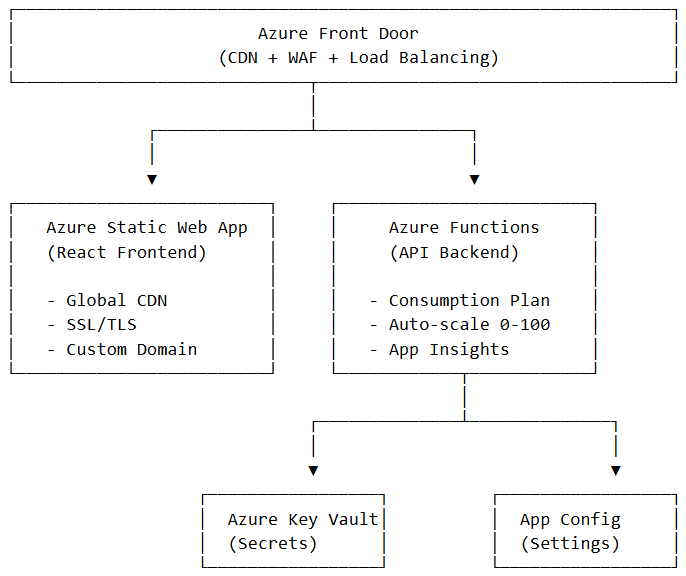
Production Topology
Infrastructure as Code
We provision infrastructure using Bicep with modular templates for Static Web App, Function App, and Key Vault—enabling repeatable deployments across environments.
Lessons Learned
Building this platform reinforced several architectural principles:
1. Recursive data structures need recursive thinking. From state management to HTML generation to bookmark creation, the recursive section model required consistent patterns throughout the stack.
2. Dual engines provide resilience. Having IronPDF and PDF Services as options means we’re never blocked by a single vendor’s limitations or outages.
3. Client-side processing reduces backend complexity. By handling image compression and base64 encoding on the client, we eliminated file upload infrastructure entirely.
4. Configuration externalization is non-negotiable. The config service pattern allows the same build to run in dev, staging, and production with environment-appropriate settings.
5. Invest in the HTML generation layer. PDF quality is ultimately limited by HTML quality. A well-architected HTML generator makes both PDF engines perform better.
Conclusion
The Job Aid Creator demonstrates that purpose-built document authoring tools can dramatically improve upon generic word processors. By combining modern frontend frameworks, serverless backend architecture, and dual PDF generation engines, we’ve created a platform that transforms documentation from a burden into a streamlined workflow.
The patterns and approaches described here—recursive state management, multi-engine PDF generation, configuration-driven deployment—are applicable beyond document creation to any domain requiring structured content authoring with professional output.
For organizations drowning in documentation debt, the technical foundation is proven. The question is no longer “Can we build this?” but “When do we start?”
This technical deep dive was prepared by the Netwoven engineering team. For architecture consultations or implementation partnerships, contact our solutions team.
Technical Stack Summary:
| Layer | Technology |
| Frontend Framework | React 19.2 + TypeScript 5.9 |
| Build Tool | Vite 7.2 |
| UI Components | Ant Design 6.1 |
| State Management | Context API + useReducer |
| Backend Runtime | .NET 8.0 |
| Serverless Platform | Azure Functions v4 (Isolated) |
| PDF Engine 1 | IronPDF 2025.12 |
| PDF Engine 2 | PDF Services SDK 4.3 |
| AI Integration | Azure OpenAI |
| Hosting | Azure Static Web Apps + Azure Functions |