Introduction
If you spent any part of your career arguing about SharePoint sites versus subsites, folders versus metadata, or whether the marketing team really needed its own site collection, you already know how the next few years of AI-workspace organization are going to go. The tools are new. The information architecture problems are not.
I have been using Claude Cowork heavily for the last few months, and a quick look at my workspace list told the story of an unresolved taxonomy debate. Fourteen workspaces. Some organized by industry vertical, some by feature, some by named customer account, a couple by function, one by time window, and a few by initiative. The naming was inconsistent. Half started with “G365” and half with Govern 365. It worked, but it worked the way a desk works when you can find the thing you need by remembering where you put it, not because the desk has a system.
This post is about the tradeoffs I noticed, the SharePoint parallels that kept coming back, the one thing about Cowork I had initially missed, and the seven-project structure I have now moved to.
Key takeaways
- Cowork projects can point at real folders. The subfolders inside become a second-level taxonomy that the project can see. This is the SharePoint document-library pattern, not the single-tag pattern.
- Stop picking one organizing axis. Cap each axis (account, feature, function, topic, initiative) at exactly one top-level project, and let subfolders handle the second level.
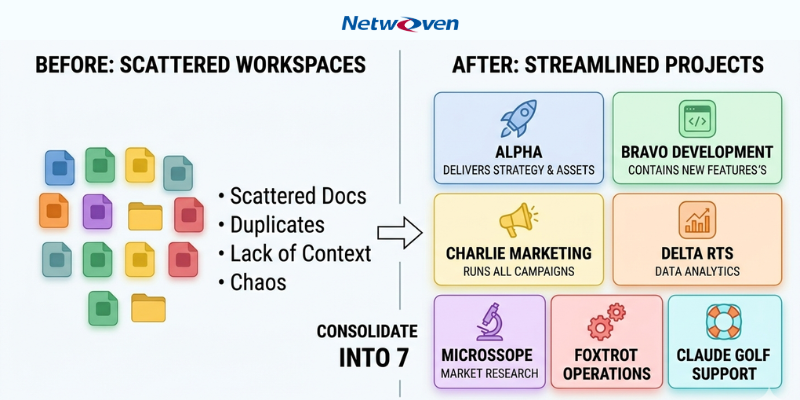
- Five anchor projects plus two utility projects covered everything in my business: SEO and Content Ops, Industry Playbooks, Feature Launches, Account Pursuit, Strategy and Initiatives, plus Netwoven content ops and a Sandbox.
- Map the folders before you rename the workspaces. Filesystem structure determines whether the new workspace structure holds.
- Walk the list every quarter. The governance habits that worked for SharePoint site collections work for AI workspaces too.
What I did originally (and what was wrong with it)
My original list had workspaces organized along at least six different axes simultaneously:
- By industry: Churches, Private Equity, Non-Profit, Medical Device
- By product feature: External Sharing, Redaction
- By named customer account: Contoso, Fabrikam, Northwind Traders, AdventureWorks
- By function: Analytics, SEO, Strategy Workshop
- By time window: a workspace covering a specific date range
- By initiative: one-off projects that did not fit anywhere else
Each of those decisions was rational at the moment I made it. Cumulatively they were a mess. When I sat down to start new work, I sometimes did not know where it belonged. I had asked Claude essentially the same question in two different workspaces because the context I needed was split across both. And the inconsistent prefixing meant search depended on guessing which abbreviation past-me was using.
If that description sounds familiar, it should. This is exactly the SharePoint sprawl pattern from 2008 through about 2015. You stand up sites for legitimate reasons, each one solves a real problem, and three years later nobody can find anything.
The SharePoint analogy holds up, with one important update
- Sites and subsites – how do you carve up the top-level containers
- Document libraries and folders – how do you organize within a container
- Metadata, columns, and views – how do you let people slice the same content multiple ways
My first instinct was to say that Cowork compresses all three layers into one. That is half right and half wrong, and the wrong half matters.
It is true that there is no metadata you can attach to a Cowork workspace to let you view your portfolio by “customer” today and by “industry” tomorrow. The old SharePoint folders-versus-metadata argument resolved with “metadata wins because it gives you multiple views of the same content,” and Cowork does not give you that.
But Cowork is not folder-less. A Cowork project can be pointed at a real filesystem folder, and the subfolders inside that folder become a second-level taxonomy that the project can see. That is the layer I underweighted in my first pass at this problem. The right mental model is not “one container, one lens.” It is “one container at the top, full folder hierarchy beneath.” That is much closer to a SharePoint document library than to a single tag.
The organizing patterns and where each one breaks
Here are the main axes people use for top-level workspaces, what each one optimizes for, and where each one struggles.
One workspace for everything
The simplest possible approach. Drop everything into a single workspace and let search do the work.
Pros: Zero overhead. All your context is in one place.
Cons: Context bleeds across unrelated topics. The model picks up on the wrong threads. You cannot share narrowly because sharing the workspace shares everything. As volume grows, signal-to-noise drops.
By customer or account
One workspace per named customer or prospect.
Pros: Clean confidentiality boundary. Each customer’s history lives together. Easy to share with teammates working on that account.
Cons: Cross-customer patterns are invisible. Common assets get duplicated or stranded in a separate workspace you forget to update. The workspace count grows linearly with customer count.
By industry or segment
One workspace per vertical.
Pros: Industry context (terminology, regulatory background, common pain points) accumulates in one place.
Cons: A customer that crosses segments has no natural home. As segments multiply, this looks a lot like the customer approach with extra steps.
By product feature or capability
One workspace per feature, module, or product area.
Pros: Engineering and product conversations stay consistent. Documentation, FAQs, positioning, and competitor notes for a single feature live together.
Cons: Customer conversations cut across features. Marketing campaigns cut across features. You hop between workspaces and lose context each time.
By function
One workspace per discipline (SEO, analytics, strategy, content, support).
Pros: Maps to how teams actually work. Functional expertise compounds.
Cons: Customer and product context lives elsewhere. The SEO workspace knows a lot about SEO and very little about the specific customer you are doing SEO for.
By time window or campaign
One workspace per quarter, per launch, per campaign.
Pros: Naturally time-boxed. Easy to archive when the period ends.
Cons: Long-running context gets stranded in old workspaces. Bad fit for anything not actually time-bounded.
Hybrid (the thing I actually did)
A pragmatic mix where each workspace was created for whatever organizing principle made sense at the moment.
Pros: Each individual workspace is fit-for-purpose. Quick to start.
Cons: Taxonomy drift. No consistent rule for where new work goes. New team members would have no chance of navigating the list without a tour.
The key insight: stop picking one axis, cap each axis instead
The mistake I made was assuming I had to choose between these patterns. The axes are not actually competing. They describe different real dimensions of real work. My business genuinely has customers, and it genuinely has product features, and it genuinely has functional teams, and it genuinely runs time-bounded initiatives. All of those dimensions exist whether I model them or not.
The fix is not to pick one and ignore the rest. The fix is to give each axis exactly one top-level project, and use subfolders inside that project to handle the second level. Industries do not need four workspaces. They need one Industry Playbooks project pointing at one folder, with one subfolder per industry. Active customers do not need a workspace each. They need one Account Pursuit project with a subfolder per active deal.
This is the SharePoint metadata pattern recreated using folders, which is what SharePoint architects ended up doing in practice anyway every time the metadata governance broke down.
A worked example: 14 workspaces to 7
Here is the consolidation I actually ran. The customer names are placeholders, but the structure is the real plan.
| Project | Replaces | Folder it points at |
| G365 – SEO and Content Ops | G365 – Analytics, Govern 365 SEO Project, Govern 365 – May 1 to June 3 | Main Govern 365 working folder with content calendar, audits, and schema work |
| G365 – Industry Playbooks | G365 – Industry – Churches, PE, Non-Profit, Medical Device | One folder, subfolders per industry. Each industry has reference docs and positioning notes |
| G365 – Feature Launches | Govern 365 – Feature – Redaction, G365 – Feature – External Sharing | One folder, subfolders per feature. Used for V-Next May 2026 onward |
| G365 – Account Pursuit | Contoso, Fabrikam, Northwind Traders, AdventureWorks | One folder, subfolders per active account. Archive the four originals unless they are live deals |
| G365 – Strategy and Initiatives | Govern 365 – Strategy Workshop, plus future cross-cutting initiatives like the book launch and V-Next GTM | One folder, subfolders per initiative |
| Netwoven – SEO and Content Ops | (new – currently scattered) | Netwoven.com working folder |
| G365 – Sandbox | (new – replaces “I will figure out where this goes later”) | A temporary folder, cleared quarterly |
A few notes on the choices.
Five primary projects, plus two utility projects. The first four (SEO and Content Ops, Industry Playbooks, Feature Launches, Account Pursuit) cover the four real axes of the business. Strategy and Initiatives is the fifth, and it deserves its own home because strategic work is genuinely cross-cutting and will dilute any of the others if you stuff it inside them. Netwoven is its own brand and warrants its own content ops project. The Sandbox is the deliberate scratch space, which prevents ambiguous prompts from polluting the anchor projects.
Subfolders carry the second level. Industries do not get four workspaces. They get four subfolders inside Industry Playbooks. Same for features, accounts, and initiatives. The folder mapping is what makes this work.
The time-bounded workspace got absorbed. “Govern 365 – May 1 to June 3” was the brittlest workspace in the original list. It got folded into SEO and Content Ops, which is where the work was actually happening anyway.
Archive criteria are explicit. Old account workspaces get archived unless they represent live deals. That is the kind of specific trigger that survives contact with reality. Vague rules (“archive what is stale”) never work because nothing ever feels stale enough.
How to migrate from a messy list
If your current Cowork list looks like mine did, the migration is less painful than you would think:
- Map your folders first. Before you touch a single workspace, decide what your filesystem looks like. Each anchor project will point at one folder, and that folder needs to exist with the right subfolders inside it. This is the step most people skip, and it is the step that determines whether the new structure holds.
- Pick your anchor projects. Look at your work and identify the genuine axes. Most B2B businesses end up with some version of Account, Industry, Feature, Function, and Strategy. Pure-product businesses might drop Account. Internal-only knowledge work might drop Industry. Pick the set that matches your reality.
- Add the two utility projects. A Sandbox for ambiguous starts and, if you run more than one brand, a separate top-level project per brand. These are cheap insurance against the kinds of drift that killed your previous list.
- Rename, do not recreate. Cowork preserves history if you rename. New names, same containers, same content. Where two workspaces should clearly become one, do the harder work of exporting the relevant conversations and re-running the important threads in the survivor.
- Archive aggressively on the first pass. Anything you have not opened in 90 days probably does not need to be in your active list. Prefix it with “Z-ARCHIVE” so it drops to the bottom of the list and the status is unambiguous.
- Set a quarterly review. Walk the list every three months. Confirm that subfolder contents inside each anchor project still match the project’s name. Empty the Sandbox by either reclassifying its contents or accepting that they were throwaway. Look for any project whose actual usage has drifted from its name and rename it.
It took me roughly an hour to migrate fifteen workspaces into seven. Most of that hour was deciding which subfolder structure each anchor project needed, which is exactly the kind of decision that gets harder, not easier, the longer you delay it.
The honest summary
Cowork is a younger product than SharePoint was when most of us were arguing about it, and at first glance it looks like it has fewer organizational levers. Spend a little time with it and the project-to-folder mapping reveals a layer that does most of what SharePoint metadata used to do, as long as you organize the folders deliberately. The lesson is not that AI workspaces are a step backward in information architecture. The lesson is that the architecture work has moved one floor down, from the workspace level to the folder level, and the same governance habits that worked in SharePoint work here too.
The mistake I made, and the one I keep seeing other people make, is not picking a bad pattern. It is picking all of them at once, at the top level, and letting the workspace list become a museum of decisions I no longer remember making. The SharePoint version of that mistake gave us a generation of intranets nobody used. The Cowork version is more recoverable, but only if you do the cleanup before the workspace list gets long enough that nobody, including you, wants to look at it.
The good news is that the discipline required is small. Identify your real axes. Cap each one at a single top-level project. Use subfolders for the second level. Add a Sandbox. Walk the list every quarter. The same habits that worked when we were herding SharePoint site collections work just as well now that we are herding AI workspaces, which is either reassuring or depressing depending on how much of your career was spent on the first round.
Frequently asked questions
For most small and mid-sized businesses, five to seven top-level projects is enough. The right number is the smallest set of projects that covers your real organizational axes (typically Account, Industry, Feature, Function, Strategy) plus a Sandbox and any brand-level separation you need. If you have more than ten, you are almost certainly using the workspace list as a substitute for folder organization.
Yes. A Cowork project can be pointed at a real filesystem folder, and the subfolders inside that folder give you a second level of organization. This is the feature that makes the consolidation strategy work, because it lets you use folders as the per-project taxonomy rather than creating a new workspace every time a new category appears.
Neither alone. Give each genuine organizing axis (customer, feature, industry, function, initiative) exactly one top-level project, and use subfolders inside each project for the second level. So you would have one Account project with a subfolder per active customer, and one Feature project with a subfolder per feature, rather than ten separate workspaces split across the two patterns.
A SharePoint document library gives you folders, metadata, columns, and views. Claude Cowork gives you projects (which map to folders) and the folder hierarchy beneath. Cowork has no equivalent to SharePoint metadata or views, which means your folder structure has to do the work that metadata used to do. The good news is that most SharePoint deployments ended up relying on folders anyway whenever metadata governance broke down.
Map your filesystem folders first, decide on five to seven anchor projects that match your real organizing axes, then rename existing workspaces to fit and prefix obsolete ones with “Z-ARCHIVE” so they sort to the bottom of the list. Do not delete workspaces in the first pass: archive them. Plan a quarterly review to keep the new structure from drifting back to where it started.