Slack to Microsoft Teams Migration
Netwoven goes beyond lift-and-shift, delivering a seamless Slack to Teams migration that preserves context, critical data, and user adoption.
Recognized by Microsoft as a Top 5 Global Partner for Slack to Teams Migration
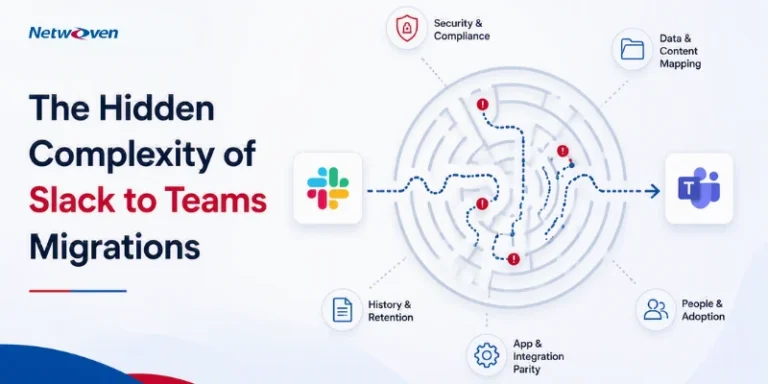
Migrating to a new platform, especially one providing such front-and-center functionalities as messaging and collaboration, can be stressful for both systems administrators and users alike. There are more variables than just data transfer that need to be accounted for to ensure a smooth transition and satisfied users. There are several challenges during enterprise Slack to Teams Migration.
- Slack integrations often break and need rebuilding.
- User resistance slows MS Teams adoption.
- Sensitive data must migrate securely and compliantly.
- API limits and large volumes cause delays.
- Hidden migration costs can strain budgets.
Without a purpose-built strategy, Slack to Teams migration can quietly disrupt your workflows, shadow IT, and governance posture.
Netwoven Makes It Seamless
As a Microsoft-endorsed migration partner, we’ve helped enterprises move thousands of Slack users to Teams—securely, completely, and without disruption.
Our enterprise-grade migration framework includes:
- Pre-Migration Assessment: Auditing Slack data, integrations, and usage patterns to build a tailored migration plan.
- Data Mapping & Transformation: Ensuring message history, threads, files, and users are correctly structured for Teams.
- Integration Planning: Replacing or rebuilding Slack integrations with Microsoft-native or custom solutions.
- Automated Migration Tools: Using proven tools to reduce manual effort, avoid data loss, and handle large volumes efficiently.
- Security & Compliance Controls: Safeguarding sensitive data and maintaining regulatory compliance throughout.
- User Ennoblement & Training: Driving adoption with user guides, training sessions, and change management support.
- Post-Migration Support: Addressing issues quickly, fine-tuning configurations, and ensuring Teams is fully operational.
Schedule Your Slack to Teams Migration Assessment Today
Schedule your assessment to learn more about Slack to Microsoft Teams migration best practices.
What We Migrate
Netwoven provides an end-to-end Slack to Microsoft Teams migration, preserving channels, content, apps, permissions, and business continuity.
| Slack Features | Details of Sub features | Netwoven migrates |
|---|---|---|
| Public Channels | ||
| Renaming to a more meaningful name | ![]() | |
| Grouping common channels in a single Teams | ![]() | |
| Merging multiple channels in a new channel | ![]() | |
| Archiving channels which are not active | ![]() | |
| Private Channels | ||
| Migrate in separate MS Teams to maintain the privacy | ![]() | |
| Grouping Channels with similar permissions in a business unit /department in a new Teams | ![]() | |
| Migrating as a new channel in an existing Teams | ![]() | |
| Channel Messages | ||
| Theads with replies | ![]() | |
| Files and Attachments Migration | ![]() | |
| Pinned Messages Migration | ![]() | |
| Preserving timestamps and original author | ![]() | |
| Full HTML message body migration | ![]() | |
| Emojis Migration | ![]() | |
| Reactions | ![]() | |
| Direct Messages | ||
| Files Attachments Migration | ![]() | |
| Authorship and timestamps for message conversations | ![]() | |
| Full HTML message body migration | ![]() | |
| Emojis Migration | ![]() | |
| Reactions | ![]() | |
| Apps | ||
| Custom Apps | ![]() | |
| OOTB Apps | ![]() | |
| Custom Bots | ![]() | |
| Notifications | ![]() | |
| Workflow Automation | ||
| Workflow Builder for automations | ![]() | |
| Maps to Power Automate or custom apps | ![]() | |
| Power Automate for advanced automation | ![]() | |
| Permission | ||
| Slack Admins as owners | ![]() | |
| Slack Members as Members | ![]() | |
| Migration of users in private channels | ![]() | |
| Migration | ||
| Pre migration assessment | ![]() | |
| Workshops | ![]() | |
| Decision making sessions | ![]() | |
| One-Time Migration and Phased migration | ![]() | |
| Delta Migration | ![]() | |
| zero downtime delta migration for business critical channels | ![]() | |
| Filtering/Selecting Time Period for Migration (e.g., last 3 years, etc.) | ![]() | |
| Archive migration | ![]() | |
| Migration of Enterprise Grid | ||
| Multi-workspace for large orgs | ![]() |
| Migration Approach | Cost Factors | Time to Value | Risk Level |
|---|---|---|---|
| Expert-Led Solution | Fixed, predictable pricing | 6-8 weeks | Low |
| Internal Development | Variable, often underestimated | 4-6 months | High |
Migration Process
Proof of Concept
Proof of Concept
Workshops & Decision Making
Migration Readying
Migration Readying
Pilot, Full, & Delta Migrations
Adoption & Change Management
Go-Live & Hypercare Support
Slack to Teams Migration – Frequently Asked Questions
Q1: How do you handle Slack’s new rate limits?
Our pipeline ingests Slack JSON exports into a MySQL database and transfers messages, attachments, and images directly to Microsoft Teams. This avoids Slack APIs (e.g., conversations. History/replies) impacted by new rate limits.
Q2: What is the migration capacity?
During production migration, throughput typically ranges from 1M–2.5M messages per week, depending on Azure configuration, tenant geography, and channel type.
Q3: How many parallel jobs can run?
The solution supports 12–18 parallel instances.
Q4: How is concurrency managed across channels and DMs?
Channels and direct message threads are processed concurrently using scalable Azure infrastructure and optimized pipelines.
Q5: Do you support incremental/delta migrations?
Yes. Delta exports are fully supported for new or changed messages and files, tracked using Slack timestamps. This enables phased migrations and long cutovers without data loss.
Q6: Can you support monthly deltas or pause/resume migrations?
Yes. Monthly deltas and phased migrations are available for large datasets (>5M messages). Pause/resume is supported without reprocessing. To preserve authorship/timestamps, Teams are initially created in migration mode; after release, posts retain service account authorship with metadata.
Q7: How do you manage errors and reporting?
Automated retries are built in. Failed messages (historically <0.01%) are logged, reviewed, and reprocessed. Detailed per-job and per-wave reports provide visibility into Slack object mappings.
Q8: Are private channels supported?
Yes. Limitations include:
- Messages posted by a service account (not the original author).
- Current timestamp applied, with headers noting original author/date.
- Migration runs ~2.5× slower due to Microsoft API restrictions.
Q9: Do you support workflow migration?
Yes, workflows are supported.


Insights
Thought Leadership
Introduction As more organizations are making the switch from Slack to Microsoft Teams, one of the biggest hurdles they face is moving app integrations like Jenkins, TeamCity, and even custom-built… Continue reading Step-by-Step Guide to Migrating Slack Apps into Microsoft Teams
Introduction Collaboration tools are the backbone of modern business operations and are required for seamless communication and productivity. Among these tools, Slack and Microsoft Teams are two of the most… Continue reading The Enterprise Guide to Slack to Teams Migration: Avoid These 10 Common Pitfalls
Introduction: In our previous blog ‘Slack to Microsoft Teams Migration: A Step-by-Step Guide’, we learned about the merits of migrating from Slack to Microsoft Teams and the methods to execute… Continue reading Slack to Teams Migration Tools and Migration Experience
Introduction: The fact that you are reading this article means you have already decided to or are at least seriously considering migration from Slack to Microsoft Teams. It is fair… Continue reading Slack to Microsoft Teams Migration: A Step-by-Step Guide [Updated]
Introduction: If you have already embarked on your migration journey, you must have realized that there are several blockers in user experience post-migration. A major hurdle that impacts the users… Continue reading How to Manage Your Broken Links Post-Migration
Why Choose Netwoven ?
Netwoven helps organizations move from Slack to Microsoft Teams with confidence by combining deep Microsoft expertise, proven migration frameworks, and a business-first approach. We ensure collaboration continuity, data integrity, and rapid user adoption with minimal disruption.
Contact Us- 1Proven Migration FrameworkA structured, repeatable approach that ensures accurate data mapping, validation, and predictable outcomes.
- 2Microsoft-Certified ExpertiseAccredited Microsoft Solutions Partner with extensive experience delivering enterprise-scale Teams migrations.
- 3Minimal Business DisruptionPhased and delta migrations designed to maintain collaboration continuity and avoid downtime.
- 4Security & Compliance FirstPermissions, privacy, and governance are preserved to meet enterprise security and compliance requirements.
- 5Adoption-Focused DeliveryBeyond data movement, we support user readiness and Teams best practices to drive faster adoption and ROI.
Prefer to call?1-877-638-9683
Drop us a mailinfo@netwoven.com
Talk with an Expert
Find out how we can help you with your organization’s digital transformation journey.