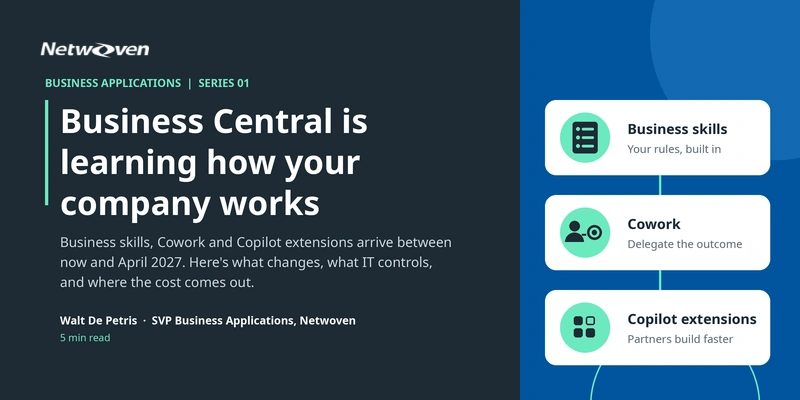
Between now and April 2027, Business Central changes from a system where people record work into one where Copilot and agents do it. Three changes drive that shift:
1. Business skills put your own rules into the system.
2. Cowork lets people delegate outcomes, with Business Central data and agents behind it.
3. Copilot extensions let partners build what a customer needs in a fraction of the time.
Together, they go after the biggest cost in most ERP environments: people waiting on people to remember a rule, find a record and key in a change.
| When | What | Stage |
|---|---|---|
| Now | Edit with Copilot | Early access for partner |
| November 2026 | Business skills | Early access for partners |
| November to December 2026 | Business Central in Cowork | Early access for partners |
| January 2027 | Copilot in Business Central | General availability |
| January 2027 | Business Central in Cowork | Public preview |
| January 2027 | Customize with Copilot | Early access for partners |
| April 2027 | Edit with Copilot, Business Central agents in Cowork, business skills | Public preview |
These are Microsoft’s current dates and can change.
Change 1: Your rules become part of the system
A business skill is a plain article inside Business Central that describes how your company works. Copilot reads it before it acts.
Take a new product on a sales order. The company’s skill says the standard margin is 30 percent on one line and 40 percent on another, that new suppliers default to 15 percent, that colors are separate items instead of variants, and that every vendor needs a website and an email address. Copilot reads the order and that skill, sets up the two item records, creates the vendor, and drafts a purchase order that it leaves unposted for a person to approve. It changes six rows, flags the fields it wants reviewed, and writes a plain account of what it did.
Those rules used to live in a few experienced heads and a binder nobody opens. Now they apply on every transaction, the same way, whoever is on shift. For customers, that means fewer exceptions, less rework and a process that survives staff turnover. For partners, it’s a new kind of engagement: interview the experts, write the skill, test it.
Change 2: Work starts in Cowork and finishes in Business Central
Cowork is where a person describes an outcome instead of asking a question. Copilot gathers context from email, meetings, files and business data, works across tools, and completes multi-step actions with the person’s approval. Business Central joins as a plugin.
What that looks like for the business: analyze cash movements from every customer through receivables into the cash accounts, then build an interactive view of amounts by aging bucket. Or ask which customers have the largest overdue balances, which open orders ship before a deadline, or why margin is slipping. Each answer cites the records behind it, so a person can check the work.
Agents inside Business Central do the transactional work. The Payables Agent already reads vendor invoices from a mailbox, identifies the vendor, proposes purchase order lines and drafts the invoice. A supervisor reviews the flagged fields, and the agent finalizes an unposted invoice. It never posts. Update 29.0 adds better purchase order matching, easier agent permission management and one task pane for every agent. Cowork can hand tasks to custom Business Central agents and track the results.
What IT controls
- Setup. An administrator assigns the Business Central plugin in the Microsoft 365 admin center, under Copilot, Tools, to all users, no users, or specific users and groups. Each user then switches it on in Cowork.
- Access. The plugin connects through the Business Central MCP server’s default configuration. It runs with the signed-in user’s own permissions, across the environments and companies that user can reach. It’s read-only until someone enables writes. To keep an environment away from Cowork, disable the MCP server or empty the default configuration.
- Tools. The server exposes purpose-built tools from your API pages and queries, generic data query tools that discover tables, schema and relationships, and agent tools. The dynamic tools are
bc_actions_search,bc_actions_describeandbc_actions_invoke, andbc_data_queryhandles data queries. No custom APIs are needed to start. - Spend. Cowork, data query tools and agent tools use Copilot credits. Cost management in the admin center sets spending policies by user or group. Usage billing is on by default for new Microsoft 365 Copilot Business licenses bought through CSP from December 1, 2026.
- Value. A consumption dashboard reports assisted hours, so you can compare credits spent to time returned.
Change 3: Partners can extend Copilot
- Customize with Copilot. A customer describes a change in natural language, and Copilot builds it as a normal extension, tied into the engineering process and governed by permissions. Partners get it in early access in January 2027.
- Custom agents. Each has its own identity, assigned permissions, defined triggers, sandbox testing, versioned instructions, an auditable timeline and a reasoning log.
- Skills and plugins. People write custom skills as simple instruction files and share them across the organization. Partners can package skills and connectors as Microsoft 365 apps and publish through Marketplace.
- Faster, safer delivery. AL-Go for GitHub now includes the BCQuality library of Business Central knowledge and AL examples. Page scripting is generally available, so teams record and replay acceptance tests with no AL code.
Where the cost comes out
I won’t put a percentage on it. Measure your own. The sources of saving are clear:
- Fewer handoffs, because one agent moves a task across Outlook, Teams and Business Central.
- Consistent rules, because skills apply policy the same way every time.
- Review instead of re-keying, so experienced people check the work with an audit trail.
- Cheaper delivery and testing, because partners prototype and test faster.
One more point for on-premises customers: Copilot and agents are available only on Business Central online.
The Bottom Line
What to do first:
- Pick one process that costs you the most waiting. Payments collection, vendor onboarding and new product setup are good candidates.
- Write it down as a skill. If it can’t fit on a page, find out why.
- Pilot with one security group. Assign the plugin to that group, set a credit spending policy, and keep the connection read-only at first.
- Measure before and after. Cycle time, rework and credits used, with a person approving every write.
At Netwoven we run Business Central, Microsoft 365 and Copilot practices together, which is the combination these changes need. If you want to test one process, we’d be glad to talk.
Move from Dynamics GP to Business Central Online and get ready for Copilot
Get a migration assessment with fixed scope, timeline and cost, and keep your financial history and customizations intact on the way to Copilot and agents.
Frequently Asked Questions
A business skill is a plain article inside Business Central that describes how your company works, such as margin rules, vendor setup rules or item conventions. Copilot reads the skill before it acts, so it applies your policy the same way on every transaction. Partners can get early access from November 2026, with public preview in April 2027.
Partners get early access between November and December 2026. Public preview starts in January 2027, and Business Central agents in Cowork reach public preview in April 2027. These are Microsoft’s current dates and can change.
No. It reads vendor invoices from a mailbox, identifies the vendor and proposes purchase order lines. A supervisor reviews the flagged fields, and the agent then finalizes an unposted invoice. Microsoft’s FAQ states plainly that Payables Agent doesn’t post purchase invoices or purchase credit memos.
Access: An admin assigns the Business Central plugin in the Microsoft 365 admin center to all users, no users or specific groups. The plugin runs with the signed-in user’s own permissions and is read-only until someone enables writes.
Spend: Cowork, data query tools and agent tools use Copilot credits. Spending policies by user or group are set under cost management in the admin center.
No. Copilot and agents are available only on Business Central online. Microsoft confirms that Copilot is exclusive to Business Central online. Therefore, it isn’t available for other deployment types, such as on-premises or private cloud.
References
- Microsoft Learn, Copilot Cowork overview
- Microsoft Learn, Business Central MCP Server Overview and Setup – Business Central
- Microsoft Learn, Copilot FAQ – Business Central