Introduction
In Chapters 1- Beyond the Portal: How AI is Turning the Corporate Intranet into a Digital Colleague and Chapter 2 – The Rise of the AI-Driven Intranet – Why Enterprises Must Modernize Now, we traced the evolution of the intranet to AI-driven intranet – from a static portal into a digital colleague, and then into an AI‑driven enterprise command center. We established that intelligence is no longer a feature layered onto the intranet; it is the foundation of how modern work gets done.
But a deeper transformation occurs when organizations move beyond platforms altogether.
The true inflection point comes when enterprises stop asking, “How do we add AI to our intranet?” and start asking,
“How do we redesign work when AI agents become part of the workforce?”
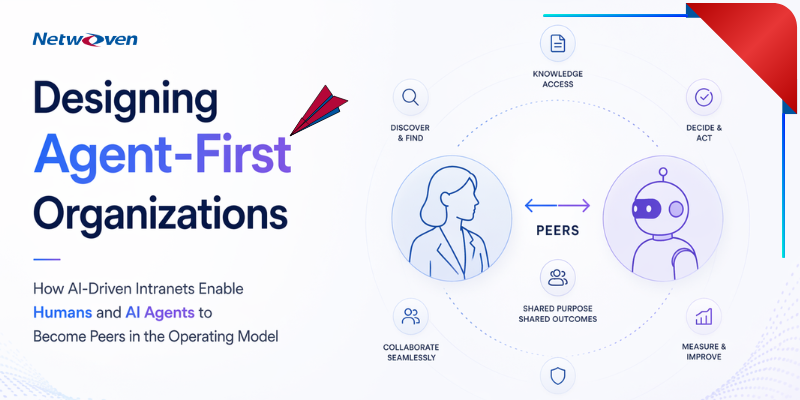
Welcome to the era of the Agent‑First Organization.
From AI‑Enabled Platforms to AI‑Native Operating Models
Most enterprises today are still operating with human‑only assumptions:
- Humans search, read, decide, and act
- Systems store, route, and notify
- Automation supports, but rarely leads
Agent‑first organizations flip this model.
In these organizations:
- AI agents read first
- AI agents synthesize and recommend
- AI agents execute repeatable work
- Humans govern, decide, and create
The intranet is no longer the “front door” to information – it becomes the control plane where humans and AI agents collaborate.
This shift requires re‑imagining:
- Roles
- Workflows
- Accountability
- Governance
- And most importantly, how intelligence shows up in daily work
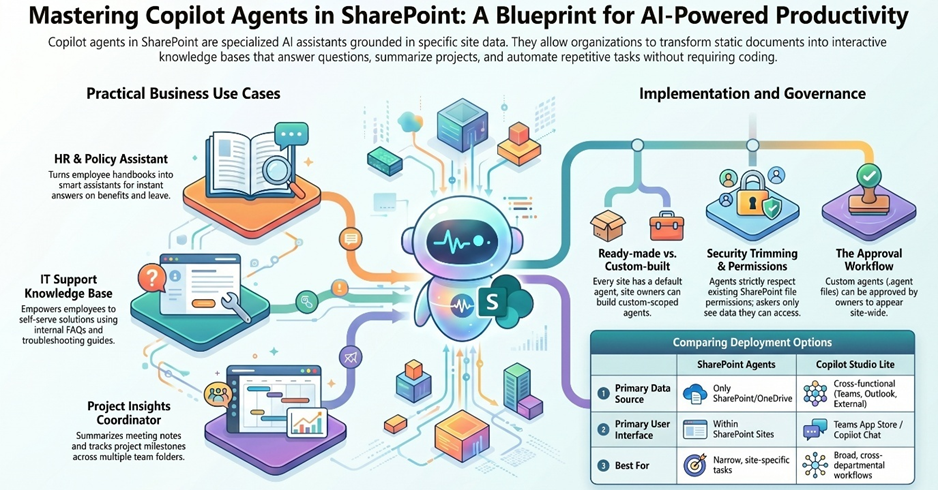
The Intranet as an Agent Runtime
In an agent‑first organization, the intranet is no longer just a publishing system. It becomes:
- A trusted knowledge source for AI reasoning
- A runtime environment for enterprise AI agents
- A governed space where agents operate with context, permissions, and constraints
This is where theory becomes practical.
Let’s ground this transformation in real intranet experiences organizations can deploy today.
Embedding AI Agents Where Work Already Lives
1. Creating an AI Agent on a Document Library
Consider a high‑value SharePoint document library:
- Policies
- Engineering specs
- Playbooks
- Product documentation
- PMO guidelines
Traditionally, users search, open, and read.
In an agent‑first model:
- The AI agent is attached to the library
- It understands:
- Document context
- Version history
- Metadata
- Permissions
- It can answer questions like:
- “What changed in the latest policy?”
- “Summarize this folder for a new joiner.”
- “Highlight risks across these documents.”
The library becomes AI‑addressable, not just searchable.
At this point, the AI agent is no longer generic – it is domain‑aware, scoped, and trustworthy.
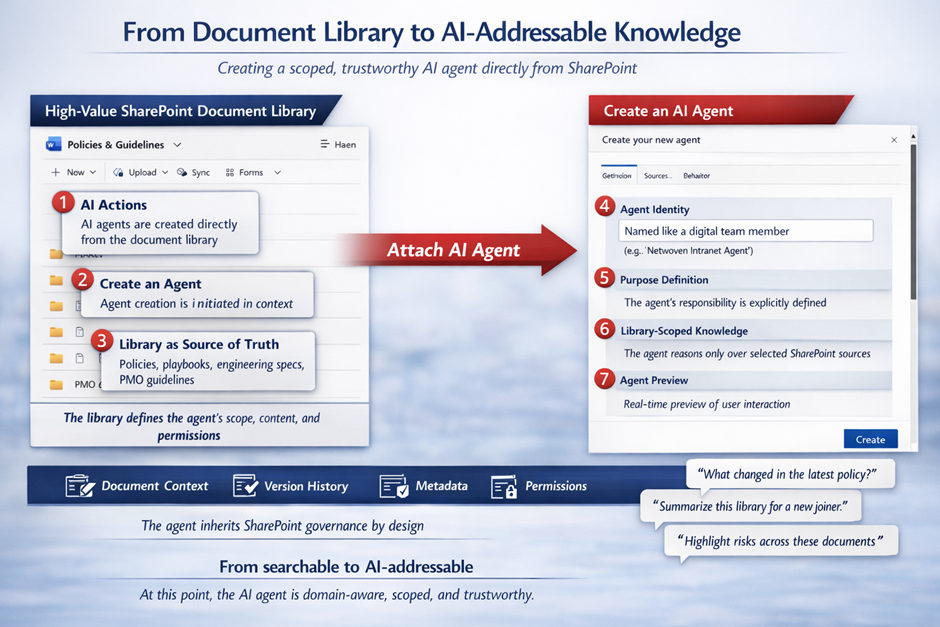
Steps: Creating an AI Agent on a SharePoint Document Library
- Navigate to the Target Document Library
Identify a high‑value SharePoint library such as Policies, Engineering Specs, Playbooks, Product Documentation, or PMO Guidelines. This library will define the agent’s knowledge boundary. - Initiate Agent Creation from the Library
From the document library command bar, select AI actions → Create an agent.
Agent creation happens in context, directly where the content lives. - Define the Agent’s Identity and Purpose
- Provide a meaningful agent name (for example, Policy Advisor or PMO Assistant).
- Define the agent’s purpose clearly, such as summarization, change analysis, or risk identification.
- Scope the Agent to the Library Content
The selected document library becomes the agent’s source of truth.
By design, the agent inherits:- Document context
- Version history
- Metadata
- Permissions
- Review and Validate the Agent Preview
Use the agent preview to validate interactions and suggested prompts before activation, ensuring the agent behaves as expected for its intended audience. - Create and Activate the Agent
Once created, the agent becomes available to users with access to the library, operating fully within SharePoint governance and security boundaries.
2. Bringing the Agent to the Intranet Home Page
Agent‑first design breaks a common anti‑pattern:
making users go find AI.
Instead, AI comes to where users start their day.
On the intranet home page:
- The AI agent appears as:
- A conversational panel
- A task‑oriented assistant
- A contextual “Ask Me” experience
- It is already scoped to:
- Role
- Department
- Recent activity
- Enterprise priorities
This transforms the home page from a broadcast surface into an interactive intelligence layer. The homepage stops telling and starts collaborating.
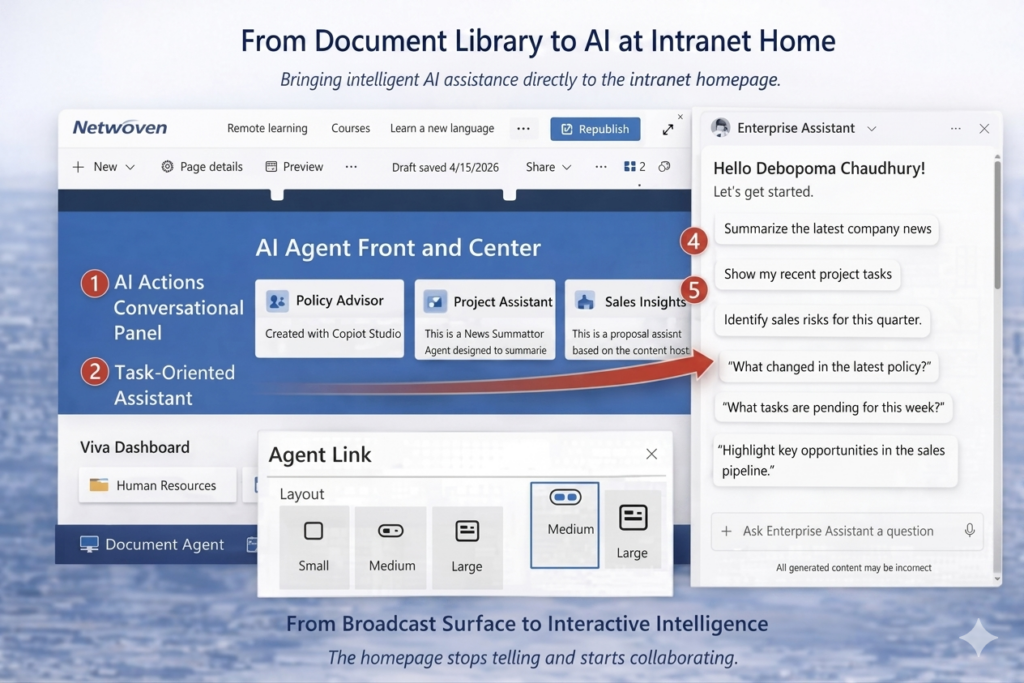
Steps: Adding an AI Agent to the Intranet Home Page
- Open the Intranet Home Page in Edit Mode
Navigate to the SharePoint intranet home page and select Edit to begin authoring. - Insert the Agent Link Web Part
Add a new web part and select Agent Link.
This web part is used to surface AI agents as first‑class components on the page. - Choose the Agent Link Layout
Select an appropriate layout based on prominence:- Small – secondary or supporting agent
- Medium – task‑focused assistant
- Large – primary conversational entry point
- Select the AI Agent
From the agent picker, search for and select the required agent (for example, Policy Advisor, Project Assistant, or Sales Insights).
Only pre‑created, governed agents are available for selection. - Position the Agent for Visibility
Place the Agent Link web part in a prominent section of the homepage – typically near the hero or primary content area – so users encounter AI immediately on arrival. - Publish the Home Page
Save and Publish the page to make the agent available to users with appropriate access.
3. AI‑Enabled FAQs: From Static Lists to Living Knowledge
FAQs are one of the most visited and most neglected areas of most intranets.
In an agent‑first organization:
- FAQs are no longer manually written and maintained
- They become AI‑generated, AI‑validated, and context‑aware
AI‑enabled FAQs:
- Are derived directly from authoritative documents
- Adjust answers based on user role and location
- Evolve as content changes
- Provide answers, not links
This is not just better UX – it is knowledge automation.
Support teams see fewer tickets. Employees get answers instantly. Governance improves because responses trace back to source content.
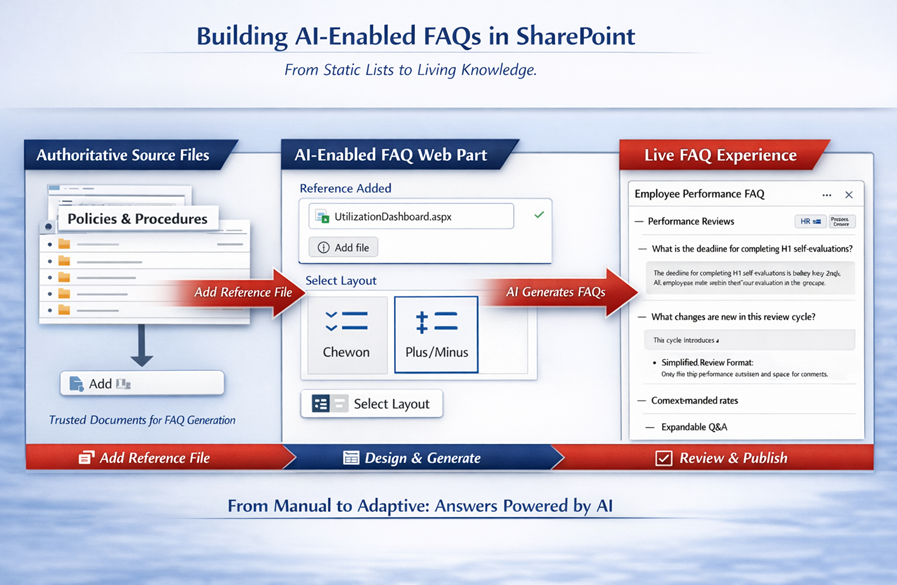
Steps: Creating an AI‑Enabled FAQ in SharePoint
Step 1: Edit the Target Page
Open the relevant intranet or department page (for example, HR, PMO, or IT Help) and select Edit.
Step 2: Add the FAQ Web Part
From the web part picker:
- Search for FAQ (AI category)
- Select the FAQ web part
This is the AI‑enabled FAQ experience—not a traditional static FAQ list.
Step 3: Provide the Authoritative Source
In the FAQ configuration panel:
- Under Content → Reference, add one or more trusted files
- Policy documents
- Process guides
- Dashboards or authoritative pages
This reference file becomes the source of truth for FAQ generation.
Step 4: Let AI Generate FAQs
Once the source is added:
- SharePoint AI automatically:
- Extracts common questions
- Generates clear, natural‑language answers
- Groups them into logical categories
FAQs are now derived, not manually authored
Step 5: Choose the FAQ Layout
Select a layout that suits user consumption:
- Chevron – best for scanning and skimming
- Plus / Minus – ideal for concise Q&A expansion
Optional:
- Enable Show category for better grouping and navigation
Step 6: Review, Refine, and Publish
Authors can:
- Review generated questions and answers
- Make light refinements if required
- Publish with confidence, knowing answers are grounded in source content
What Makes These FAQs “AI‑Enabled”
Unlike traditional FAQs:
- Answers update automatically when source documents change
- Responses stay aligned with governance and permissions
- Users receive direct answers, not document pointers
FAQs become a living knowledge layer, not a maintenance burden.
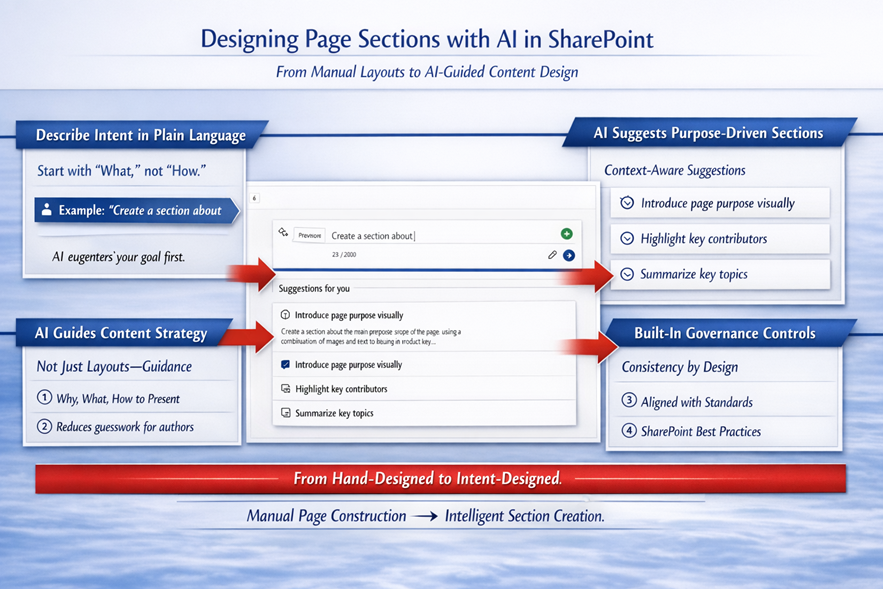
Designing Pages with AI‑Enabled Suggestions in SharePoint
Traditional intranet pages are manually composed – authors decide sections, layouts, and content upfront, and those decisions rarely change. Structure and relevance are shaped by past patterns rather than current user needs.
AI‑enabled page design in SharePoint fundamentally changes this approach.
Instead of starting with a blank canvas, authors design pages with AI assistance built directly into the authoring experience. Using out‑of‑the‑box AI capabilities, SharePoint guides page creation through intelligent suggestions rather than fixed design assumptions.
With AI‑enabled page design:
- Authors describe intent in natural language, and SharePoint proposes relevant sections
- Design ideas and templates align layouts to the page’s purpose
- AI recommends section structure, visuals, and formatting to improve clarity and engagement
- Page authoring becomes faster, more consistent, and guided -without custom development
Typical capabilities include:
- AI‑suggested sections for introductions, summaries, and contributor highlights
- Pre‑configured templates and design ideas for common content patterns
- Intelligent author guidance that supports branding, structure, and readability
As a result, intranet pages are no longer handcrafted artifacts – they are co‑created with AI.
This marks a shift from manual page composition to intelligent content creation, laying the foundation for more adaptive and experience‑driven intranets.
From Governance to Partnership: Operating the Agent‑First Intranet
As AI agents begin to operate alongside humans, governance must evolve. In an agent‑first world, organizations no longer focus primarily on governing pages and sites. Instead, they govern the agents themselves—defining:
- Agent scope and responsibilities
- Data boundaries and permissions
- Confidence levels and validation mechanisms
- Feedback loops and learning controls
- Clear human override points
Well‑designed agent‑first intranets make accountability explicit. They clearly define:
- What an agent can answer
- What it can summarize
- What it can automate
- And what always requires human judgment
In this model, trust is not assumed – it is intentionally designed.
At the same time, agent‑first organizations do not replace people.
They liberate them.
AI agents absorb cognitive load—handling pattern recognition, summarization, and first‑pass execution—while humans focus on higher‑order work:
- Judgment and decision‑making
- Creativity and problem solving
- Strategic thinking
- Ethical and organizational accountability
The intranet becomes the shared operating space where this human–AI partnership functions every day.
By this stage, the intranet is no longer a portal, a CMS, or a collection of pages.
It has evolved into an AI‑powered operating layer, populated with intelligent agents and adaptive experiences.
Yet to fully realize this vision, enterprises need more than configuration.
They need purpose‑built intelligence:
- Custom AI‑powered web parts
- Agent orchestration across experiences
- Tailored AI interactions designed for specific business workflows
That is the next evolution and where we go next.
Next Chapter
Building Custom AI Web Parts for the Agent‑Driven Intranet
From Configured Intelligence to Purpose‑Built Enterprise AI Experiences
In Chapter 4, we’ll move from concepts to construction – showing how organizations design and deploy custom AI web parts that turn the intranet into a truly agent‑native workplace.
Curious to learn more, contact our team.