

Introduction
A workflow is a series of tasks or steps designed to achieve a specific business outcome. Workflows help organizations streamline operations, improve efficiency, and ensure consistency in how work is completed. By automating repetitive processes, workflows reduce manual effort, minimize errors, and enable teams to focus on higher-value activities.
Starting with a Copilot-First Power Automate Approach
Copilot is readily available in Power Automate, empowering businesses to streamline workflows and reduce development time with intelligent automation. By leveraging Copilot’s AI-driven suggestions and low-code capabilities, organizations can automate complex tasks, cut operational costs, and increase productivity. This results in faster solution delivery, enhanced business growth, and a measurable boost in return on investment through optimized process efficiency.
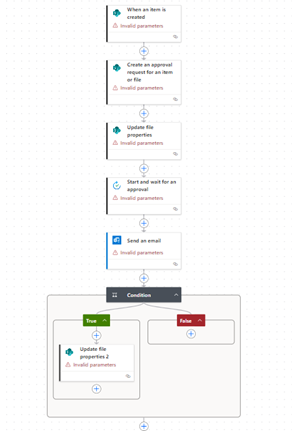
When managing complex or lengthy business automation processes, it is beneficial to begin with a Copilot-first Power Automate approach. Leveraging Copilot and low-code tools helps rapidly design, test, and deploy solutions while reducing the need for extensive custom development. I started with the following template:
“I want to create a Power Automate flow. It should do the following steps. This will initiate when an item is created in a SharePoint list. Add a Scope called Try and within the Try scope, add all the following actions. Next, create an approval task item in another SharePoint list. Update the status in the current item, then create an approval. After creating, send a mail notification to the requester. Then wait for approval and update the status accordingly based on approval or rejection. Yes, that is fine, but prior to the condition, create an approval step. Update item status when rejected. Close the Try scope. Then add another scope called “catch”, where a compose will capture the error.”
Challenges with Long-Running Processes and Flow Timeout Limitations
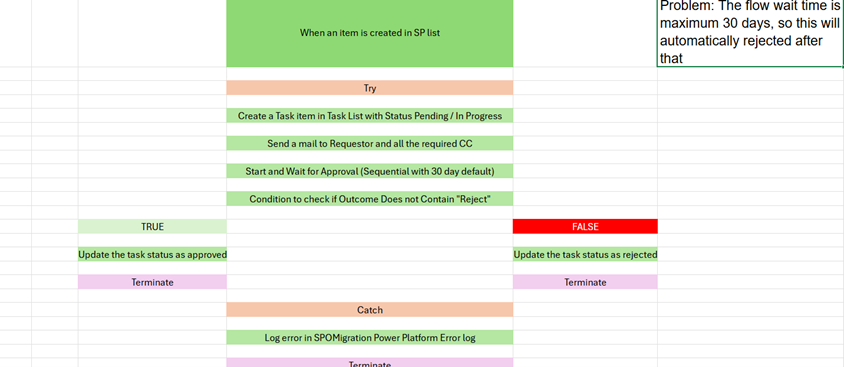
One common challenge in workflow automation is handling long-running approval processes. Power Automate flows have a timeout limitation, which can cause flows to fail or terminate if approvals take too long. This limitation can disrupt business operations and result in incomplete or delayed tasks.
Improved Approach: Using Try-Catch Blocks, Parent-Child Flows, and Reminders
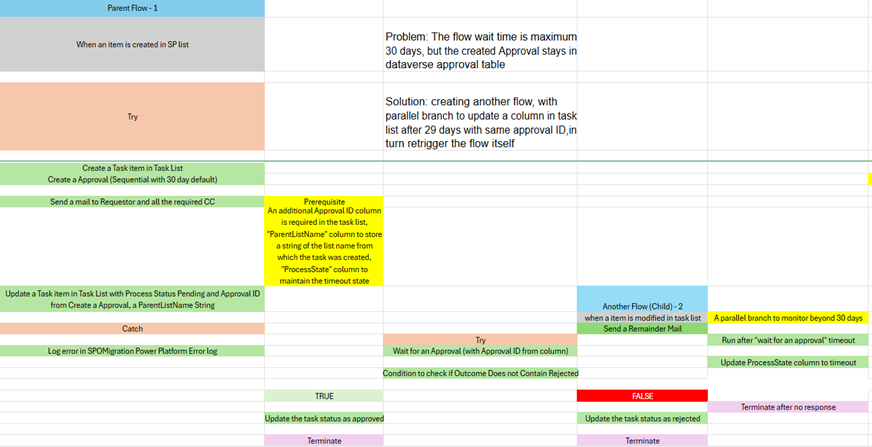
To overcome these challenges, a more robust solution involves implementing try-catch blocks within your flows and structuring your process using parent and child flows. Setting timeout limits on child flows helps manage expectations and ensure timely completion. Additionally, integrating reminder emails for pending approvals can prompt timely responses and mitigate bottlenecks in the workflow.
Key Benefits of the Improved Approach:
- Guaranteed Process Completion: Prevents 30-day timeouts by using parent/child flows, ensuring long-running approvals never fail.
- Reduced Manual Intervention: Eliminates manual tracking using automated reminders and notifications.
- Improved Compliance and Audit Trails: Maintains complete Dataverse-based approval history for regulatory clarity.
- Enhanced Maintainability and Scalability: Modular child flows make automation easier to build, update, and troubleshoot.
- Increased Process Efficiency and Faster Decisions: Streamlines approvals and supports faster decision-making with real-time data.
- Maximised Reusability: Reusable child flows standardize common tasks across multiple processes.
- Optimal Resource Allocation: Modular flow design enables parallel development and faster delivery.
An overview of the approach
Approval Tasks Repository Created
Establish a dedicated Approval Tasks list to store Approval ID, Approval Link, Approvers, and Approval Status.
Approval Initiated by Parent Flow
Parent flow generates the approval request and writes the Approval ID into the Approval Tasks list.
Parent Flow Timeout Evaluation
Upon reaching the “wait for an approval” limit without a response, the parent flow updates the status column to “TimeOut.” In the Approval Tasks list.
Child Flow Triggered on Timeout
A child flow listens for the “TimeOut” value in the Approval task list (with optional filters like Parent List name from where the item is created) and is triggered when it occurs. It also sends a reminder email to the approvers.
Child Flow Resumes Approval Monitoring
Using the stored Approval ID, the child flow resumes waiting for the approval response.
Repeated Timeout Looping
If the child flow’s waiting period also expires without a decision, it updates the status again and re-triggers itself, forming a controlled approval loop.
Guaranteed Approval Completion
This continuous reactivation ensures that extended or delayed approvals persist indefinitely and are never lost due to platform timing constraints.
A little but important thing to remember (The Catch Block)
It is important to note that when working with parent and child flows triggered by item creation or modification, there exists a brief interval—typically a few minutes depending on configuration—between the occurrence of the event and the actual initiation of the flow. This interval must be managed diligently, as approvals or rejections by authorised personnel may take place during this period, specifically after the timeout but before the child flow is initiated. If such actions occur, the “Wait for an approval” step throws an error, as the approval or rejection has already been completed in real time, causing the process to proceed to the catch block.
Within the catch block, in addition to logging errors, monitoring for this specific scenario is essential. Leveraging the Dataverse action (premium) enables the retrieval of the current approval status for cases that fall within this gap, allowing the system to update the status accordingly and maintain process integrity.
The Future is here – the Hybrid approach with AI-Powered Approval
Integrating AI-powered approvals within Power Automate can significantly enhance the efficiency and intelligence of business workflows. AI models can analyse approval requests, flag anomalies, and suggest decisions based on historical data, while still providing scope for human intervention where critical judgment is required. This hybrid approach ensures routine approvals are automated, but exceptional cases get routed to authorised personnel for review, maintaining both speed and compliance within the process.
Transform Workflows into Smart Business Automation
Tired of workflow timeouts? Achieve true business automation with guaranteed audit logs, instant Teams/Email notifications, and zero manual intervention. It’s smart, efficient, and unstoppable.
Ready to see limitless automation in action? Let’s turn your current automation into Smart, Unrestricted Efficiency. Contact our team today to customize a powerful workflow for your Compliance, Engineering, or Procurement needs.