Introduction: The Integration Challenge in High-Tech Manufacturing
In today’s technology landscape, organizations invest heavily in AI agents and intelligent automation. While these innovations deliver value in customer service and predictive analytics, many organizations still struggle with fundamental integration challenges, that directly impact daily operations and bottom line – challenges where smart automation patterns can make an immediate difference.
The Real-World Problem: Semiconductor Equipment Installation at Scale
Dynamics 365 integration pattern become especially important in complex operational scenarios. Consider a global semiconductor equipment manufacturer with thousands of installations worldwide. When a chip fabrication facility (“fab”) orders a multi-million-dollar production tool, the CRM system generates a Customer Required Date (CRD) – when the customer expects equipment to arrive and begin production, often tied to their own billion-dollar fab construction milestones.
The complexity: A single installation isn’t a simple delivery. It’s a sophisticated, multi-phase operation:
- Tier 0 (Pre-installation): Site prep, power/utilities, cleanroom certification
- Tier 1 (Installation): Equipment delivery, mechanical setup, utilities hookup
- Tier 2 (Commissioning): System integration, performance verification, customer acceptance
Each tier requires specialized engineers (mechanical, electrical, process, applications). A typical installation involves:
- 15-25 field service tasks spanning 3-8 weeks
- 8-12 specialized engineers across multiple regions
- Critical components ordered 6-12 weeks in advance
- Contractual SLAs with performance guarantees
Scale: This scenario plays out hundreds of times per month across Asia, Europe, and the Americas. One of the key integration challenges in Dynamics 365 is ensuring that installation dates in Dynamics 365 Sales synchronize accurately with Field Service Management, where all resources, tasks, and schedules are managed.
The Ripple Effect: When Automation Breaks Operational Plans
A customer’s primary fab construction is delayed by two weeks. Your account manager updates the installation date from September 1st to September 15th at 2 PM on a Tuesday.
But in Field Service Management:
- 5 specialized, high-demand engineers booked and locked in for September 1st
- Staged, critical tool components arriving for just-in-time delivery
- Multi-tier dependencies (site prep, hardware setup, qualification) spanning 3–8 weeks
- Contractual SLAs with strict delivery performance guarantees
What happens next?
Scenario A: Full Automation (Chaos)
CRM change automatically cascades. All 5 engineer bookings break. Tier schedules invalidate. Planner discovers it 3 days later when an engineer asks why their assignment disappeared. Original slots now filled. 8-10 hours firefighting. Can’t meet new date either – resources committed elsewhere.
Impact: Delayed revenue recognition, expedited parts shipments, overtime costs, SLA violations.
Scenario B: Manual Queue (Bottleneck)
Change sits 3-5 days awaiting manual approval. Planners work with outdated info – booking resources for wrong date, ordering parts for old timeline. Queue grows to 50+ pending items. Planner burnout: 40% time on manual data sync instead of strategic planning.
Impact: Operational inefficiency, customer satisfaction damage, data staleness.
Scenario C: Full Approval (Noise)
Every change requires approval. 30-40 requests/day. Simple 2-day shift for unscheduled jobs goes through same heavyweight process as complex multi-engineer commitments. Approval becomes rubber-stamping. Real issues lost in noise.
Impact: Bottleneck, risk desensitization, alert fatigue.
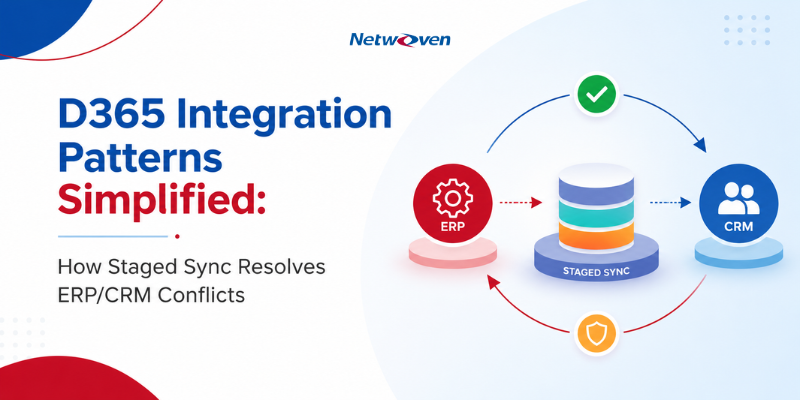
The Solution: Staged Sync with Conditional Approval
Deployed in production: Fortune 500 semiconductor manufacturer, 18 months, 200+ daily changes.
Results:
✅ 95% automation rate (60-70% auto-approved, 30-40% manual review)
✅ 80% reduction in scheduling conflicts
✅ 45-second average decision time (down from 3 minutes)
✅ 4.7/5 user satisfaction from field planners
How It Works: Two-Phase Commit with Intelligent Decisioning
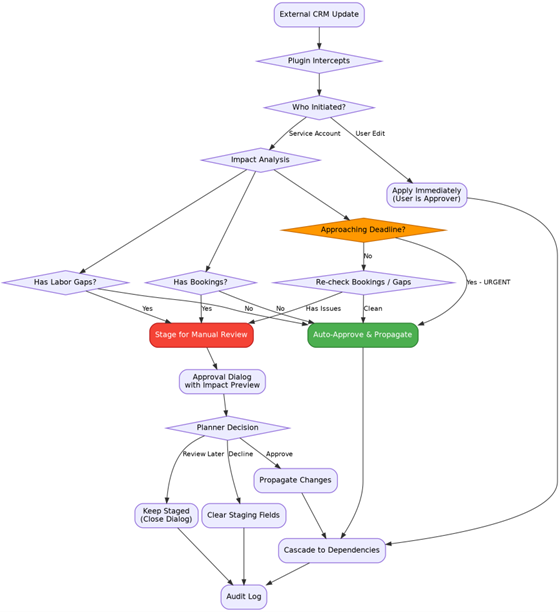
Core Pattern Components
1. Service Account Detection
System distinguishes between:
- Service account changes (CRM integration) → Apply conditional logic
- Direct user edits (planner in D365 form) → Immediate propagation
Why: Users editing forms directly ARE the approval authority.
2. Staging Fields
Parallel field structure prevents operational disruption:
| Field Type | Purpose | Example |
| Operational | Active scheduling values | crd, mcsd, asd |
| Staging | Proposed pending approval | new_crd, new_mcsd |
| Control | User decision flag | approval_flag |
| Notification | Triggers UI alert | approval_required |
3. Impact Analysis (Plugin Decision Logic)
Server-side C# plugin evaluates:
- Does work order have active resource bookings?
- Does demand have escalated labor gaps?
- Is move-in date approaching (<15 days)?
- Is change initiated by service account?
Decision: Auto-approve if low-risk (no bookings, no gaps) OR urgent (deadline approaching). Otherwise, stage for manual review.
📖 Deep Dive: See Part 2: Server-Side Plugins & Transaction Pipelines for full C# implementation, PreOperation vs. PostOperation architecture, and impact query patterns.
4. Conditional Propagation
- Auto-approved (60-70%): Immediate cascade to Work Order → Tier Dates → Tasks → Bookings
- Manual review (30-40%): Staged to new_crd, planner notified, approval dialog displays impact
5. Approval Dialog (PCF Control)
The approval experience is built using a React-based PCF control. Learn how the Power Apps Component Framework in Dynamics 365 can support responsive, business-specific user experiences.
- Old vs. new dates with visual indicators
- Calculated tier date impacts (Tier 0/1/2 start dates)
- Affected resource tasks table (current vs. proposed dates)
- Validation (prevents invalid date sequences)
- Three actions: Accept | Review Later | Decline
Key Innovation: Dialog calls server-side custom action to calculate impact asynchronously (tier dates, task dates, resource conflicts) before planner decides.
📖 Deep Dive: See Part 3: PCF React Component & Custom Actions for full TypeScript/React implementation, custom action design, Fluent UI patterns, and state management with hooks.
6. Comprehensive Audit Trail
Plugin Trace Log captures every decision:
- SUCCESS events: Auto-propagated changes with eligibility criteria
- BLOCKED events: Manual review triggers with impact summary
- USER DECISION events: Approve/decline with timestamp
When to Use This Pattern
✅ Ideal Scenarios
- High volume: >50 changes/day (manual review impractical)
- Complex dependencies: Changes cascade across >3 entities
- Mixed risk: Some changes safe (early-stage, no commitments), others risky (booked resources)
- Regulatory requirements: Audit trails, approval workflows
- Resource scheduling: Breaking commitments unacceptable (FSM, project management)
❌ When NOT to Use
- Low volume (<10/month): ROI doesn’t justify 4-6 week implementation
- Simple CRUD syncs: No impact analysis needed (master data, contacts, products)
- Real-time required: Pattern introduces 2-3 sec delay (auto) to hours (manual review)
- Immutable records: Should block updates entirely, not stage them
- Non-critical data: Approval overhead unjustified
Simpler Alternatives
| Your Scenario | Use This Instead |
| Low volume (<20/month) | Power Automate approval queue |
| Simple field mapping | Direct sync with error handling |
| Single approver | Business Process Flow |
| Real-time sync | Event-driven (Azure Service Bus) |
Business Impact: Why This Matters
Operational Excellence
- Fewer scheduling conflicts: 80% reduction in post-approval firefighting
- Planner productivity: 40% time saved (manual sync → strategic planning)
- Resource utilization: Engineers not scrambling when automation breaks schedules
Financial Impact
- Revenue recognition: Avoid $500K-$2M delays per installation week
- Operational costs: Reduce expedited parts, overtime, emergency travel
- Penalty avoidance: Meet contractual SLA commitments
Customer Satisfaction
- Responsiveness: 45-second approval decisions vs. 3-5 day manual queues
- Reliability: Commitments honored, not silently broken by automation
- Trust: Transparent impact preview before changes propagate
Compliance & Risk
- Audit trail: Every decision logged (automated or manual)
- Approval workflows: Satisfy regulatory requirements
- Rollback capability: Revert approved changes when needed
Trade-offs & Considerations
| Aspect | Benefit | Cost |
| Complexity | Prevents scheduling chaos | 1-2 week dev cycle, plugin maintenance |
| Latency | Data quality assurance | 2-3 sec (auto) to hours (manual) delay |
| Storage | Comprehensive audit trail | Double field count (operational + staging) |
| User Training | Informed decisions | Planners learn approval workflow |
| Testing | Validation coverage | Integration tests for auto/manual paths |
Beyond Field Service: Cross-Platform Applications
While Field Service is our primary example, this pattern applies across Dynamics 365:
| Platform | Scenario | Auto-Approve When | Manual Review When |
| D365 Sales | Opportunity stage changes | Early stages, no quotes | Quotes exist, pricing approved |
| Customer Service | Case priority/SLA updates | New cases (<1 hr), no activities | Scheduled calls, escalated |
| Business Central | Sales order ship dates | Quote/Planning, no warehouse docs | Warehouse shipment created |
| Custom Apps | Employee transfer dates | No task assignments | Critical path resource |
Common thread: Stage → Evaluate Impact → Auto/Manual → Cascade → Audit
Implementation Overview
Phase 1: JavaScript Proof of Concept
Simple approval dialog using native D365 Xrm.Navigation.openConfirmDialog. Validates pattern before PCF investment.
Result: 60% approval rate (planners declining due to lack of impact visibility).
Phase 2: PCF Production
Organizations that need production-ready controls can explore Netwoven’s custom PCF development services for Dynamics 365, model-driven apps, Canvas Apps, and Power Pages.
React-based approval dialog with async tier date calculation, task impact grid, real-time validation.
Result: 95% approval rate (planners confident with impact preview).
Migration Path
- Deploy JavaScript POC for pattern validation
- Gather user feedback on missing information
- Build PCF control with React components
- Pilot group deployment, iterate on UI
- Full rollout, decommission JavaScript dialog
Technical Deep Dives:
- Part 2: Server-side plugins, transaction pipelines, decision logic (Read Part 2)
- Part 3: PCF React components, custom actions, Fluent UI (Read Part 3)
Key Takeaways
- Balance automation with control: 95% automation doesn’t mean 100% automation. The 30-40% requiring manual review are high-stakes decisions.
- Impact preview is critical: 40% decline rate with simple dialog → 95% approval rate with impact visualization.
- Audit everything: Plugin Trace Log + tracking fields enable troubleshooting, compliance, and optimization.
- Service account pattern matters: Users editing forms directly should see immediate results, not approval workflows.
- Start simple, evolve: JavaScript POC (Week 1-2) validates pattern before PCF investment (Week 5-12).
Next Steps
Download the Complete Blueprint
Complete Blueprint Coming Soon
Get the full Enterprise Integration Blueprint covering:
- Detailed C# plugin implementation with code samples
- PCF React component architecture and TypeScript examples
- Custom action design for tier date calculations
- Complete decision framework and applicability worksheet
- Production metrics and ROI calculator
Continue Reading: Technical Deep Dives
The Next Articles Are Coming Soon
Part 2: Implementing Staged Sync in Dataverse: Server-Side Plugins & Transaction Pipelines
C# plugin architecture, Pre-Operation vs. Post-Operation, impact queries, conditional logic, cascading updates
Part 3: Building an Impact-Aware Approval PCF Control with React & Fluent UI
TypeScript/React structure, async custom actions, state management, validation, error handling, reusability
For Your Organization
Complimentary 30-minute technical assessment:
- Pattern applicability to your environment
- Estimated implementation timeline and ROI
- Alternative approaches if not the right fit
To avail the assessment, reach out to our experts or email us at info@netwoven.com