Why We Evolved from JavaScript to PCF
In Part 1, we explained the business need for impact preview. In Part 2, we built server-side logic for conditional approval. Both the articles are provided towards the end of this blog.
Now we tackle the user experience.
The Problem with Simple JavaScript Dialogs:
- 40% decline rate (planners lacked confidence without impact preview)
- No tier date visibility
- No task-level impact breakdown
- Binary approve/decline only (no “Review Later” option)
What Planners Needed:
- “Which tier dates will shift?”
- “How many tasks are affected?”
- “Can I override calculated dates if system is wrong?”
- “What’s the delta (days advanced/delayed)?”
Solution: Power Apps Component Framework (PCF) control with React, Fluent UI, and async custom actions.
Result: 95% approval rate (planners confident with full context).
📸 Visual Preview: Staged Date Approval PCF Control
Below is the production UI showing the approval dialog with tier date impact grid and task breakdown.
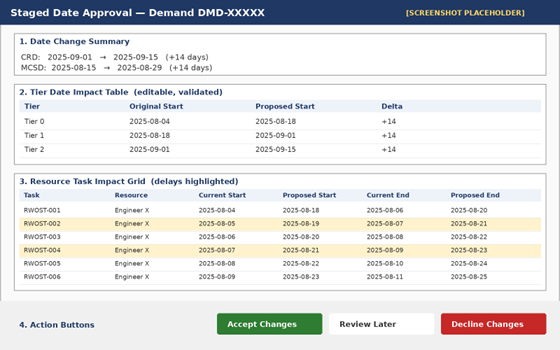
PCF Approval Dialog
Key UI Elements Shown:
1. Date Change Summary (top): Old CRD/MCSD → New CRD/MCSD with visual indicators
2. Tier Date Impact Table (middle): Original vs. Proposed dates for Tier 0/1/2, editable with validation
3. Resource Task Impact Grid (bottom): All affected RWOSTs with current/proposed start/end dates, delays highlighted in yellow
4. Action Buttons (footer): Accept Changes (green) | Review Later | Decline Changes
5. Loading State (not shown): Spinner during async custom action calculation
PCF Architecture Overview
User Opens Demand Record
    ↓
Form OnLoad → PCF Control Initializes
    ↓
PCF Detects: contoso_new_crd OR contoso_new_mcsd populated
    ↓
Renders React Dialog Component
    ↓
useEffect Hook Fires
    ↓
Calls Custom Action: "CalculateTierDatesAndDurations"
    ↓
Custom Action → Plugin → Business Logic → Calculated Tier Dates
    ↓
PCF Receives Response (1-2 seconds)
    ↓
setState: proposedDates, rwostRows
    ↓
Dialog Renders: Date Summary, Tier Table, Task Grid
    ↓
User Reviews, Optionally Edits Proposed Dates
    ↓
User Clicks "Accept Changes"
    ↓
PCF Calls Custom Action: "ReviseSchedule"
    ↓
Plugin Cascades: Demand → Work Order → Tier Dates → Tasks
    ↓
Audit Log Updated → Dialog Closes → Form Refreshes
PCF Control Structure
1. Control Manifest (ControlManifest.Input.xml)
<?xml version="1.0" encoding="utf-8" ?>
<manifest>
  <control namespace="Contoso" constructor="CRDMCSDApprovalControl" version="1.0.0">
    <property name="demandId" display-name-key="Demand ID" of-type="SingleLine.Text" usage="bound" required="true" />
    <property name="oldCRD" display-name-key="Current CRD" of-type="DateAndTime.DateOnly" usage="bound" required="false" />
    <property name="newCRD" display-name-key="Staged CRD" of-type="DateAndTime.DateOnly" usage="bound" required="false" />
    <property name="oldMCSD" display-name-key="Current MCSD" of-type="DateAndTime.DateOnly" usage="bound" required="false" />
    <property name="newMCSD" display-name-key="Staged MCSD" of-type="DateAndTime.DateOnly" usage="bound" required="false" />
    <property name="approvalRequired" display-name-key="Approval Required" of-type="TwoOptions" usage="bound" required="false" />

    <resources>
      <code path="index.ts" order="1" />
      <css path="css/CRDMCSDApprovalControl.css" order="1" />
    </resources>
  </control>
</manifest>
2. PCF Entry Point (index.ts)
import { IInputs, IOutputs } from "./generated/ManifestTypes";
import * as React from "react";
import * as ReactDOM from "react-dom";
import { ApprovalDialog, IApprovalDialogProps } from "./components/ApprovalDialog";

export class CRDMCSDApprovalControl
    implements ComponentFramework.StandardControl<IInputs, IOutputs>
{
    private _container: HTMLDivElement;
    private _context: ComponentFramework.Context<IInputs>;
    private _notifyOutputChanged: () => void;

    public init(
        context: ComponentFramework.Context<IInputs>,
        notifyOutputChanged: () => void,
        state: ComponentFramework.Dictionary,
        container: HTMLDivElement
    ): void {
        this._context = context;
        this._container = container;
        this._notifyOutputChanged = notifyOutputChanged;
    }

    public updateView(context: ComponentFramework.Context<IInputs>): void {
        this._context = context;

        // Check if approval is required
        const approvalRequired = context.parameters.approvalRequired.raw;
        const newCRD = context.parameters.newCRD.raw;
        const newMCSD = context.parameters.newMCSD.raw;

        if (approvalRequired && (newCRD || newMCSD)) {
            this.renderApprovalDialog();
        } else {
            // Clear dialog if no approval needed
            ReactDOM.unmountComponentAtNode(this._container);
        }
    }

    private renderApprovalDialog(): void {
        const props: IApprovalDialogProps = {
            demandId: this._context.parameters.demandId.raw || "",
            oldCRD: this._context.parameters.oldCRD.raw,
            newCRD: this._context.parameters.newCRD.raw,
            oldMCSD: this._context.parameters.oldMCSD.raw,
            newMCSD: this._context.parameters.newMCSD.raw,
            onAccept: this.handleAccept.bind(this),
            onDecline: this.handleDecline.bind(this),
            onReviewLater: this.handleReviewLater.bind(this),
            xrmContext: this._context.webAPI,
        };

        ReactDOM.render(
            React.createElement(ApprovalDialog, props),
            this._container
        );
    }

    private handleAccept(): void {
        // Trigger form save to commit approved changes
        this._context.parameters.demandId.refresh();
        this._notifyOutputChanged();
    }

    private handleDecline(): void {
        // Trigger form save to clear staged fields
        this._context.parameters.demandId.refresh();
        this._notifyOutputChanged();
    }

    private handleReviewLater(): void {
        // Simply close dialog without making changes
        ReactDOM.unmountComponentAtNode(this._container);
    }

    public getOutputs(): IOutputs {
        return {};
    }

    public destroy(): void {
        ReactDOM.unmountComponentAtNode(this._container);
    }
}
React Approval Dialog Component
3. ApprovalDialog.tsx (Main Component)
import * as React from "react";
import { useState, useEffect } from "react";
import { Dialog, DialogType, DialogFooter } from "@fluentui/react/lib/Dialog";
import { PrimaryButton, DefaultButton } from "@fluentui/react/lib/Button";
import { Spinner, SpinnerSize } from "@fluentui/react/lib/Spinner";
import { Stack, Text, Icon } from "@fluentui/react";
import { DateChangeSummary } from "./DateChangeSummary";
import { TierDateTable } from "./TierDateTable";
import { TaskImpactGrid } from "./TaskImpactGrid";

export interface IApprovalDialogProps {
    demandId: string;
    oldCRD: string | null;
    newCRD: string | null;
    oldMCSD: string | null;
    newMCSD: string | null;
    onAccept: () => void;
    onDecline: () => void;
    onReviewLater: () => void;
    xrmContext: ComponentFramework.WebApi;
}

export interface IProposedDates {
    moveInDate: string;
    tier0StartDate: string;
    tier1StartDate: string;
    tier2StartDate: string;
}

export interface IRWOSTRow {
    id: string;
    resourceName: string;
    task: string;
    role: string;
    currentStartDate: string;
    proposedStartDate: string;
    currentEndDate: string;
    proposedEndDate: string;
    isDelay: boolean;
    hasValidationError: boolean;
}

export function ApprovalDialog(props: IApprovalDialogProps): JSX.Element {
    const [isCalculating, setIsCalculating] = useState<boolean>(true);
    const [proposedDates, setProposedDates] = useState<IProposedDates | null>(null);
    const [rwostRows, setRwostRows] = useState<IRWOSTRow[]>([]);
    const [hasErrors, setHasErrors] = useState<boolean>(false);
    const [calculationError, setCalculationError] = useState<string | null>(null);
    const [isSaving, setIsSaving] = useState<boolean>(false);

    // Calculate proposed dates on mount
    useEffect(() => {
        calculateProposedDates();
    }, []);

    const calculateProposedDates = async (): Promise<void> => {
        setIsCalculating(true);
        setCalculationError(null);

        try {
            // Call custom action to calculate tier dates
            const request = {
                demandId: props.demandId,
                newCRD: props.newCRD,
                newMCSD: props.newMCSD,
            };

            const response = await props.xrmContext.execute({
                name: "contoso_CalculateTierDatesAndDurations",
                parameters: request,
            } as any);

            // Check if response is OK (custom actions can return non-200 status)
            if (!response.ok) {
                const errorText = await response.text();
                throw new Error(`Custom action failed (${response.status}): ${errorText}`);
            }

            const contentType = response.headers.get("content-type");
            if (!contentType || !contentType.includes("application/json")) {
                // Dataverse sometimes returns HTML error pages on validation failures
                const errorHtml = await response.text();
                throw new Error("Server returned non-JSON response. Check Plugin Trace Log for details.");
            }

            const result = await response.json();

            // Validate response structure
            if (!result.moveInDate || !result.tier0StartDate) {
                throw new Error("Invalid response from server: Missing required date fields.");
            }

            setProposedDates({
                moveInDate: result.moveInDate,
                tier0StartDate: result.tier0StartDate,
                tier1StartDate: result.tier1StartDate,
                tier2StartDate: result.tier2StartDate,
            });

            setRwostRows(result.affectedTasks || []);
        } catch (error: any) {
            console.error("Calculation failed:", error);

            // Extract user-friendly error message
            let userMessage = "Unable to calculate tier dates. Please enter dates manually.";

            if (error.message) {
                // Check for known error patterns
                if (error.message.includes("work order")) {
                    userMessage = "No work order found for this demand. Please create a work order first.";
                } else if (error.message.includes("tier duration")) {
                    userMessage = "Tier durations not configured on incident type. Please contact system administrator.";
                } else if (error.message.includes("Plugin Trace Log")) {
                    userMessage = "Server error occurred. Check Plugin Trace Log for details.";
                } else {
                    userMessage = error.message;
                }
            }

            setCalculationError(userMessage);
        } finally {
            setIsCalculating(false);
        }
    };

    const handleAcceptChanges = async (): Promise<void> => {
        // Validate tier date sequence
        if (proposedDates && !validateTierDateSequence(proposedDates)) {
            alert("Invalid tier date sequence. Tier 0 must come before Tier 1, which must come before Tier 2.");
            return;
        }

        setIsSaving(true);

        try {
            // Call custom action to revise schedule
            const request = {
                demandId: props.demandId,
                mode: 1, // Accept mode
                shippingDate: calculateShippingDate(props.newCRD, props.newMCSD),
                moveInDate: proposedDates?.moveInDate || null,
                tier0Date: proposedDates?.tier0StartDate || null,
                tier1Date: proposedDates?.tier1StartDate || null,
                tier2Date: proposedDates?.tier2StartDate || null,
                rwosts: rwostRows
                    .filter((r) => !r.isDelay)
                    .map((r) => ({
                        rwostId: r.id,
                        plannedStartDate: r.proposedStartDate,
                        plannedEndDate: r.proposedEndDate,
                    })),
            };

            await props.xrmContext.execute({
                name: "contoso_ReviseSchedule",
                parameters: request,
            } as any);

            props.onAccept();
        } catch (error: any) {
            console.error("Failed to accept changes:", error);
            alert("Failed to accept changes: " + error.message);
        } finally {
            setIsSaving(false);
        }
    };

    const handleDeclineChanges = async (): Promise<void> => {
        setIsSaving(true);

        try {
            // Call custom action to decline (mode = 2)
            const request = {
                demandId: props.demandId,
                mode: 2, // Decline mode
            };

            await props.xrmContext.execute({
                name: "contoso_ReviseSchedule",
                parameters: request,
            } as any);

            props.onDecline();
        } catch (error: any) {
            console.error("Failed to decline changes:", error);
            alert("Failed to decline changes: " + error.message);
        } finally {
            setIsSaving(false);
        }
    };

    const validateTierDateSequence = (dates: IProposedDates): boolean => {
        const tier0 = new Date(dates.tier0StartDate);
        const tier1 = new Date(dates.tier1StartDate);
        const tier2 = new Date(dates.tier2StartDate);

        if (tier1 < tier0) return false;
        if (tier2 < tier1) return false;

        return true;
    };

    const calculateShippingDate = (crd: string | null, mcsd: string | null): string | null => {
        // Priority: MCSD > CRD
        return mcsd || crd;
    };

    const dialogContentProps = {
        type: DialogType.normal,
        title: "Accept CRD/MCSD Changes to Schedule",
        showCloseButton: true,
    };

    const modalProps = {
        isBlocking: true,
        styles: {
            main: {
                maxWidth: "90vw",
                minWidth: "1125px",
                maxHeight: "90vh",
            },
        },
    };

    const hasValidationErrors = rwostRows.some((r) => r.hasValidationError);

    return (
        <Dialog
            hidden={false}
            onDismiss={props.onReviewLater}
            dialogContentProps={dialogContentProps}
            modalProps={modalProps}
        >
            <Stack tokens={{ childrenGap: 12 }}>
                {/* Loading State */}
                {isCalculating && (
                    <div style={{ padding: "10px 14px", backgroundColor: "#fff4ce", borderRadius: "4px" }}>
                        <Stack horizontal verticalAlign="center" tokens={{ childrenGap: 8 }}>
                            <Spinner size={SpinnerSize.small} />
                            <Text>Calculating proposed dates...</Text>
                        </Stack>
                    </div>
                )}

                {/* Calculation Error */}
                {calculationError && (
                    <div style={{ padding: "10px 14px", backgroundColor: "#fde7e9", borderRadius: "4px" }}>
                        <Stack horizontal verticalAlign="center" tokens={{ childrenGap: 8 }}>
                            <Icon iconName="ErrorBadge" styles={{ root: { color: "#d13438" } }} />
                            <Text>{calculationError}</Text>
                        </Stack>
                    </div>
                )}

                {/* Date Change Summary */}
                {!isCalculating && (
                    <DateChangeSummary
                        oldCRD={props.oldCRD}
                        newCRD={props.newCRD}
                        oldMCSD={props.oldMCSD}
                        newMCSD={props.newMCSD}
                    />
                )}

                {/* Tier Date Impact Table */}
                {!isCalculating && proposedDates && (
                    <TierDateTable
                        proposedDates={proposedDates}
                        onChange={setProposedDates}
                        onValidationError={setHasErrors}
                    />
                )}

                {/* Resource Task Impact Grid */}
                {!isCalculating && rwostRows.length > 0 && (
                    <TaskImpactGrid tasks={rwostRows} onChange={setRwostRows} />
                )}
            </Stack>

            {/* Dialog Footer */}
            {!isCalculating && (
                <DialogFooter>
                    <PrimaryButton
                        text="Accept Changes"
                        onClick={handleAcceptChanges}
                        disabled={hasErrors || isSaving || hasValidationErrors}
                        styles={{
                            root: { backgroundColor: "#107c10" },
                            rootHovered: { backgroundColor: "#0e6b0e" },
                        }}
                        iconProps={{ iconName: "CheckMark" }}
                    />
                    <DefaultButton
                        text="Review Later"
                        onClick={props.onReviewLater}
                        disabled={isSaving}
                        iconProps={{ iconName: "Clock" }}
                    />
                    <DefaultButton
                        text="Decline Changes"
                        onClick={handleDeclineChanges}
                        disabled={isSaving}
                        iconProps={{ iconName: "Cancel" }}
                    />
                </DialogFooter>
            )}

            {/* Saving Overlay */}
            {isSaving && (
                <div style={{ position: "absolute", top: 0, left: 0, width: "100%", height: "100%", backgroundColor: "rgba(255,255,255,0.8)", display: "flex", alignItems: "center", justifyContent: "center" }}>
                    <Spinner size={SpinnerSize.large} label="Saving schedule changes..." />
                </div>
            )}
        </Dialog>
    );
}
Critical: WebAPI Exception Handling
Dataverse custom actions can fail in unexpected ways:
- Non-JSON responses: When plugin throws exception, Dataverse may return HTML error page instead of JSON
- Non-200 status codes: Custom action validation failures return 400/500 but response body format varies
- Empty responses: If plugin doesn’t set output parameters, response.json() may throw
Best Practices:
✅ Always check response.ok before calling response.json()
✅ Validate content-type header to detect HTML error pages
✅ Validate response structure (check for required fields)
✅ Provide user-friendly error messages (not raw plugin exceptions)
✅ Log full error to console for debugging (keep technical details out of UI)
User Experience: If custom action fails, dialog still renders with empty proposed dates, allowing planner to manually enter dates and proceed. This prevents a server error from blocking the entire approval workflow.
Custom Actions: Server-Side Calculation & Revision
4. Custom Action: CalculateTierDatesAndDurations
Purpose: Calculate proposed tier dates and affected tasks based on new shipping date.
Input Parameters:
- demandId (String)
- newCRD (DateTime)
- newMCSD (DateTime)
Output Parameters:
- moveInDate (String – formatted MM/dd/yyyy)
- tier0StartDate (String)
- tier1StartDate (String)
- tier2StartDate (String)
- affectedTasks (String – JSON array of IRWOSTRow[])
Plugin Implementation (Simplified):
public class CalculateTierDatesAndDurationsAction : IPlugin
{
    public void Execute(IServiceProvider serviceProvider)
    {
        var context = (IPluginExecutionContext)serviceProvider.GetService(typeof(IPluginExecutionContext));
        var service = serviceFactory.CreateOrganizationService(context.UserId);

        // Get input parameters
        string demandId = (string)context.InputParameters["demandId"];
        DateTime? newCRD = context.InputParameters.Contains("newCRD")
            ? (DateTime?)context.InputParameters["newCRD"]
            : null;
        DateTime? newMCSD = context.InputParameters.Contains("newMCSD")
            ? (DateTime?)context.InputParameters["newMCSD"]
            : null;

        // Calculate shipping date (MCSD > CRD)
        DateTime shippingDate = newMCSD ?? newCRD ?? DateTime.UtcNow;

        // Get work order and calculate move-in date
        Entity workOrder = GetWorkOrderForDemand(demandId, service);
        int shipDays = workOrder.GetAttributeValue<int>("contoso_estimated_ship_days");
        DateTime moveInDate = shippingDate.AddDays(shipDays);

        // Get tier durations from incident type
        int tier0Duration = 7;
        int tier1Duration = 14;
        int tier2Duration = 7;

        // Calculate tier dates (backward from move-in)
        DateTime tier2Start = moveInDate;
        DateTime tier1Start = tier2Start.AddDays(-tier2Duration);
        DateTime tier0Start = tier1Start.AddDays(-tier1Duration);

        // Query affected RWOSTs
        var affectedTasks = GetAffectedRWOSTs(workOrder.Id, service);

        // Set output parameters
        context.OutputParameters["moveInDate"] = FormatDate(moveInDate);
        context.OutputParameters["tier0StartDate"] = FormatDate(tier0Start);
        context.OutputParameters["tier1StartDate"] = FormatDate(tier1Start);
        context.OutputParameters["tier2StartDate"] = FormatDate(tier2Start);
        context.OutputParameters["affectedTasks"] = SerializeToJson(affectedTasks);
    }

    private string FormatDate(DateTime date)
    {
        return date.ToString("MM/dd/yyyy");
    }
}
5. Custom Action: ReviseSchedule
Purpose: Apply approved changes to demand, work order, tier dates, and tasks.
Input Parameters:
- demandId (String)
- mode (Integer – 1=Accept, 2=Decline)
- shippingDate (String)
- moveInDate (String)
- tier0Date (String)
- tier1Date (String)
- tier2Date (String)
- rwosts (String – JSON array of RWOST updates)
Plugin Implementation (Simplified):
public class ReviseScheduleAction : IPlugin
{
    private const int ACCEPT_MODE = 1;
    private const int DECLINE_MODE = 2;

    public void Execute(IServiceProvider serviceProvider)
    {
        var context = (IPluginExecutionContext)serviceProvider.GetService(typeof(IPluginExecutionContext));
        var service = serviceFactory.CreateOrganizationService(context.UserId);

        string demandId = (string)context.InputParameters["demandId"];
        int mode = (int)context.InputParameters["mode"];

        if (mode == ACCEPT_MODE)
        {
            HandleAccept(demandId, context, service);
        }
        else if (mode == DECLINE_MODE)
        {
            HandleDecline(demandId, service);
        }
    }

    private void HandleAccept(string demandId, IPluginExecutionContext context, IOrganizationService service)
    {
        Guid demandGuid = new Guid(demandId);

        // Update demand: Copy new_crd → crd, new_mcsd → mcsd
        Entity demandUpdate = new Entity("contoso_demand", demandGuid);
        demandUpdate["contoso_crd"] = ParseDate(context.InputParameters["shippingDate"]);
        demandUpdate["contoso_new_crd"] = null; // Clear staging
        demandUpdate["contoso_new_mcsd"] = null; // Clear staging
        demandUpdate["contoso_approval_required"] = false;
        demandUpdate["contoso_approval_flag"] = true;
        service.Update(demandUpdate);

        // Update work order tier dates
        Entity workOrder = GetWorkOrderForDemand(demandGuid, service);
        Entity workOrderUpdate = new Entity("msdyn_workorder", workOrder.Id);
        workOrderUpdate["contoso_move_in_date"] = ParseDate(context.InputParameters["moveInDate"]);
        workOrderUpdate["contoso_tier0_planned_start_date"] = ParseDate(context.InputParameters["tier0Date"]);
        workOrderUpdate["contoso_tier1_planned_start_date"] = ParseDate(context.InputParameters["tier1Date"]);
        workOrderUpdate["contoso_tier2_planned_start_date"] = ParseDate(context.InputParameters["tier2Date"]);
        service.Update(workOrderUpdate);

        // Update RWOSTs
        string rwostsJson = (string)context.InputParameters["rwosts"];
        var rwosts = DeserializeRWOSTs(rwostsJson);
        foreach (var rwost in rwosts)
        {
            Entity rwostUpdate = new Entity("msdyn_resourcerequirement", new Guid(rwost.rwostId));
            rwostUpdate["msdyn_fromdate"] = ParseDate(rwost.plannedStartDate);
            rwostUpdate["msdyn_todate"] = ParseDate(rwost.plannedEndDate);
            service.Update(rwostUpdate);
        }
    }

    private void HandleDecline(string demandId, IOrganizationService service)
    {
        Guid demandGuid = new Guid(demandId);

        Entity demandUpdate = new Entity("contoso_demand", demandGuid);
        demandUpdate["contoso_new_crd"] = null; // Clear staging
        demandUpdate["contoso_new_mcsd"] = null; // Clear staging
        demandUpdate["contoso_approval_required"] = false;
        demandUpdate["contoso_approval_flag"] = false;
        service.Update(demandUpdate);
    }
}
Key Takeaways
- PCF enables rich UX: React + Fluent UI provides production-grade approval dialog
- Async calculation critical: Custom action calculates tier dates server-side (business logic centralization)
- State management: React hooks (useState, useEffect) manage loading, validation, errors
- Graceful degradation: If calculation fails, allow manual date entry
- Reusability: Same PCF control embedded in Demand form, Gantt view, Summary grid
- Production metrics: 95% approval rate vs. 60% with simple dialog (impact preview matters!)
Complete 3-Part Series
✅ Part 1: Strategy & Business Architecture – Why this pattern, when to use, ROI
✅ Part 2: Server-Side Plugins & Transaction Pipelines – C# decision logic, cascading
✅ Part 3: Client-Side PCF & Custom Actions (You Are Here)
Download the whitepaper to get a more comprehensive guide on the above three concepts.
After going through the blog series, if you are left with queries, reach out to our experts.