Introduction
Every few months a CIO calls us after a Multi-Geo project went sideways. Not because the technology failed, Microsoft’s implementation is solid but because someone treated it like a configuration change instead of a program.
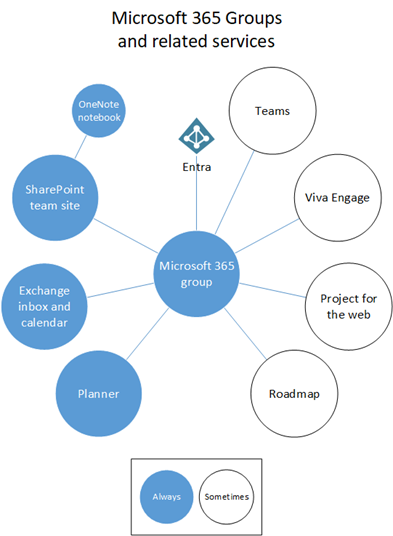
Microsoft 365 Multi-Geo lets your organization store data at rest in multiple geographic regions, all under a single tenant with one admin console. Exchange, OneDrive, SharePoint, Teams – each workload’s data can sit in the region it needs to. No tenant splits, no federation headaches.
What it’s not: a toggle you flip Friday afternoon and forget by Monday. It touches licensing, identity, governance, security ops, and user experience. Get it right and you’ve got real regulatory insurance. Get it wrong and you’ve got a support queue full of confused users and a compliance audit you weren’t expecting.
The Architecture in Plain English
Before tenant to tenant migration understand this. You keep a Primary Provisioned Geography — wherever your tenant originally lived — and layer in Satellite Geographies for the regions you need. Microsoft Entra ID handles global identity, so collaboration stays seamless across those boundaries. A user in Frankfurt working with a colleague in Singapore doesn’t feel a thing.
What trips most teams up: the workloads don’t all behave the same way when you set a user’s Preferred Data Location (PDL). Exchange Online and Teams chat? They move themselves. OneDrive and SharePoint? They absolutely do not. You’ll need to move those manually, and that requires a separate plan.
Workload Behavior at a Glance
| Workload | Moves Automatically with PDL? | What You Actually Have to Do | Rough Timeline |
| Exchange Online | Yes | Set PDL before licensing for new users; update PDL for existing ones | 1–14 days depending on mailbox size |
| Teams Chat | Yes | Follows the Exchange PDL change automatically | Aligned with mailbox move |
| OneDrive | No | Admin-triggered migration job required after satellite geo is provisioned | Plan this as a separate wave |
| SharePoint | No | Add satellite geo in Admin Center (Geo Locations tab), then move sites manually | Up to 72 hours just to provision the geo |
The OneDrive/SharePoint gap catches teams by surprise. If your program plan assumes everything moves when you flip PDL, you’re about six weeks behind before you’ve started.
The Licensing Gate: Don’t Skip This
Multi-Geo is a user-level add-on, and Microsoft requires you to license at least 5% of eligible users before the feature unlocks. Supported on Microsoft 365 F1/F3/E3/E5 and the equivalent Office 365 plans. Each user hosted in a satellite region needs the add-on.
We treat licensing as a hard readiness gate in every project we run. If a business unit hasn’t funded the add-ons for its regional employees, those employees don’t move. Simple. It sounds blunt, but it prevents a mess where half the org is in the right geo and half isn’t.
Mailbox Migration Timelines – Use P90, Not P50
Microsoft publishes P50/P90 performance estimates for mailbox moves. Here’s a cleaner view:
| Mailbox Size | Median (P50) | 90th Percentile (P90) | What This Means Practically |
| 0–10 GB | ~1 day | ~2 days | Great for your pilot wave |
| 10–50 GB | ~2 days | ~6 days | Most users fall here |
| 50–100 GB | ~4 days | ~11 days | Build buffer into the wave schedule |
| 100–200 GB | ~6 days | ~14 days | Warn users early, not the night before |
| Over 200 GB | N/A | Not supported | These need a separate conversation |
Always quote P90 to your stakeholders. When you tell someone their mailbox will be done in two days and it takes five, that’s a bad week. When you tell them it might take up to six days and it finishes in three, you’re a hero.
What You Need to Decide Before You Start
- Regulatory drivers: Map your data residency obligations by country and workload. GDPR, sector-specific rules, local data localization laws — get this list before you set a single PDL.
- User distribution: Where do your people actually work? Who collaborates cross-region? PDL assignment should reflect real usage patterns, not just office addresses.
- Workload scope: Which workloads are in scope? Exchange and Teams are relatively easy. OneDrive and SharePoint require a parallel workstream.
- Identity and sync reality: If users sync from on-premises AD, you can’t set PDL directly via Graph for those accounts. Set PDL as an AD attribute and let Entra Connect sync it. Miss this and you’ll wonder why nothing’s moving.
- Network and performance: Multi-Geo doesn’t fix a fragile WAN. Run a connectivity assessment while you’re scoping the project, not after.
- eDiscovery and compliance: Plan your Purview eDiscovery boundaries for a multi-region environment now. Legal teams hate being told about new constraints mid-litigation.
Special Case: M&A and Cross-Tenant Scenarios
Multi-Geo programs often run alongside tenant to tenant migrations in mergers and acquisitions. Microsoft provides first-party tooling for cross-tenant OneDrive moves, but the prerequisites are strict: queue limits of up to 4,000 accounts at a time, path length limits of 400 characters, and hard stops on legally-held data.
The one thing that saves teams hours of troubleshooting: Multi-Geo customers must treat each geography as a separate tenant when running cross-tenant migrations. Use geo-specific admin URLs end-to-end, not your primary tenant’s URLs.
Get the tenant to tenant migration checklist.

Playbook: Tenant to Tenant Migration Playbook
Take the guesswork out of tenant to tenant migrations with our Master Your Migration Strategy Playbook – a practical guide designed for precision, speed, and risk-free execution. From clear step-by-step planning to expert insights and ready-to-use templates, this playbook equips you with everything needed to confidently navigate divestitures, consolidations, and cloud transitions. Download it now to avoid costly missteps and lead your migration with complete control.
Get the PlaybookFrequently Asked Questions
Multi-Geo is an add-on that lets you pin specific users’ data to specific regions while keeping everything under one tenant. You need it if you operate across multiple countries with data residency rules — GDPR being the most common, but sector regulations in finance, healthcare, and government often have their own requirements. If your legal team has handed you a list of countries where data can’t leave the country, that’s your signal.
Microsoft’s floor is 5% of your eligible user base before they’ll activate the feature. The add-on is per-user, so you only pay for people who actually live in a satellite geography. You can start at 5% and scale from there as you expand to new regions.
Exchange and Teams, yes — update the PDL and those workloads relocate automatically. OneDrive and SharePoint don’t follow. Those require separate, admin-initiated migrations after the satellite geo is provisioned and configured. A lot of projects underestimate this because it’s a bigger lift than expected.
Provisioning a satellite geo through the SharePoint Admin Center (the Geo Locations tab) can take anywhere from a few hours to 72 hours. It varies and Microsoft doesn’t guarantee the window. Build that buffer into your project schedule — don’t plan a rollout for the morning after you submit the provisioning request.
Preferred Data Location is the attribute that tells Microsoft 365 where to store a user’s data. For cloud-only accounts, set it via the admin center or Graph API. For AD-synced users, you have to set it as an extension attribute in your on-premises Active Directory and let Entra Connect sync it. You cannot set PDL directly via Graph for synced accounts — this is a common gotcha that causes delays when teams discover it mid-project.
Multi-Geo and M&A migrations often overlap, but they’re not the same thing. If you’re doing a full tenant to tenant migration, that’s a separate project with its own tooling and prerequisites. Cross-tenant OneDrive moves have queue limits (4,000 accounts at a time), path length restrictions (400 characters), and legal hold blockers. For anything M&A-related, engage a partner early — the complexity compounds quickly.
Honestly, PDL hygiene. Users who don’t have a valid PDL assigned before their license is provisioned end up in the primary geography by default, and cleaning that up after the fact is time-consuming. Put a governance control in place — no license assignment without a validated PDL — before you start moving users.
Conclusion
Multi‑Geo is a compliance lever and a collaboration enabler—but only if you treat it like a program, not a project. Put governance first, pilot with purpose, and be ruthless about PDL hygiene. And remember: the goal isn’t just to move data; it’s to earn trust from regulators and employees in every region you serve.