What Purview actually is, and why the naming is still confusing
Microsoft released Purview in April 2022, merging the old Microsoft 365 Compliance Center and Azure Purview into a single brand. If you’re still calling it ‘the Compliance Center’ in Teams messages, you’re not alone — most of the IT world still is. But the product has matured significantly since the rebrand, and understanding what’s inside it now is worth the effort.
At its core, Purview is about answering three questions: Where is your sensitive data? Is it protected? Are you keeping what you need to keep and deleting what you shouldn’t hold?
Five major solutions sit under the Microsoft Purview umbrella. They’re related, but they’re not the same thing, and organizations make the mistake of thinking deploying one means they’ve deployed Purview. They haven’t.
The five modules – what each one does and when you need it
| Module | What It Does | How It Does It | Who Needs It | License Floor |
| Information Protection | Finds, classifies, and protects sensitive data | Sensitivity labels, encryption, watermarking, redaction | Any org in a regulated industry | M365 E3/E5 |
| Data Loss Prevention | Stops sensitive data from leaving where it shouldn’t | Policy-based blocking across M365, endpoints, non-MS cloud, Power BI | Practically every organization | M365 E3/E5 |
| Insider Risk Management | Catches internal threat patterns before damage is done | ML playbooks, behavioral analytics, case management | Enterprises worried about data exfiltration | M365 E5 or Compliance add-on |
| eDiscovery | Supports legal holds, investigations, litigation | Case management, preservation, content search, export | Legal, HR, compliance teams | M365 E3/E5 |
| Data Lifecycle Management | Keeps data you need, deletes data you don’t | Retention labels, retention policies, archive management | Compliance-heavy orgs managing storage and legal risk | M365 E3/E5 |
Module by module: what you’re actually deploying
Microsoft Purview Information Protection
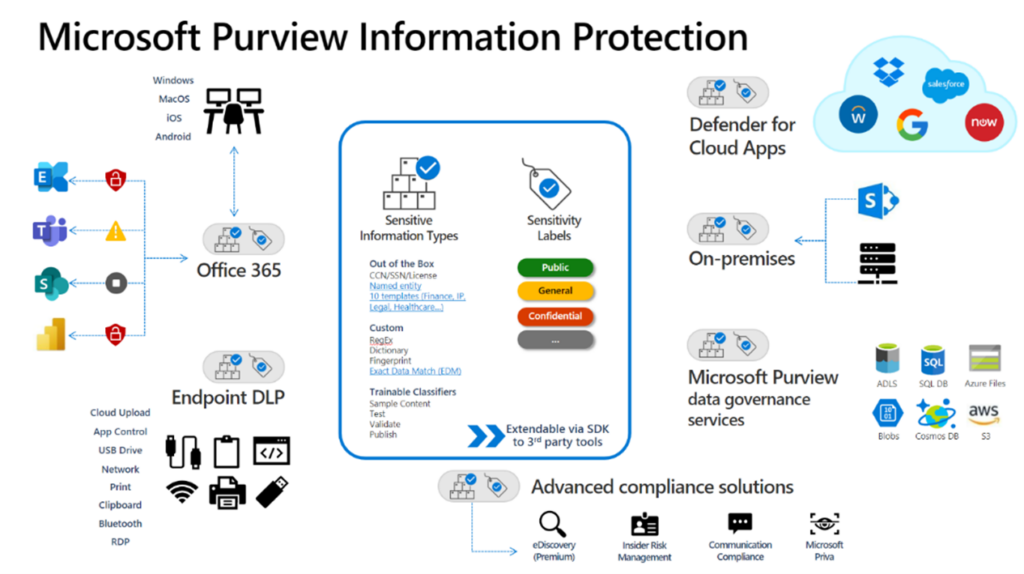
This is where most organizations start, and for good reason. Information Protection scans your environment — SharePoint, OneDrive, Exchange, Teams, endpoints, even non-Microsoft cloud apps — and classifies what it finds using built-in trainable classifiers.
Once something’s classified, sensitivity labels kick in. Labels trigger encryption, watermarks, access restrictions, or visual markings depending on how you configure your policies. The workflow is straightforward: scan, classify, label, protect. The complexity is in the labeling taxonomy, which takes more thought than most teams budget for upfront.
Data Loss Prevention
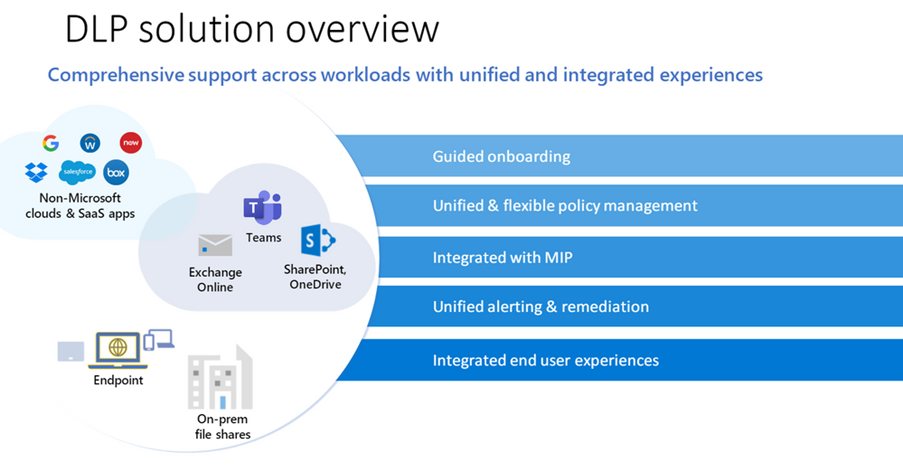
Data Loss Prevention (DLP) is the enforcement layer. It monitors data in motion — emails, uploads, downloads, prints — and blocks or logs activity that violates your policies. It covers Office 365 apps, Windows 10 and macOS endpoints, on-premises file shares, non-Microsoft cloud apps via Defender for Cloud Apps, and Power BI.
The common misconception: DLP and Information Protection are the same thing. They’re not. Information Protection labels the data. DLP acts on it. They work best together, but you can deploy DLP policies on unlabeled content too, using sensitive information types like credit card numbers or Social Security numbers.
Insider Risk Management
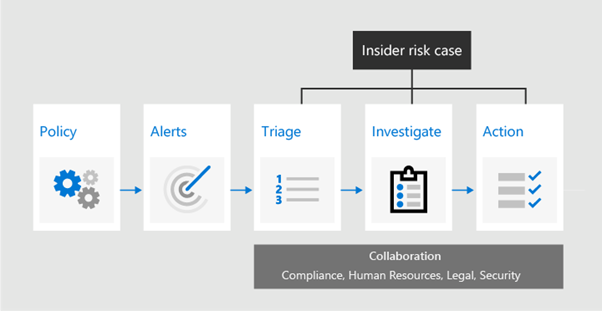
Insider Risk Management (IRM) is genuinely different from the other modules. Instead of looking at data in isolation, it looks at user behavior patterns over time. Someone downloading unusual volumes of files, accessing systems they don’t normally touch, or sending data to personal cloud accounts — IRM flags these patterns before an incident happens.
It uses machine learning playbooks to surface risks, contextual alert review to help analysts understand what’s normal vs. anomalous for a given user, and a built-in case management workflow. The indicators you configure — Office activity, device signals, Microsoft Defender data, browsing behavior — determine what gets flagged. This one requires more careful tuning than the others.
eDiscovery
If your legal team has ever had to respond to litigation, you know how painful collecting data from across Exchange, SharePoint, OneDrive, and Teams can be without proper tooling. Microsoft Purview eDiscovery gives you a case management framework where you can place legal holds (so data doesn’t get deleted during an investigation), run targeted content searches, review results, and export in formats your legal counsel can actually use.
Standard eDiscovery is included in M365 E3. If you need review workflows with machine learning-assisted relevance ranking, or cross-custodian analysis, that’s Premium eDiscovery — M365 E5 territory.
Data Lifecycle Management
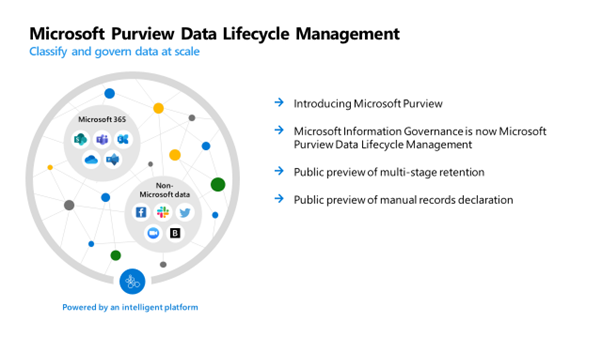
This one gets underestimated until the compliance audit. DLM is about retention: how long do you keep different types of data, and what happens when that period expires? Retention labels and policies let you automate this across the Microsoft 365 estate.
The business case is two-sided. Regulators often require you to keep certain records for defined periods. At the same time, holding data you don’t need creates unnecessary legal exposure and storage costs. DLM lets you manage both levers with the same toolset.
How to approach the rollout
The organizations that struggle with Purview are almost always the ones that tried to deploy everything at once. The ones that succeed pick one module, get it right, then expand.
A sensible sequence: start with Information Protection — get your label taxonomy agreed, roll it out in recommendation mode before enforcement, tune your classifiers. Once labels are being applied consistently, Data Loss Prevention becomes significantly easier to configure because you’re working with classified data instead of raw pattern matching. Lifecycle Management can follow, and Insider Risk Management and eDiscovery can run as separate workstreams once your data foundation is solid.
The classification taxonomy decision is the one that takes longest. Get your legal, compliance, and business stakeholders in a room early. ‘Confidential’ means something different to every department, and the conversation is worth having before you build any policies.

Ebook: Data Security and Governance: 6-Steps to kick start your initiative
This eBook offers expert advice on protecting your organization’s sensitive data. It covers key steps for building a strong defense, starting a scalable and affordable security program, optimizing existing IT investments, and provides a detailed roadmap to enhance your data protection strategies.
Get the eBookFrequently Asked Questions
Yes, April 2022 was a big naming consolidation. Microsoft Purview now covers two distinct worlds that didn’t previously share a brand: the compliance tools from the old Microsoft 365 Compliance Center (Information Protection, DLP, IRM, eDiscovery, Lifecycle Management), and the data governance tools from Azure Purview (now called Microsoft Purview Data Catalog). If you’re an IT or compliance admin, you’re mostly dealing with the first group. If you’re in data engineering or analytics, you’re dealing with the second. The portal at compliance.microsoft.com is where compliance admins live.
They’re related but they do different things. Information Protection is about classification and labeling — it identifies what data is sensitive and marks it accordingly. DLP is the enforcement layer — it monitors what happens to that data and blocks actions that violate your policies. Think of Information Protection as the labeling gun and DLP as the security guard. You can deploy DLP without Information Protection by using built-in sensitive information types, but the two work much better together.
Partially. Information Protection labels and DLP policies can extend to non-Microsoft cloud apps when you have Microsoft Defender for Cloud Apps in the mix. DLP also covers Windows endpoints regardless of which app is used. The honest answer though: coverage is deepest within the Microsoft 365 ecosystem. If you’re heavily invested in Google Workspace or Salesforce as primary data stores, you’ll want to evaluate what the connector coverage looks like for your specific apps before assuming full protection.
The baseline for most Purview compliance features is M365 E3. That gets you Information Protection, basic DLP, standard eDiscovery, and Data Lifecycle Management. To get Insider Risk Management, Communication Compliance, and Premium eDiscovery, you need M365 E5 or the standalone Microsoft 365 E5 Compliance add-on. If you’re on Business Premium, you have some Information Protection capability but not the full compliance suite. Worth a license review before you assume you have access to what you want to deploy.
For a mid-size organization, getting Information Protection to a working state — label taxonomy agreed, policies in recommendation mode, initial DLP rules live — typically takes four to six weeks. Call it eight if stakeholder alignment is slow. Full deployment of IRM and Premium eDiscovery with proper tuning usually runs three to four months total. We tell clients to budget six months for a complete Purview rollout that they’re actually confident in, not just technically deployed.
They share a name now, but they serve different audiences. Azure Purview was rebranded as Microsoft Purview Data Catalog — it’s a data governance and cataloging tool used by data teams to discover and map enterprise data assets. The compliance features (Information Protection, DLP, IRM, eDiscovery, etc.) are a separate product family. They’re both accessible through the Purview portal, but if someone says ‘we use Purview,’ you’ll want to clarify which one they mean.
Webinar: Identify Insider Risks and Prevent Data Exfiltration using Microsoft Purview. Watch Now.
Ebook: 4 ways Microsoft Purview can help you identify and mitigate insider threats
This eBook provides expert guidance on managing insider threats, including how to identify potential threats, investigate incidents, implement remediation strategies, and establish preventive measures to protect your organization.
Get the eBook